Category Archives: Uncategorized

Self-Service OpenShift Enterprise Deployments with ManageIQ ECM

In the previous post I examined how Red Hat Network (RHN) Satellite could be integrated with ManageIQ Enterprise Cloud Management (ECM). With this integration in place Satellite could provide ECM with the content required to install an operating system into a virtual machine and close the loop in ongoing systems management. This was just a first look and there is a lot of work to be done to enable discovery of RHN Satellite and best practice automation out of the box via ECM. That said, the combination of ECM and RHN Satellite provide a solid foundation for proceeding to use cases higher in the stack.

With this in mind, I decided to attempt automating a self-service deployment of OpenShift using ManageIQ ECM, RHN Satellite, and puppet.

Lucky for me, much of the heavy lifting had already been done by Krishna Raman and others who developed puppet modules for installing OpenShift Origin. There were several hurdles that had to be overcome with the existing puppet modules for my use case:

  1. They were built for Fedora and OpenShift Origin and I am using RHEL6 with OpenShift Enterprise. Because of this they defaulted to using newer rubygems that weren’t available in openshift enterprise yet. It took a little time to reverse engineer the puppet modules to understand exactly what they were doing and tweak them for OpenShift Enterprise.
  2. The OpenShift Origin puppet module leveraged some other puppet modules (stdlib, for example), so the puppet module tool (PMT) was needed which is not available in core puppet until > 2.7. Of course, the only version of puppet available in EPEL for RHEL 6 was puppet-2.6. I pulled an internal build of puppet-2.7 to get around this, but still required some packages from EPEL to solve dependencies.

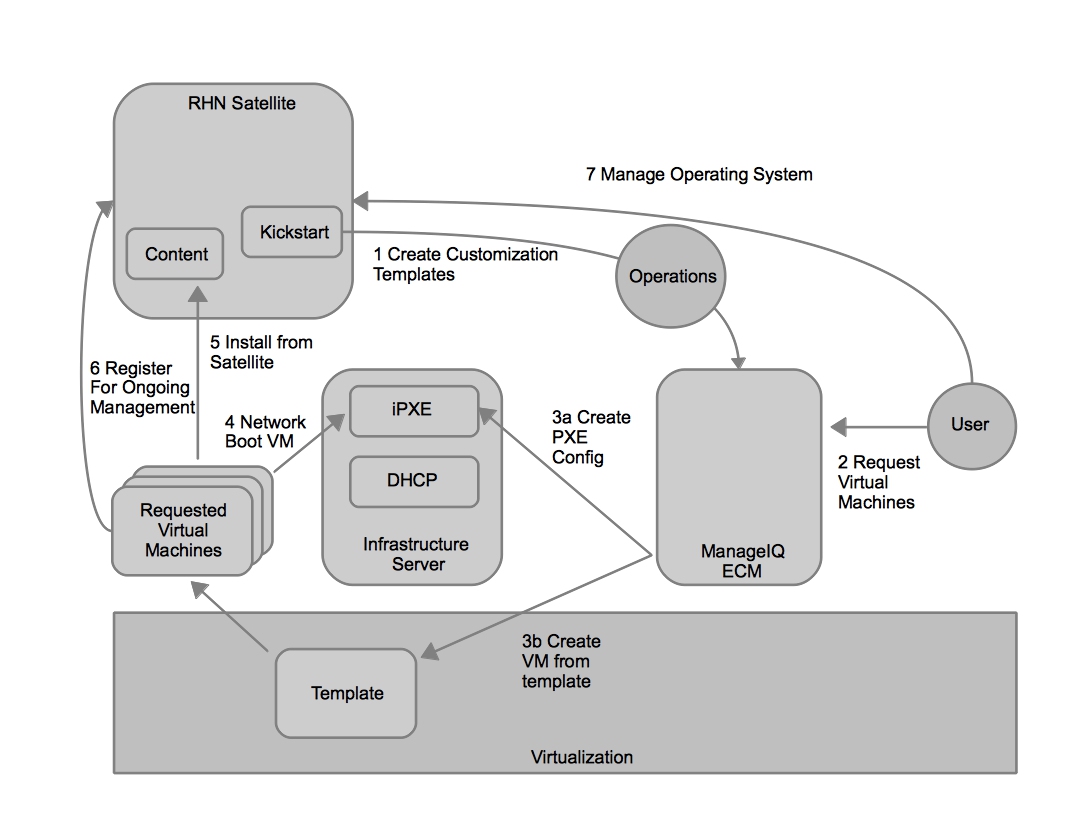
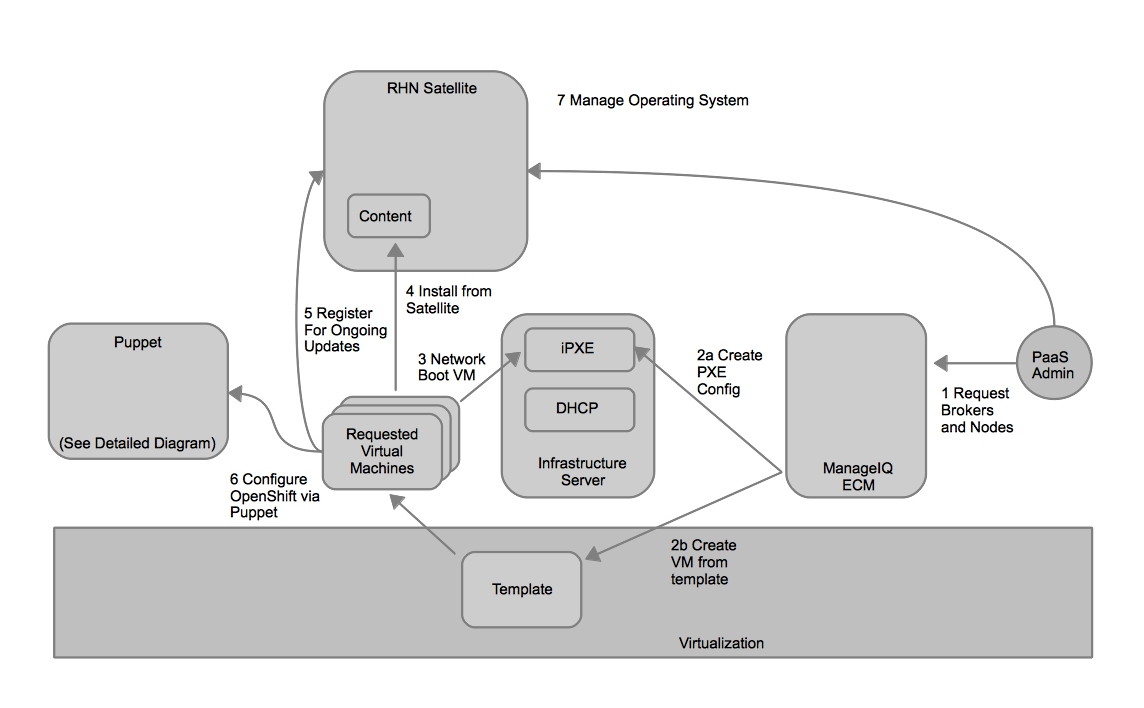
Other then that, I was able to reuse much of what already existed and deploy OpenShift Enterprise via ManageIQ ECM. How does it work? Very similar to the Satellite use case, but with the added step of deploying puppet and a puppet master onto the deployed virtual machine and executing the puppet modules.

workflow

Workflow of OpenShift Enterprise deployment via ECM

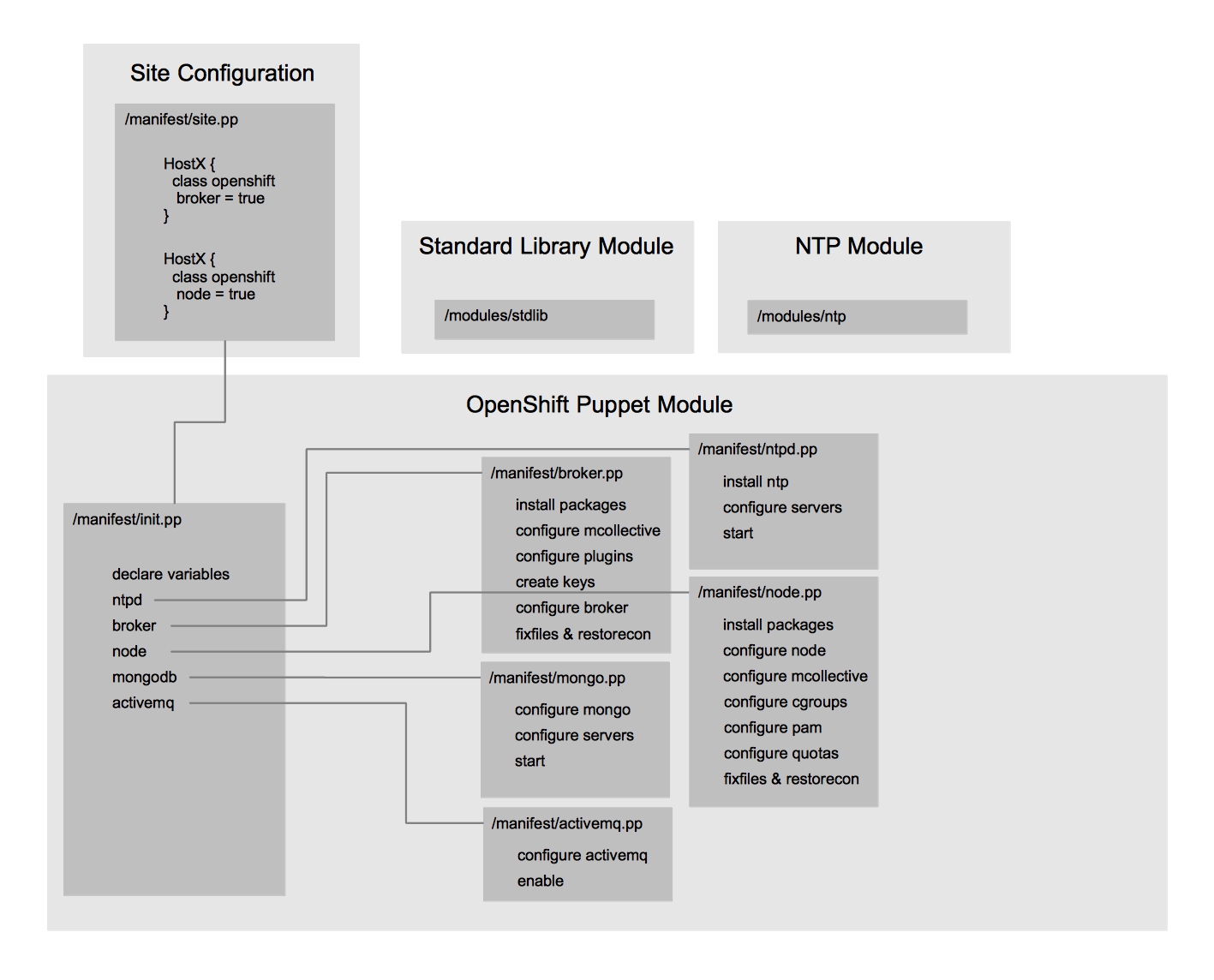
If you are curious how the puppet modules work, here is a diagram that illustrates the flow of the openshift puppet module.

Anatomy of OpenShift Puppet Module

Anatomy of OpenShift Puppet Module

Here is a screencast of the self-service deployment in action.

There are a lot of areas that can be improved in the future. Here are four which were top of mind after this exercise.

First, runtime parameters should be able to be passed to the deployment of virtual machines. These parameters should ultimately be part of a service that could be composed into a deployment. One idea would be to expose puppet classes as services that could be added to a deployment. For example, layering a service of openshift_broker onto a virtual machine would instantiate the openshift_broker class on that machine upon deployment. The parameters required for openshift_broker would then be exposed to the user if they would like to customize them.

Second, gears within OpenShift – the execution area for applications – should be able to be monitored from ECM much like Virtual Machines are today. The oo-stats package provides some insight into what is running in an OpenShift environment, but more granular details could be exposed in the future. Statistics such as I/O, throughput, sessions, and more would allow ECM to further manage OpenShift in enterprise deployments and in highly dynamic environments or where elasticity of the PaaS substrate itself is a design requirement.

Third, building an upstream library of automation actions for ManageIQ ECM so that these exercises could be saved and reused in the future would be valuable. While I only focused on a simple VM deployment in this scenario, in the future I plan to use ECM’s tagging and Event, Condition, Action construct to register Brokers and Nodes to a central puppet master (possibly via Foreman). The thought is that once automatically tagged by ECM with a “Broker” or “Node” tag an action could be taken by ECM to register the systems to the puppet master which would then configure the system appropriately. All those automation actions are exportable, but no central library exists for these at the current time to promote sharing.

Fourth, and possibly most exciting, would be the ability to request applications from OpenShift via ECM alongside requests for virtual machines. This ability would lead to the realization of a hybrid service model. As far as I’m aware, this is not provided by any other vendor in the industry. Many of the analysts are coming around to the fact that the line between IaaS and PaaS will soon be gray. Driving the ability to select an application that is PaaS friendly (python for example) and traditional infrastructure components (a relational database for example) from a single catalog would provide a simplified user experience and create new opportunities for operations to drive even higher utilization at lower costs.

I hope you found this information useful. As always, if you have feedback, please leave a comment!

Using RHN Satellite with ManageIQ ECM

Many organizations use Red Hat Network (RHN) Satellite to manage their Red Hat Enterprise Linux systems. RHN Satellite has a long and successful history of providing update, configuration, and subscription management for RHEL in the physical and virtualized datacenter. As these organizations move to a cloud model, they require other functions in addition to systems management. Capabilities such as discovery, chargeback, compliance, monitoring, and policy enforcement are important aspects of cloud models. ManageIQ’s Enterprise Cloud Management, recently acquired by Red Hat, provides these capabilities to customers.

One of the benefits of an Open Hybrid Cloud is that organizations can leverage their existing investments and gain the benefits of cloud across them. How then, could organizations gain the benefits of cloud computing while leveraging their existing investment in systems management? In this post, I’ll examine how Red Hat Network Satellite can be utilized with ManageIQ ECM to demonstrate the evolutionary approach that an Open Hybrid Cloud provides.

Here is an overview of the workflow.

RHN Satellite and ManageIQ ECM Workflow

RHN Satellite and ManageIQ ECM Workflow

  1. The operations user needs to transfer the kickstart files into customization templates in ManageIQ ECM. This is literally copying and pasting the kickstart files. It’s important to change the “reboot” option to “poweroff” in the kickstart file. If this is isn’t done, the VM will be rebooted and continually loop into an installation via PXE. Also, in the %post section of the kickstart you need to include “wget –no-check-certificate <%= evm[:callback_url_on_post_install] %>”. This will allow ECM to understand that the system has finished building and boot the VM after it has shutoff.
  2. The user requests virtual machine(s) from ECM.
  3. ECM creates an entry in the PXE environment and creates a new virtual machine from the template selected by the user.
  4. The virtual machine boots from the network and the PXE server loads the appropriate kickstart file.
  5. The virtual machine’s operating system is installed from the content in RHN Satellite.
  6. The virtual machine is registered to RHN Satellite for ongoing management.
  7. The user (or operations users) can now manage the operating system via RHN Satellite.

Here is a screencast of this workflow in action.

There are a lot of areas that can be improved upon.

  1. Utilize the RHN Satellite XMLRPC API to delete the system from RHN Satellite.
  2. Allow for automatic discovery of kickstarts in RHN Satellite from ECM.
  3. Unify the hostnames deployed to RHEVM with their matching DNS entries, so they appear the same in RHN Satellite.

Automating a training environment for ManageIQ ECM [part 1]

I didn’t think it was possible, but since the acquisition of ManageIQ things have gotten even busier. There are a lot of people working around the clock to ensure a high quality delivery of product and deliver new capabilities throughout our portfolio. It’s really exciting to see such a comprehensive portfolio being brought together by all of the teams at Red Hat and I believe customers will be pleasantly surprised in the near future.

I’ve recently begun to work on a plan to train our field engineers on Enterprise Cloud Management (ECM). One of my goals as part of the training was to be able to quickly build up an entire classroom environment for at least 20 students. Quickly being minutes, not days. One of the great things about ECM is that is delivered as an appliance. This makes for an easy deployment. I wanted to avoid all the clicking through the Web Admin interface to deploy 20 virtual machines from a template. I also wanted the names of the virtual machines in the RHEV-M console to match the hostnames in DNS they would receive.

For this reason I wrote a quick ruby script, named automate_build.rb. I tried to keep it as generic as possible with all environment specific variables referenced in the first few lines so others could reuse it. The script assumes you’ve already imported the OVF and have a template available to base the VMs from. The script does several things including:

  1. Accepts user input for the cluster they’d like to create the VMs on
  2. Accepts user input for the template name they’d like to use as a basis for the VMs
  3. Accepts user input for the number of VMs they’d like to build
  4. Proceeds to build the VMs based on the input from above
  5. Writes a file that can be included in the dhcp.conf containing the correct static entries using the MAC addresses of the VMs that were built in the previous step

This means that with a few pieces of input one could deploy many virtual machines from a template and have the VM names match DNS entries based on static entries.

For the sake of completeness I will also create an automated teardown script named automate_destroy.rb. For now this functionality could just as easily be achieved by shift+clicking a group of virtual machines in the Web Administration console of RHEV-M and removing them. In the future I may attempt to use the build and destroy scripts to perform more advanced lab setup, so having a scripted removal process may prove more useful. Some lab scenarios that might be useful to students in the future could include:

  • Identifying which virtual machines are causing high resource utilization on a host
  • Performing capacity analysis for a cluster
  • Comparing virtual machines for differences

With this framework in place I could easily add scenarios to be built into the automate_build.rb and automate_destroy.rb scripts and have a lab ready quickly. Here is a quick screencast showing the script in action.

I hope to be able to share more with you in the future on this training environment and I hope you find the scripts useful!

Automating OpenStack deployments with Packstack

If you’d like a method to consistently deploy OpenStack in an automated fashion I’d recommend checking out packstack – an Openstack installation automation tool which utilizes puppet.

[root@rhc-05 ~]# packstack
Welcome to Installer setup utility
Should Packstack install Glance image service [y|n]  [y] : 
Should Packstack install Cinder volume service [y|n]  [y] : 
Should Packstack install Nova compute service [y|n]  [y] : 
Should Packstack install Horizon dashboard [y|n]  [y] : 
Should Packstack install Swift object storage [y|n]  [n] : y
Should Packstack install Openstack client tools [y|n]  [y] : 
Enter list of NTP server(s). Leave plain if packstack should not install ntpd on instances.: ns1.bos.redhat.com
Enter the path to your ssh Public key to install on servers  [/root/.ssh/id_rsa.pub] : 
Enter the IP address of the MySQL server  [10.16.46.104] : 
Enter the password for the MySQL admin user :
Enter the IP address of the QPID service  [10.16.46.104] : 
Enter the IP address of the Keystone server  [10.16.46.104] : 
Enter the IP address of the Glance server  [10.16.46.104] : 
Enter the IP address of the Cinder server  [10.16.46.104] : 
Enter the IP address of the Nova API service  [10.16.46.104] : 
Enter the IP address of the Nova Cert service  [10.16.46.104] : 
Enter the IP address of the Nova VNC proxy  [10.16.46.104] : 
Enter a comma separated list of IP addresses on which to install the Nova Compute services  [10.16.46.104] : 10.16.46.104, 10.16.46.106
Enter the Private interface for Flat DHCP on the Nova compute servers  [eth1] : 
Enter the IP address of the Nova Network service  [10.16.46.104] : 
Enter the Public interface on the Nova network server  [eth0] : 
Enter the Private interface for Flat DHCP on the Nova network server  [eth1] : 
Enter the IP Range for Flat DHCP  [192.168.32.0/22] : 
Enter the IP Range for Floating IP's  [10.3.4.0/22] : 
Enter the IP address of the Nova Scheduler service  [10.16.46.104] : 
Enter the IP address of the client server  [10.16.46.104] : 
Enter the IP address of the Horizon server  [10.16.46.104] : 
Enter the IP address of the Swift proxy service  [10.16.46.104] : 
Enter the Swift Storage servers e.g. host/dev,host/dev  [10.16.46.104] : 
Enter the number of swift storage zones, MUST be no bigger than the number of storage devices configured  [1] : 
Enter the number of swift storage replicas, MUST be no bigger than the number of storage zones configured  [1] : 
Enter FileSystem type for storage nodes [xfs|ext4]  [ext4] : 
Should packstack install EPEL on each server [y|n]  [n] : 
Enter a comma separated list of URLs to any additional yum repositories to install:    
To subscribe each server to Red Hat enter a username here: james.labocki
To subscribe each server to Red Hat enter your password here :

Installer will be installed using the following configuration:
==============================================================
os-glance-install:             y
os-cinder-install:             y
os-nova-install:               y
os-horizon-install:            y
os-swift-install:              y
os-client-install:             y
ntp-severs:                    ns1.bos.redhat.com
ssh-public-key:                /root/.ssh/id_rsa.pub
mysql-host:                    10.16.46.104
mysql-pw:                      ********
qpid-host:                     10.16.46.104
keystone-host:                 10.16.46.104
glance-host:                   10.16.46.104
cinder-host:                   10.16.46.104
novaapi-host:                  10.16.46.104
novacert-host:                 10.16.46.104
novavncproxy-hosts:            10.16.46.104
novacompute-hosts:             10.16.46.104, 10.16.46.106
novacompute-privif:            eth1
novanetwork-host:              10.16.46.104
novanetwork-pubif:             eth0
novanetwork-privif:            eth1
novanetwork-fixed-range:       192.168.32.0/22
novanetwork-floating-range:    10.3.4.0/22
novasched-host:                10.16.46.104
osclient-host:                 10.16.46.104
os-horizon-host:               10.16.46.104
os-swift-proxy:                10.16.46.104
os-swift-storage:              10.16.46.104
os-swift-storage-zones:        1
os-swift-storage-replicas:     1
os-swift-storage-fstype:       ext4
use-epel:                      n
additional-repo:               
rh-username:                   james.labocki
rh-password:                   ********
Proceed with the configuration listed above? (yes|no): yes

Installing:
Clean Up...                                              [ DONE ]
OS support check...                                      [ DONE ]
Running Pre install scripts...                           [ DONE ]
Installing time synchronization via NTP...               [ DONE ]
Setting Up ssh keys...                                   [ DONE ]
Create MySQL Manifest...                                 [ DONE ]
Creating QPID Manifest...                                [ DONE ]
Creating Keystone Manifest...                            [ DONE ]
Adding Glance Keystone Manifest entries...               [ DONE ]
Creating Galnce Manifest...                              [ DONE ]
Adding Cinder Keystone Manifest entries...               [ DONE ]
Checking if the Cinder server has a cinder-volumes vg... [ DONE ]
Creating Cinder Manifest...                              [ DONE ]
Adding Nova API Manifest entries...                      [ DONE ]
Adding Nova Keystone Manifest entries...                 [ DONE ]
Adding Nova Cert Manifest entries...                     [ DONE ]
Adding Nova Compute Manifest entries...                  [ DONE ]
Adding Nova Network Manifest entries...                  [ DONE ]
Adding Nova Scheduler Manifest entries...                [ DONE ]
Adding Nova VNC Proxy Manifest entries...                [ DONE ]
Adding Nova Common Manifest entries...                   [ DONE ]
Creating OS Client Manifest...                           [ DONE ]
Creating OS Horizon Manifest...                          [ DONE ]
Preparing Servers...                                     [ DONE ]
Running Post install scripts...                          [ DONE ]
Installing Puppet...                                     [ DONE ]
Copying Puppet modules/manifests...                      [ DONE ]
Applying Puppet manifests...
Applying /var/tmp/packstack/20130205-0955/manifests/10.16.46.104_prescript.pp
Testing if puppet apply is finished : 10.16.46.104_prescript.pp OK
Testing if puppet apply is finished : 10.16.46.104_mysql.pp OK
Testing if puppet apply is finished : 10.16.46.104_qpid.pp OK
Applying /var/tmp/packstack/20130205-0955/manifests/10.16.46.104_keystone.pp
Applying /var/tmp/packstack/20130205-0955/manifests/10.16.46.104_glance.pp
Applying /var/tmp/packstack/20130205-0955/manifests/10.16.46.104_cinder.pp
Testing if puppet apply is finished : 10.16.46.104_keystone.pp OK
Testing if puppet apply is finished : 10.16.46.104_cinder.pp OK
Testing if puppet apply is finished : 10.16.46.104_glance.pp OK
Applying /var/tmp/packstack/20130205-0955/manifests/10.16.46.104_api_nova.pp
Testing if puppet apply is finished : 10.16.46.104_api_nova.pp OK
Applying /var/tmp/packstack/20130205-0955/manifests/10.16.46.104_nova.pp
Applying /var/tmp/packstack/20130205-0955/manifests/10.16.46.104_osclient.pp
Applying /var/tmp/packstack/20130205-0955/manifests/10.16.46.104_horizon.pp
Testing if puppet apply is finished : 10.16.46.104_nova.pp OK
Testing if puppet apply is finished : 10.16.46.104_osclient.pp OK
Testing if puppet apply is finished : 10.16.46.104_horizon.pp OK
Applying /var/tmp/packstack/20130205-0955/manifests/10.16.46.104_postscript.pp
Testing if puppet apply is finished : 10.16.46.104_postscript.pp
Testing if puppet apply is finished : 10.16.46.104_postscript.pp OK
                            [ DONE ]

 **** Installation completed successfully ******

     (Please allow Installer a few moments to start up.....)

Additional information:
 * Time synchronization installation was skipped. Please note that unsynchronized time on server instances might be problem for some OpenStack components.
 * To use the command line tools source the file /root/keystonerc_admin created on 10.16.46.104
 * To use the console, browse to http://10.16.46.104/dashboard
 * The installation log file is available at: /var/tmp/packstack/20130205-0955/openstack-setup.log

You can also generate an answer file and use it on other systems

[root@rhc-06 ~]# packstack --gen-answer-file=answerfile

Be careful, if your system is subscribed to Red Hat Network’s classic entitlement packstack will register the systems via subscription-manager (certificate based entitlement). This can cause some issues if you already subscribed the system and added the OpenStack  channels via RHN.

Building an Open Hybrid Cloud

I’m often asked to explain what an Open Hybrid Cloud is to those interested in cloud computing. Those interested in cloud computing usually includes everyone. For these situations, some high level slides on the what cloud computing is, why it’s important to build an Open Hybrid Cloud, and what the requirements of an Open Hybrid Cloud are usually enough to satisfy.

In contrast to everyone interested in cloud, there are system administrators, developers, and engineers (my background) who want to understand the finer details of how multi-tenancy, orchestration, and cloud brokering are being performed. Given my background, these some of my favorite conversations to have. As an example, many of the articles I’ve written on this blog drill down to this level of discussion.

Lately, however, I’ve observed that some individuals – who fall somewhere in between the geeks and everyone else – have a hard time understanding what is next for their IT architectures. To be clear, having an understanding of the finer points of resource control and software defined networking are really important in order to ensure you are making the right technology decisions, but it’s equally important to understand the next steps that you can take to arrive at the architecture of the future (an Open Hybrid Cloud).

With that in mind let’s explore how an Open Hybrid Cloud architecture can allow organization to evolve to greater flexibility, standardization, and automation on their choice of providers at their own pace. Keep in mind, you may see this same basic architecture proposed by other vendors, but do not be fooled – there are fundamental differences in the way problems are solved in a true Open Hybrid Cloud. You can test whether or not a cloud is truly an Open Hybrid Cloud by comparing and contrasting it against the tenants of an Open Hybrid Cloud as defined by Red Hat. I hope to share more on those differences later – let’s get started on the architecture first.

Side note – this is not meant as the only evolutionary path organizations can take on their way to an Open Hybrid Cloud architecture. There are many paths to Open Hybrid Cloud! 🙂
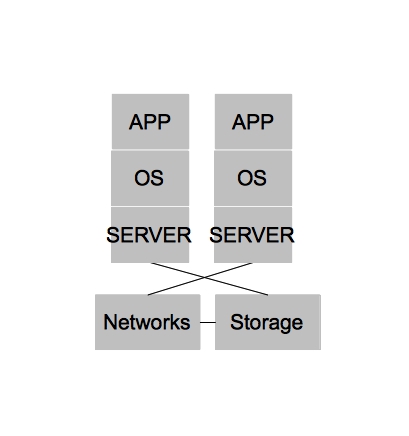
physicaldatacenter

In the beginning [of x86] there were purely physical architectures. These architectures were often rigid, slow to change, and under utilized. The slowness and rigidity wasn’t necessarily because physical hardware is difficult to re-purpose quickly or because you can’t achieve close to the same level of automation with physical hardware as you could with virtual machines. In fact, I’m fairly certain many public cloud providers today could argue they have no need for a hypervisor at all for their PaaS offerings. Rather, purely physical architectures were slow to change and rigid because operational processes were often neglected and the multiple hardware platforms that quickly accumulated within a single organization lacked well defined points of integration for which IT organizations could automate. The under utilization of physical architectures could be largely attributed to operating systems [on x86], which could not sufficiently serve multiple applications within a single operating system (we won’t name names, but we know who you are).

Side note – for the purposes of keeping our diagram simple, we will group the physical systems in with the virtualized systems. Also, we won’t add all the complexity that was likely added due to changing demands on IT. For example, an acquisition of company X – two teams being merged together, etc. You can assume wherever you see architecture there are multiple types, different versions, and different administrators at each level.
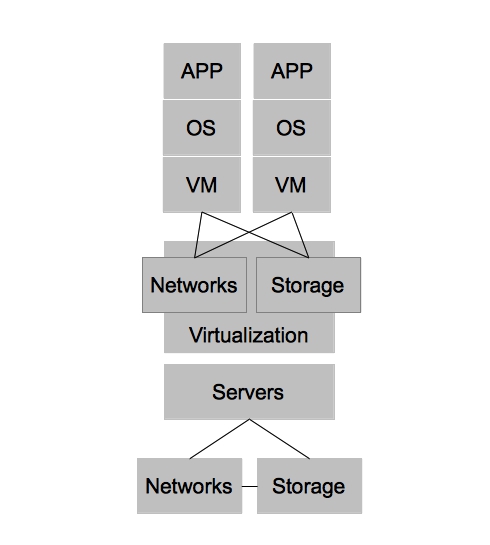
virtualdatacenter

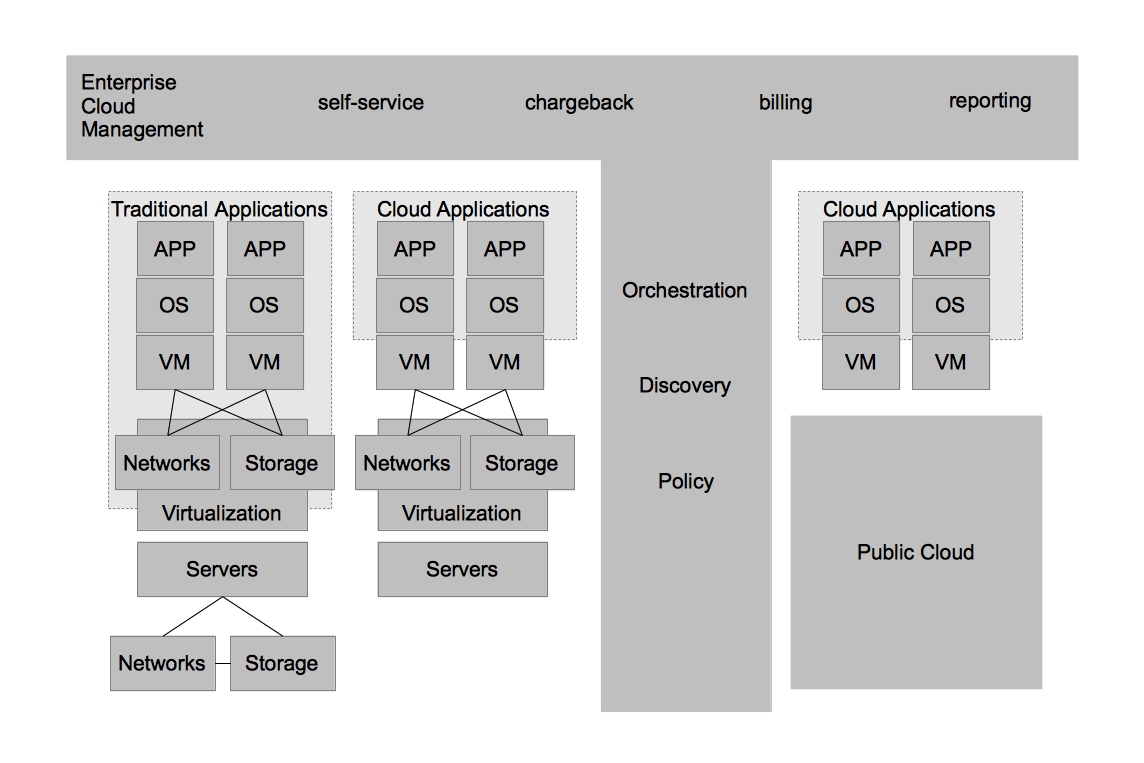
Virtualized architectures provided a solution to the problems faced in physical architectures. Two areas in which virtualized architectures provided benefits are by allowing for higher utilization of physical hardware resources and greater availability for workloads. Virtualized Architectures did this by decoupling workloads from the physical resources that they were utilizing. Virtualized architectures also provided a single clean interface by which operations could request new virtual resources. It became apparent that this interface could be utilized to provide other users outside IT operations with self-service capabilities. While this new self-service capability was possible, virtualized architectures did NOT account for automation and other aspects of operational efficiency, key ingredients in providing end users with on demand access to the compute resources while still maintaining some semblance of control required by IT operations.
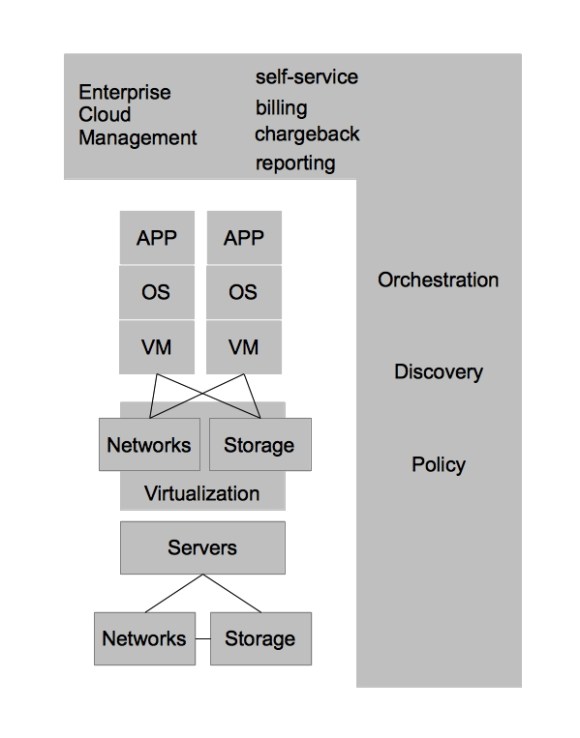
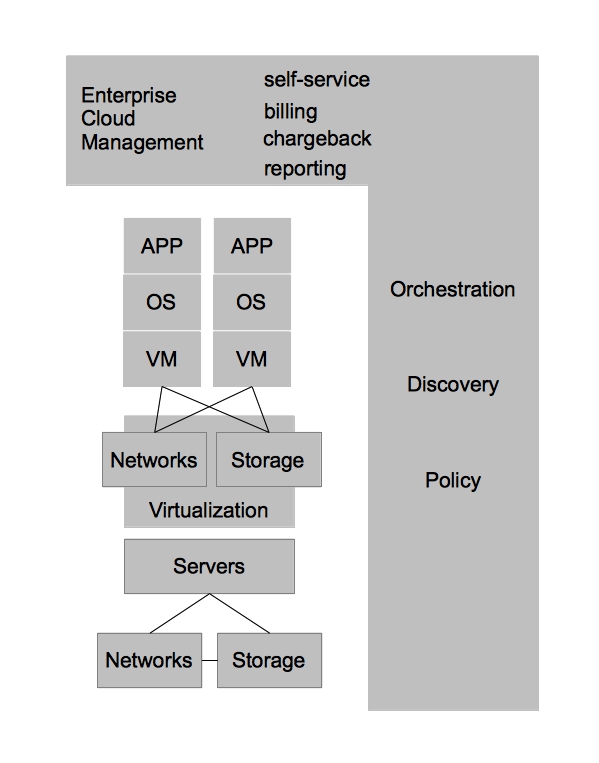
enterprisecloudmanagement

In order to combine the benefits of operational efficiency with the ability for end users to utilize self-service, IT organizations adopted technologies that could provide these benefits. In this case, I refer to them as Enterprise Cloud Management tools, but each vendor has their own name for them. These tools provide IT organizations the ability to provide IT as a Service to their end customers. It also provided greater strategic flexibility for IT operations in that it could decouple the self-service aspects from the underlying infrastructure. Enforcing this concept allows IT operations to ensure they can change the underlying infrastructure without impacting the end user experience. Enterprise Cloud Management coupled with virtualization also provides greater operational efficiency, automating many of the routine tasks, ensuring compliance, and dealing with the VM sprawl that often occurs when the barrier to operating environments is reduced to end users.

Datacenter virtualization has many benefits and coupled with Enterprise Cloud Management it begins to define how IT organization can deliver services to its customers with greater efficiency and flexibility. The next generation of developers, however, have begun to recognize that applications could be architected in such ways that are less constrained by physical hardware requirements as well. In the past, developers might develop applications using a relational database that required certain characteristics of hardware (or virtual hardware) to achieve a level of scale. Within new development architectures, such as noSQL for example, applications are built to scale horizontally and are designed to be stateless from the ground up. This change in development impacts greatly the requirements that developers have from IT operations. Applications developed in this new methodology are built with the assumption that the underlying operating system can be destroyed at any time and the applications must continue to function.
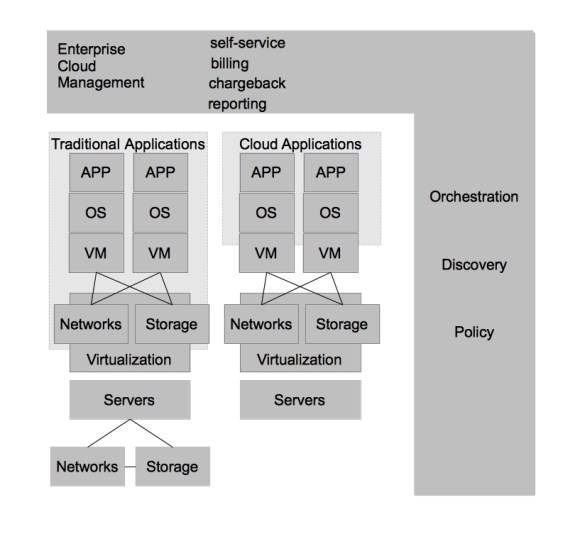
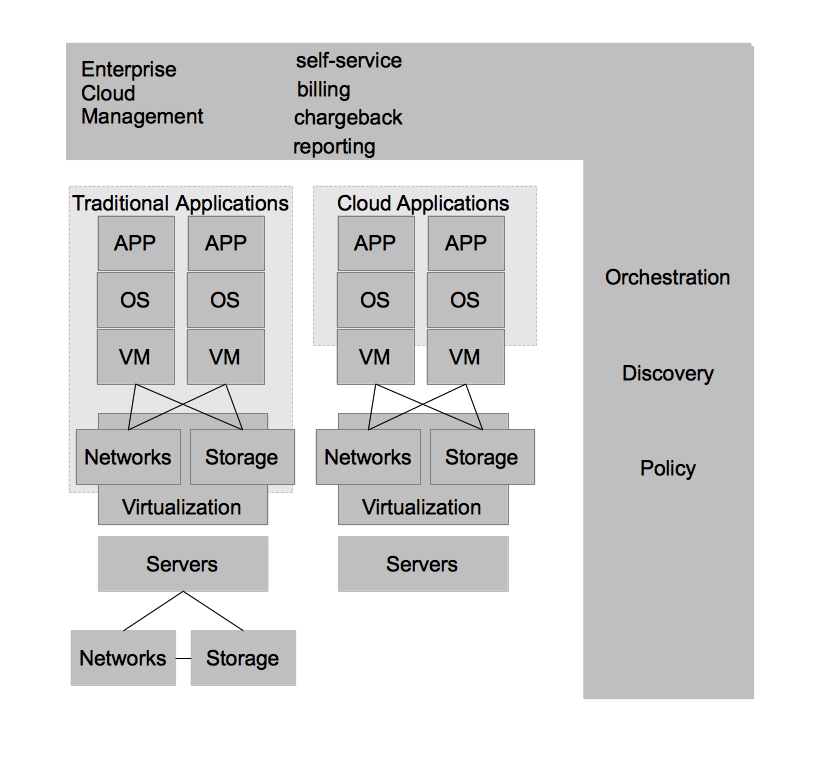
datacentervirtualizationandprivatecloud

For these types of applications, datacenter virtualization is overkill. This realization has led to the emergence of private cloud architectures, which leverage commodity hardware to provide [largely] stateless environments for applications. Private cloud architectures provide the same benefits as virtualized datacenter architectures at a lower cost and with the promise of re-usable services within the private cloud. With Enterprise Cloud Management firmly in place, it is much easier for IT organizations to move workloads to the architecture which best suits them at the best price. In the future, it is likely that lines between datacenter virtualization and private clouds become less distinct– eventually leading to a single architecture that can account for the benefits of both.
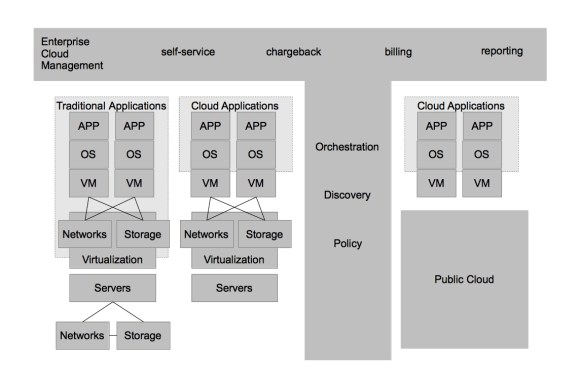
hybridcloud

As was previously mentioned, Enterprise Cloud Management allows IT organizations to deploy workloads to the architecture which best suits them. With that in mind, one of the lowest cost options for hosting “cloud applications” is in a public IaaS provider. This allows businesses to choose from a number of public cloud providers based on their needs. It also allows them to have capacity on demand without investing heavily in their own infrastructure should they have variable demand for workloads.
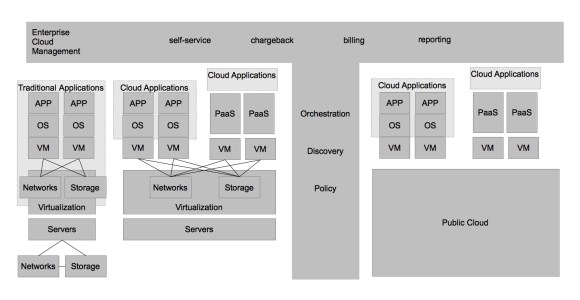
paas

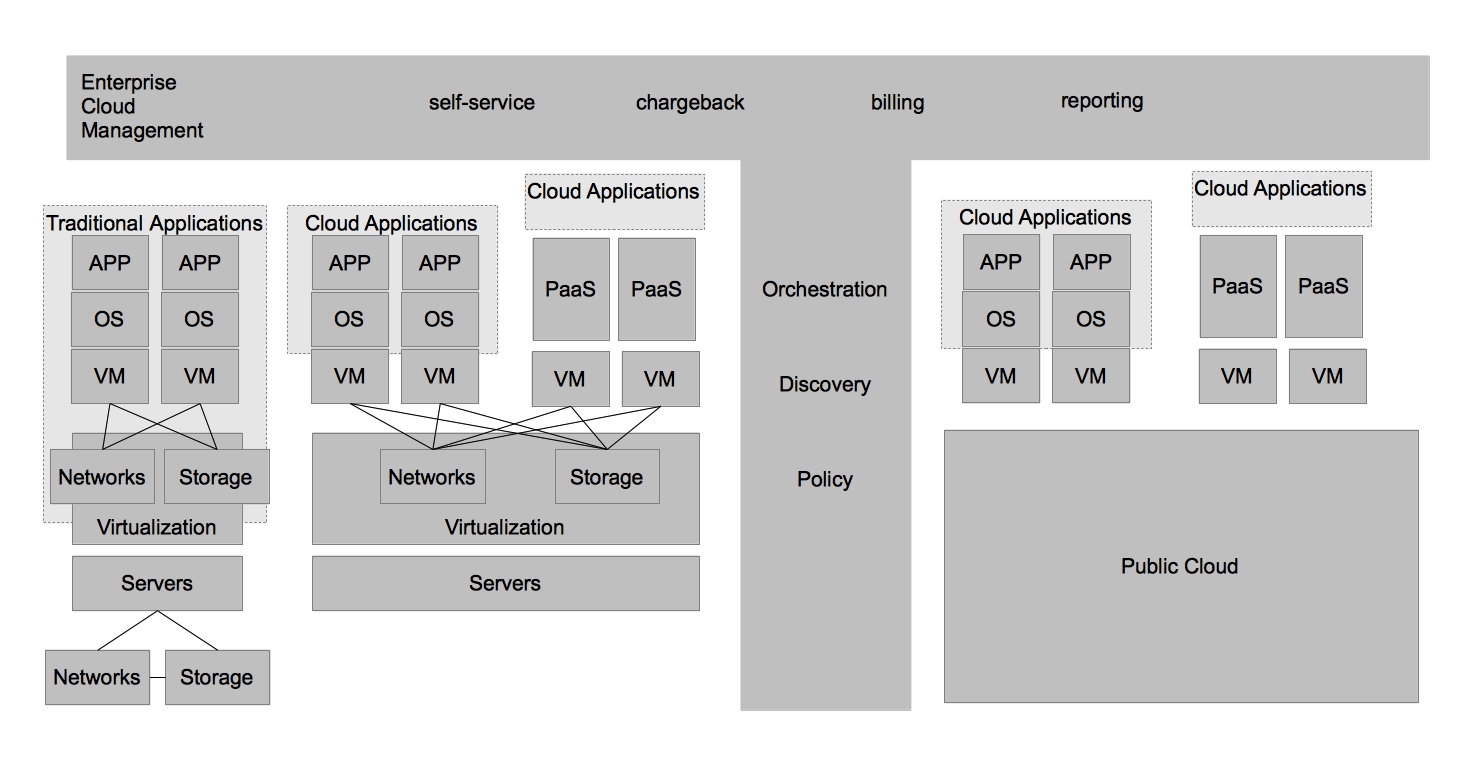
Finally, IT organizations would like to continue to increase operational efficiency while simultaneously increasing the ability for its end customers to achieve their requirements without needing manual intervention from IT operations. While the “cloud applications” hosted on a private cloud remove some of the operational complexity of application development, and ultimately deployment/management, they don’t address many of the steps required to provide a running application development environment beyond the operating system. Tasks such as configuring application servers for best performance, scaling based on demand, and managing the application namespaces are still manual tasks. In order to provide further automation and squeeze even higher rates of utilization within each operating system, IT organizations can adopt a Platform as a Service (PaaS). By adopting a PaaS architecture, organizations can achieve many of the same benefits that virtualization provided for the operating system at the application layer.

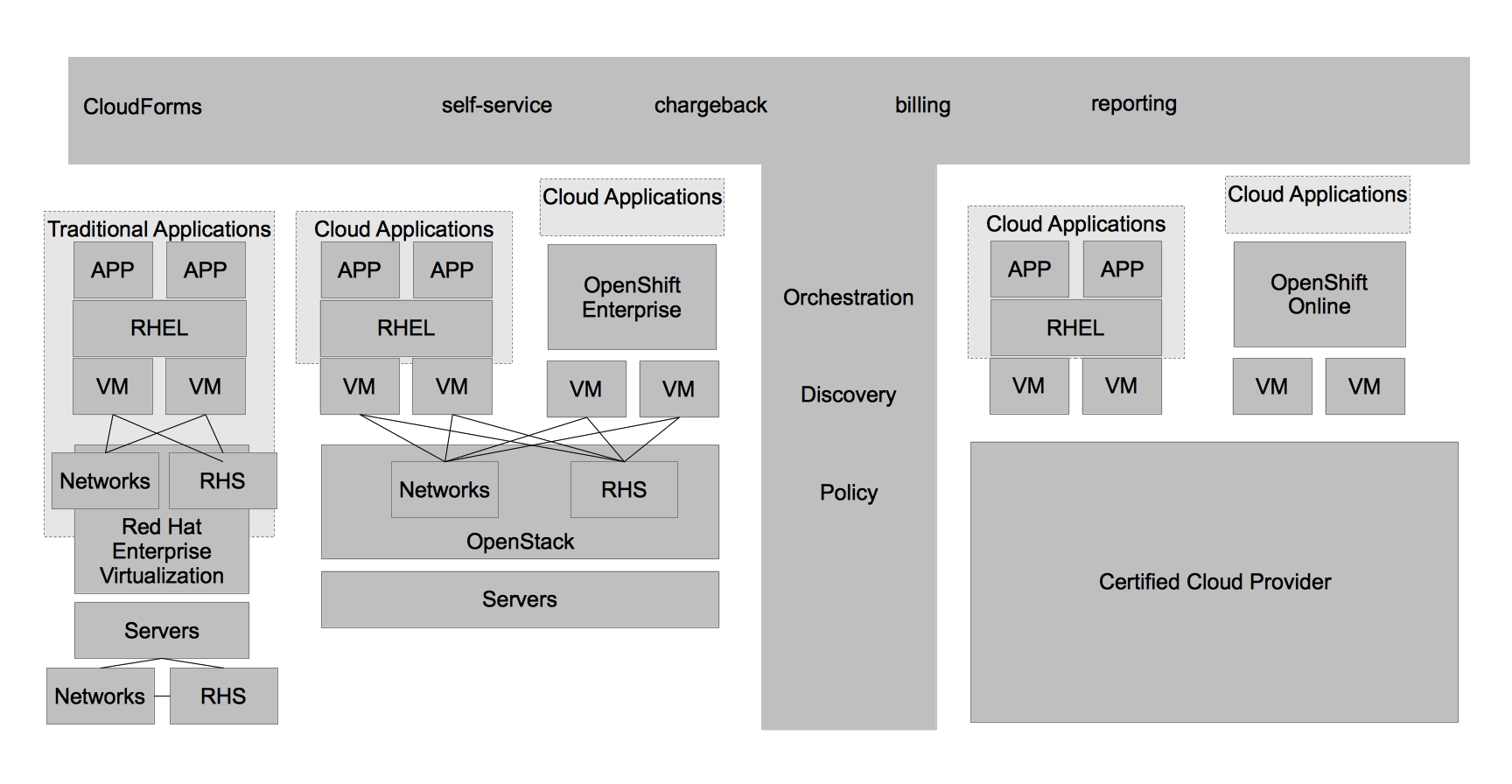
This was just scratching the surface of how customers are evolving from the traditional datacenter to the Open Hybrid Cloud architecture of the future. What does Red Hat provide to enable these architectures? Not surprisingly, Red Hat has community and enterprise products for each one of these architectures. The diagram below demonstrates the enterprise products that Red Hat offers to enable these architectures.
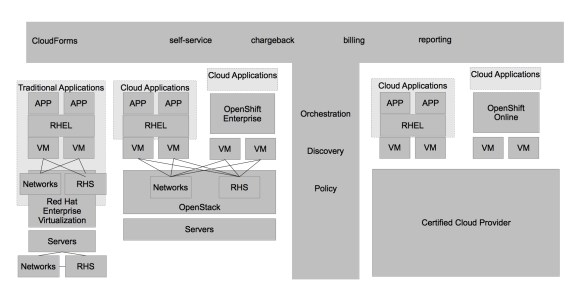
productnames

Area                                             Community         Enterprise
Physical Architectures             Fedora                  Red Hat Enterprise Linux
Datacenter Virtualization       oVirt                      Red Hat Enterprise Virtualziation
Hybrid Cloud Management   Aeolus/Katello    CloudForms/ManageIQ EVM
Private Cloud                            OpenStack            Stay Tuned
Public Cloud                             Red Hat’s Certified Cloud Provider Program
Platform as a Service              OpenShift Origin  OpenShift Enterprise
Software based storage          Gluster                     Red Hat Storage

Areas of Caution

While I don’t have the time to explore every differentiating aspect of a truly Open Hybrid Cloud in this post, I would like to focus on two trends that IT organizations should be wary of as they design their next generation architectures.
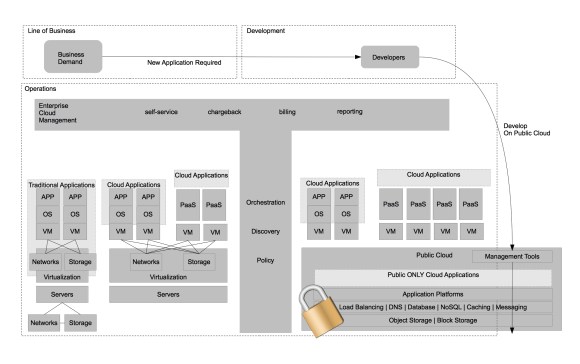
scenario1

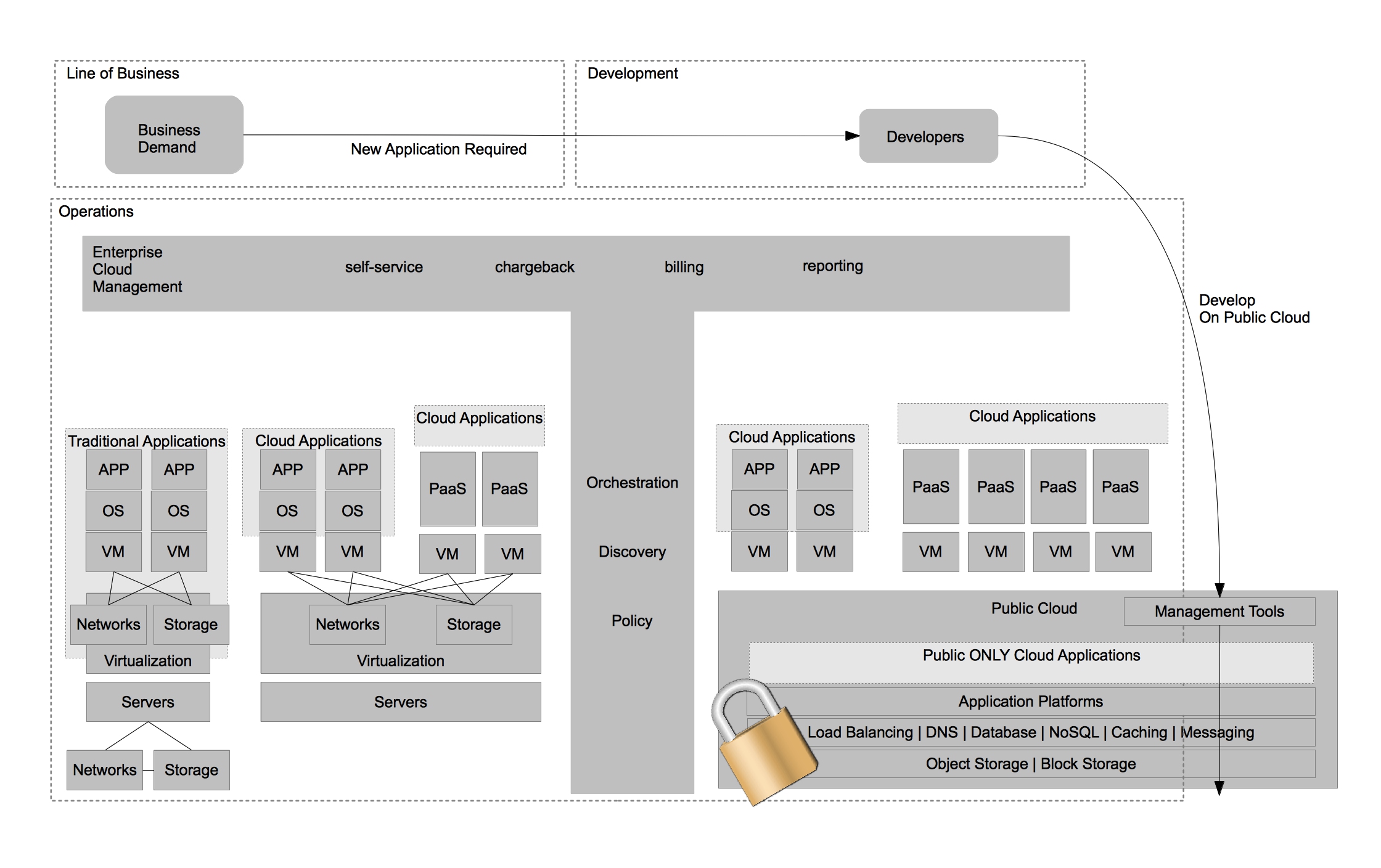
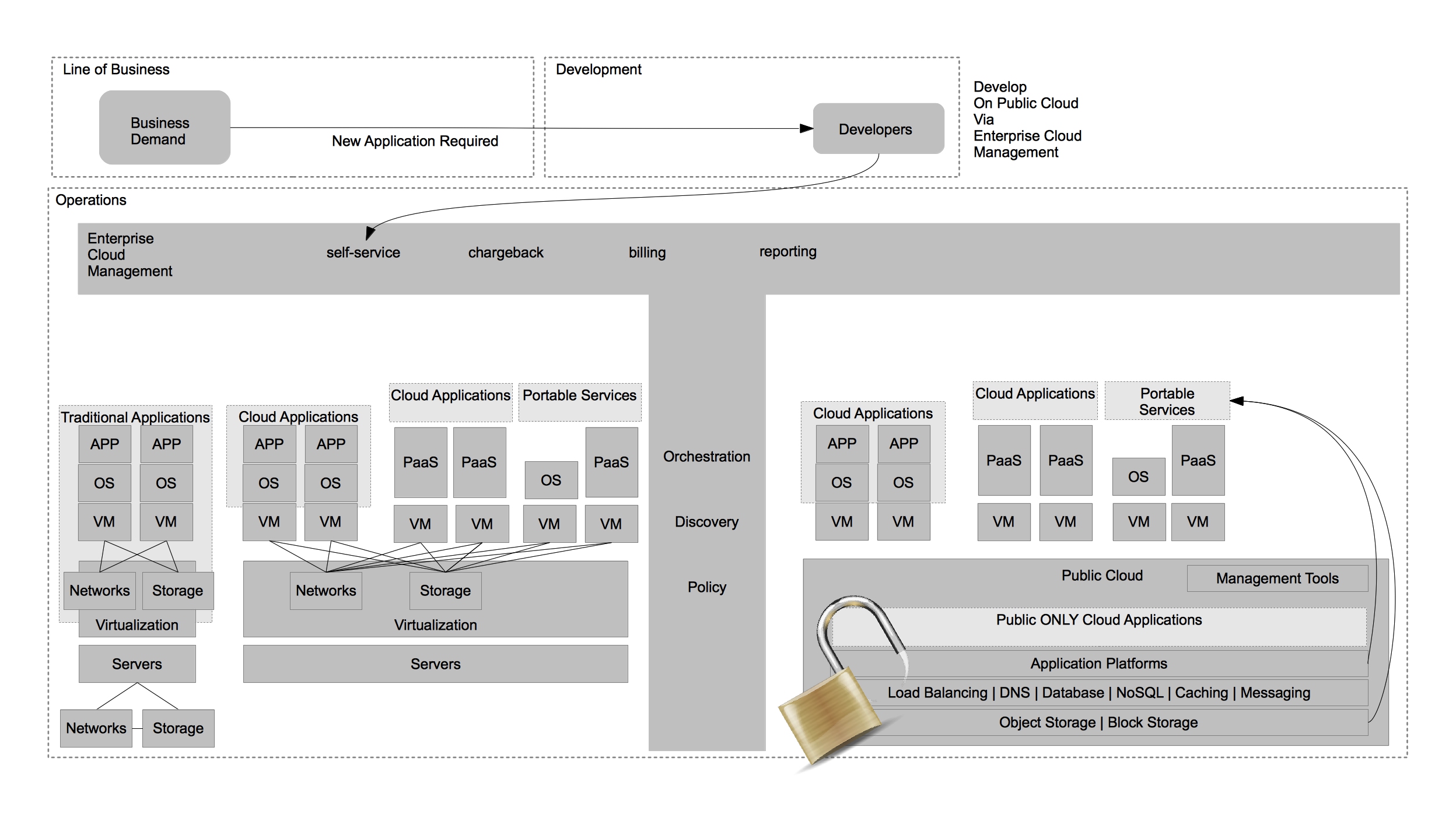
The first trend to be wary of is developers utilizing services that are only available in the public cloud (often a single public cloud) to develop new business functionality. This limits flexibility of deployment and increases lock-in to a particular provider. It’s ironic, because many of the same developers moved from developing applications that required specific hardware requirements to horizontally scaling and stateless architectures. You would think developers should know better. In my experience it’s not a developers concern how they deliver business value and at what cost of strategic flexibility they deliver this functionality. The cost of strategic flexibility is something that deeply concerns IT operations. It’s important to highlight that any applications developed within a public cloud that leverages that public clouds services are exclusive to that public cloud only. This may be OK with organizations, as long they believe that the public cloud they choose will forever be the leader and they never want to re-use their applications in other areas of their IT architecture.
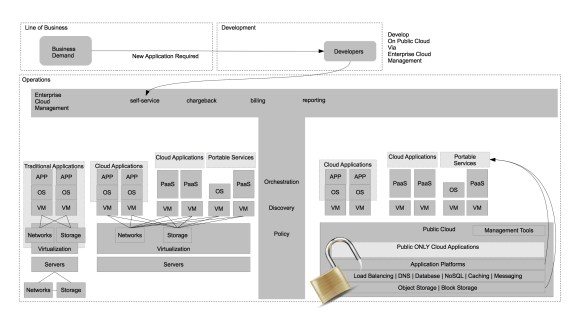
scenario2

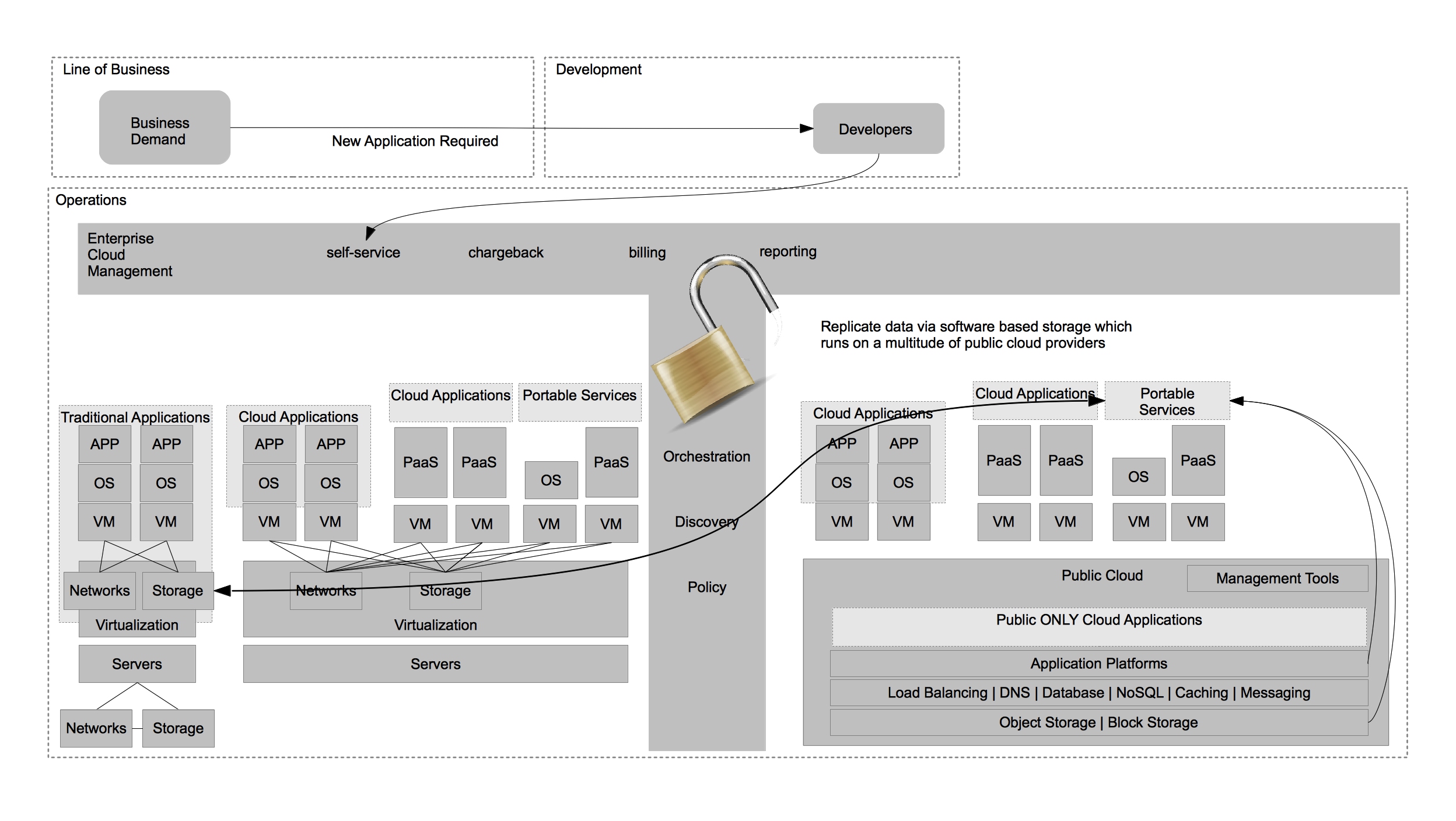
This is why it is imperative to provide the same level of self-service via Enterprise Cloud Management as the public cloud providers do in their native tools. It’s also important to begin developing portable services that mirror the functionality of a single public provider but are portable across multiple architectures – including private clouds and any public cloud provider that can provide Infrastructure as a Service (IaaS). A good example of this is the ability to use Gluster (Red Hat Storage) to provide a consistent storage experience between both on and off premise storage architectures as opposed to using a service that is only available in the public cloud.
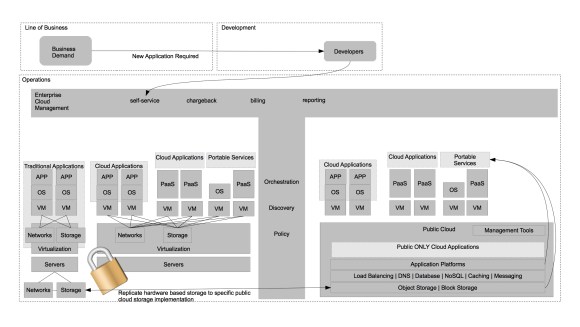
scenario3

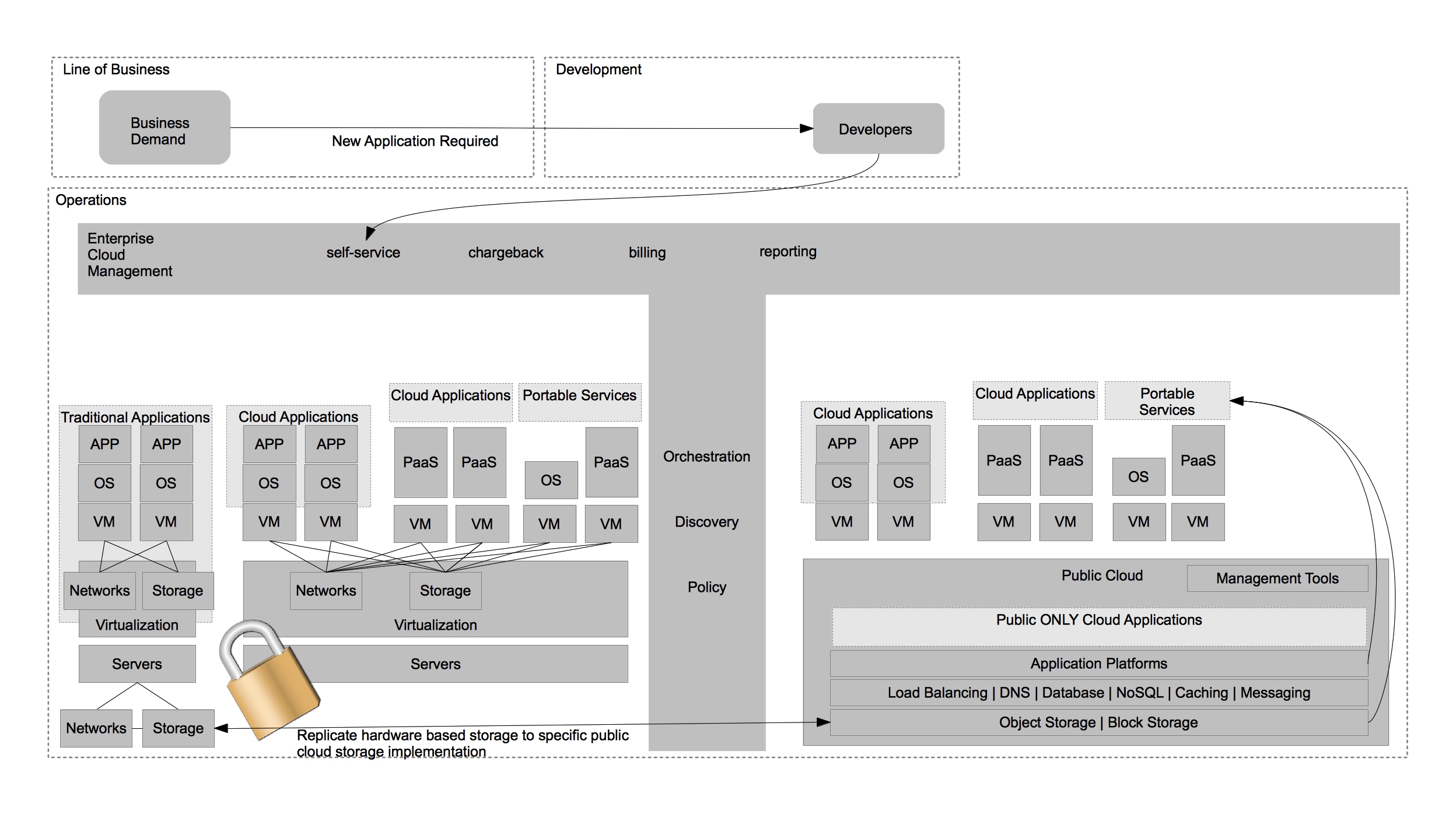
The second trend to be wary of is datacenter virtualization vendors advocating for hybrid cloud solutions that offer limited portability due to their interest in preserving the nature of proprietary hardware or software platforms within the datacenter. A good example of this trend would be a single vendor advocating replication of a single type of storage frame be performed to a single public cloud providers storage solution. This approach screams lock-in beyond that of using just the public cloud and should be avoided for the same reasons.
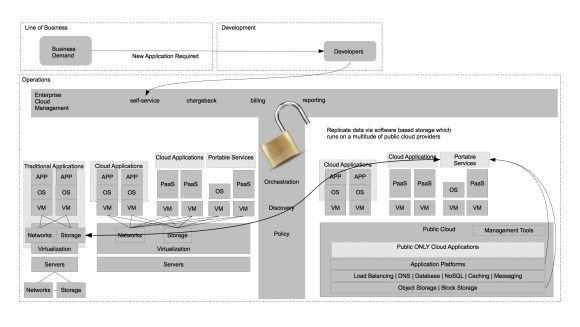
scenario4

Instead, IT organizations should seek to solve problems such as this through the use of portable services. These services allow for greater choice of public cloud providers while also allowing for greater choice of hardware AND software providers within the virtualized datacenter architecture.

I hope you found this information useful and I hope you visit again!
Using a Remote ImageFactory with CloudForms

In Part 2 of Hands on with ManageIQ EVM I explored how ManageIQ and CloudForms could potentially be integrated in the future. One of the suggestions I had for the future was to allow imagefactory to run within the cloud resource provider (vsphere, RHEV, openstack, etc). This would simplify the architecture and require less infrastructure to host Cloud Engine on physical hardware. Requiring less infrastructure is important for a number of scenarios beyond just the workflow I explained in the earlier post. One scenario in particular is when one would want to provide demonstration environments of CloudForms to a large group of people – for example while training students on CloudForms.

Removing the physical hardware requirement for CloudForms Cloud Engine can be done in two ways. The first is by using nested virtualization. This is not yet available in Red Hat Enterprise Linux, but is available in the upstream – Fedora. The second is by running imagefactory remotely on a physical system and the rest of the component of CloudForms Cloud Engine within a virtual machine. In this post I’ll explore utilizing a physical system to host imagefactory and the modification necessary to a CloudForms Cloud Engine environment to make it happen.

How It Works

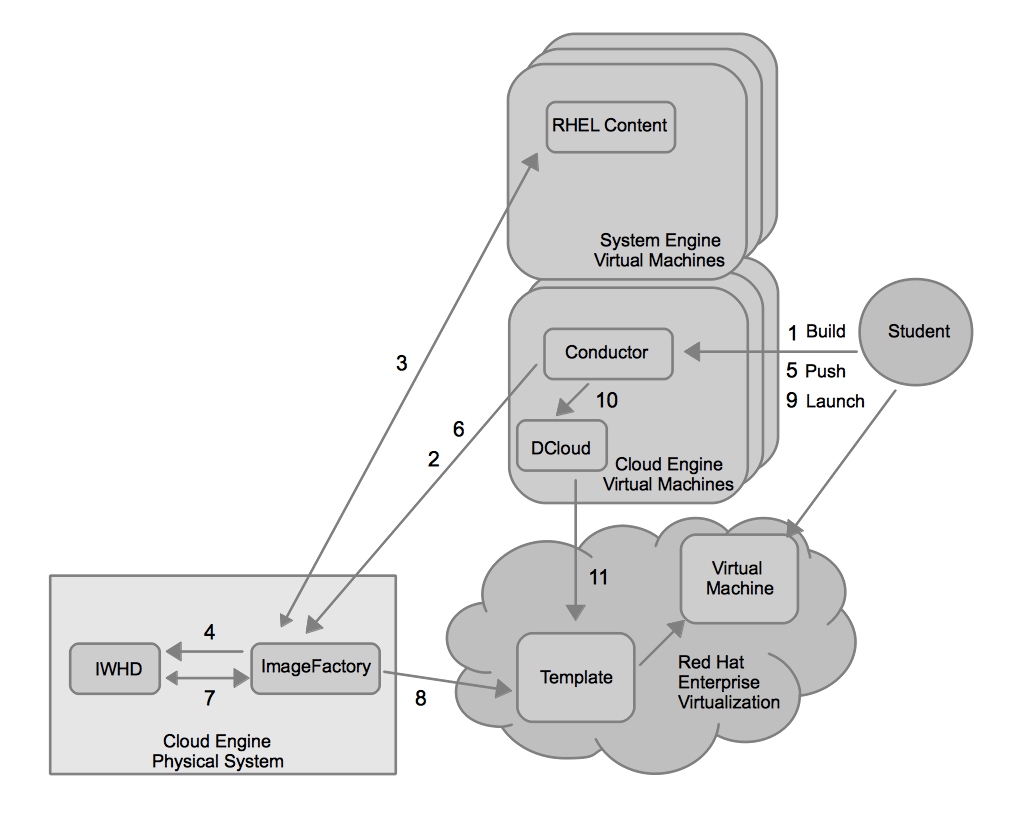
The diagram below illustrates the decoupling of imagefactory from conductor. Keep in mind, this is using CloudForms 1.1 on Red Hat Enterprise Linux 6.3.

Using a remote imagefactory with CloudForms

Using a remote imagefactory with CloudForms

1. The student executes a build action in their Cloud Engine. Each student has his/her own Cloud Engine and it is built on a virtual machine.

2. Conductor communicates with imagefactory on the physical cloud engine and instructs it to build the image. There is a single physical host acting as a shared imagefactory for every virtual machine hosting Cloud Engine for the students.

3. Imagefactory builds the image based on the content from virtual machines hosting CloudForms Cloud Engine.

4. Imagefactory stores the built images in the image warehouse (IWHD).

5. When the student wants to push that image to the provider, in this case RHEV they execute the action in Cloud Engine conductor.

6. Conductor communicates with imagefactory on the physical cloud engine and instructs it to push the image to the RHEV provider.

7. Imagefactory pulls the image from the warehouse (IWHD) and

8. pushes it to the provider.

9.  The student launches an application blueprint which contains the image.

10. Conductor communicates with deltacloud (dcloud) requesting that it launch the image on the provider.

11. Deltacloud (dcloud) communicates with the provider requesting that a virtual machine be created based on the template.

Configuration

Here are the steps you can follow to enable a single virtual machine hosting cloud engine to build images using a physical system’s imagefactory. These steps can be repeated and automated to stand up a large amount of virtual cloud engines that use a single imagefactory on a physical host. I don’t see any reason why you couldn’t use the RHEL host that acts as a hypervisor for RHEV or the RHEL host that acts as the export storage domain host. In fact, that might speed up performance. Anyway, here are the details.

1. Install CloudForms Cloud Engine on both the virtual-cloud-engine and physical-cloud-engine host.

2. Configure cloud engine on all the virtual-cloud-engine and physical-cloud-engine.

virtual-cloud-engine# aeolus-configure
physical-cloud-engine# aeolus-configure

3. On the virtual-cloud-engine configure RHEV as a provider.

virtual-cloud-engine# aeolus-configure -p rhevm

4. Copy the oauth information from the physical-cloud-engine to the virtual-cloud-engine.

virtual-cloud-engine# scp root@physical-cloud-engine:/etc/aeolus-conductor/oauth.json /etc/aeolus-conductor/oauth.json

5. Copy the settings for conductor from the physical-cloud-engine to the virtual-cloud-engine.

virtual-cloud-engine# scp root@physical-cloud-engine:/etc/aeolus-conductor/settings.yml /etc/aeolus-conductor/settings.yml

6.  Replace localhost with the IP address of physical-cloud-engine in the iwhd and imagefactory stanzas of /etc/aeolus-conductor/settings.yml on the virtual-cloud-engine.

7. Copy the rhevm.json file from the virtual-cloud-engine to the physical-cloud-engine.

physical-cloud-engine# scp root@virtual-cloud-engine:/etc/imagefactory/rhevm.json /etc/imagefactory/rhevm.json

8. Manually mount the RHEVM export domain listed in the rhevm.json file on the physical-cloud-engine.

physical-cloud-engine# mount nfs.server:/rhev/export /mnt/rhevm-nfs

9. After this is done, restart all the aeolus-services on both physical-cloud-engine and virtual-cloud-engine to make sure they are using the right configurations.

physical-cloud-engine# aeolus-restart-services
virtual-cloud-engine# aeolus-restart-services

Once this is complete, you should be able to build images on the remote imagefactory instance.

Multiple Cloud Engines sharing a single imagefactory

It should be noted that running a single imagefactory to support multiple Cloud Engine’s is not officially supported, and is probably not tested. In my experience, however, it seems to work. I hope to have time to post something with more details on the performance of utilizing a single imagefactory between multiple cloud engine’s performing concurrent build and push operations in the future.

Hands on with ManageIQ EVM – Part2: Exploring Integration with CloudForms

In Part 1 of the Hands on with ManageIQ EVM series I walked through how easy it is to deploy and begin using EVM Suite. In part2, I’d like to explore how a workflow between EVM Suite and CloudForms can be established. This is important, because while some of the capabilities of EVM Suite and CloudForms overlap, there are vast areas where they compliment one another and together they provide a range of capabilities that is very compelling, and in many ways unmatched by any other vendors.

The Capabilities

EVM Suites’s capabilities fall squarely into providing operational management around infrastructure and virtual machines. CloudForms provides the ability to install operating systems into virtual machine containers and manage the content that is available or installed into the operating systems once the virtual machines are running. Of course, CloudForms also provides a self-service catalog which end users could interact with to deploy application blueprints. This is an area of overlap and will likely be worked out over the roadmap of the products. In this workflow, we’ll attempt to use ManageIQ as the self-service portal, but it could just as easily have been CloudForms acting as the self-service portal.

The Chicken and Egg

One of the values that needs to be maintained during the workflow is the ability for CloudForms to manage the launched instances in order to be able to provide updated content (RPM packages) to them. The problem is that the images must be built using CloudForms Cloud Engine and they are being launched by a user via EVM suite. What is needed is a way to tell the launched instance to register to CloudForms System Engine. When CloudForms Cloud Engine is used to launch the instances it could execute a service on the launched instances to have them register to CloudForms System Engine. With EVM suite launching the instances I wasn’t aware of any way in which this could be passed into the virtual machines on launch. This might be a limitation of my knowledge of EVM suite. I’ll explore this further in the future.

Catwalk

To get around the chicken and egg problem I’ve created something I call Catwalk. It is a RPM package which once installed allows a user to specify a CloudForms System Engine for the instance to register to upon boot. You can download it here.

The logic works like this:

1. On installation catwalk places a line in /etc/rc.local to execute /opt/catwalk/cfse-register.

2. cfse-register defaults to looking for a host named catwalk and attempts to download http://catwalk/pub/environment.

3. if the file “environment” exists at http://catwalk/pub/environment it is used to set the variables for catwalk.

4. if the file “environment” does not exist then a default set of variables are used by catwalk from the catwalk.conf file.

5. the catwalk cfse-register script runs subscription-manager to register the system to the system engine.

In the future it would be more elegant if catwalk registered the instance to a puppet master and utilized it to register to system engine and apply/enforce configurations. For the time being, catwalk can be slip streamed into images during the step in which CloudForms builds provider specific images. This helps us get beyond the chicken and egg problem of system registration for ongoing updates of content.

The Proposed Workflow

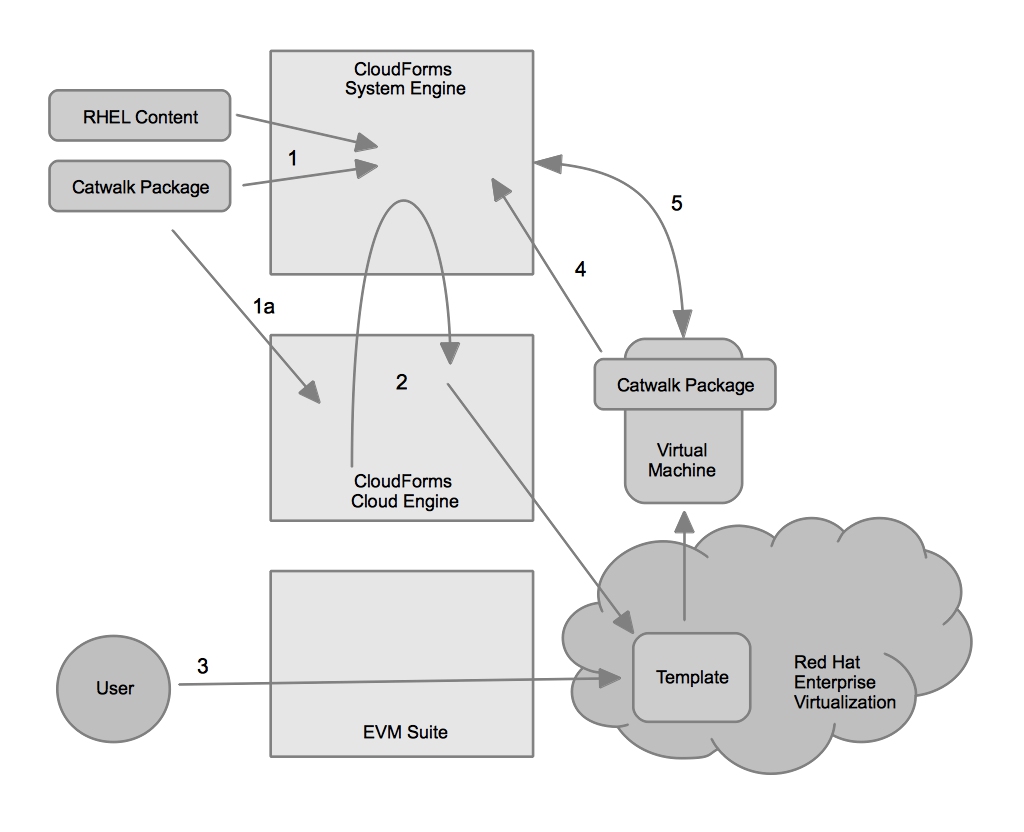
The diagram below illustrates the workflow I was attempting to create between CloudForms and ManageIQ EVM.

Example Workflow

Example Workflow

1. Synchronize the content for building a Red Hat Enterprise Linux virtual machine and the catwalk package into CloudForms System Engine or alternatively perform step 1a.

1a. CloudForms Cloud Engine is used to build the images. The targetcontent.xml file is edited to ensure that the catwalk package is automatically included in the images built.

<template_includes>
  <include target='rhevm' os='RHEL-6' version='3' arch='x86_64'>
    <packages>
      <package name='rhev-agent'/>
      <package name='katello-agent'/>
      <package name='aeolus-audrey-agent'/>
      <package name='catwalk'/>
    </packages>
    <repositories>
      <repository name='cf-tools'>
      <url>https://rhc-cfse2.lab.eng.bos.redhat.com/pulp/repos/Finance_Organization/Administrative/content/dist/rhel/server/6/6.3/x86_64/cf-tools/1/os/</url>
      <persisted>No</persisted>
      <clientcert>-----BEGIN CERTIFICATE-----
my unique certificate here
-----END CERTIFICATE-----
</clientcert>
      <clientkey>-----BEGIN RSA PRIVATE KEY-----
my unique key here
-----END RSA PRIVATE KEY-----
</clientkey>
      </repository>
      <repository name='catwalk'>
      <url>http://rhc-02.lab.eng.bos.redhat.com/pub/repo/catwalk/</url>
      <persisted>No</persisted>
      </repository>
    </repositories>
  </include>
</template_includes>

2. CloudForms Cloud Engine pushes the images to Red Hat Enterprise Virtualization.

3. EVM Suite discovers the templates.

4. When a user launches a virtual machine based on the template, the catwalk package executes and registers the virtual machine to CloudForms System Engine.

5. CloudForms System Engine can manage the virtual machine as it runs.

The Problem

As I went to implement this workflow I ran into a problem. Today, EVM Suite requires a gPXE server for RHEV in order to launch virtual machines. It does not support strictly launching a virtual machine from a template. I will be working with the team to determine the best way to move forward in both the short and long term to move beyond this.

Short Term Possibilities

In the short term I’m going to try to slip stream the catwalk RPM into the gPXE environment. This will hopefully allow an OS to be built via EVM and have it attach to CloudForms System Engine automatically. This effectively removes CloudForms Cloud Engine from the workflow. I’ll provide an update once I get to this point.

Future Suggestions

There are a LOT of suggestions I have floating around in my head, but here are just a few changes that would make this workflow easier and more valuable in the future.

First, include the image building capabilities within the providers of Red Hat Enterprise Virtualization, vSphere, and OpenStack. If the imagefactory was viewed as a service within the provider that EVM was aware of and could orchestrate there would be no need to include CloudForms Cloud Engine in the workflow. This would eliminate an extra piece of infrastructure required and simplify the user experience while maintaining the value of image building. The virtualization/cloud provider has the physical resources required to build images at scale anyway, so why perform it locally on a single system when you have the whole “cloud” at your disposal?

It would also be useful to build a custom action into EVM Suite that automatically deletes the registered system in CloudForms System Engine once the virtual machine is removed in EVM suite. This would automate the end of the lifecycle.

One area of further thought is creating a workflow for provisioning that is easy and flexible. For example, maintaining the image building capabilities but also allowing for installation via gPXE (or a MaaS) and being able to reconcile the differences between that and an existing image would be ideal.


Hands on with ManageIQ EVM – Part1: Deployment and Initial Configuration

As you might have heard, Red Hat has acquired ManageIQ. This is an exciting acquisition as it brings many new technologies to Red Hat that will continue to enable it to deliver on the vision of an Open Hybrid Cloud. I have begun to get hands on with ManageIQ’s EVM Suite in order to better understand where it fits in relation to Red Hat’s current products and solution, including Red Hat Enterprise Virtualization and CloudForms. I thought I’d document my experience here in the hope it might be useful to others looking to gain insight into EVM suite.

EVM is a snap to deploy. It is provided as an OVF based appliance, so it can be deployed in just about any virtualization provider. In the case of Red Hat Enterprise Virtualization (RHEV) I simply utilized the rhevm-image-uploader tool to upload the EVM appliance to my RHEV environment.

rhevm-image-uploader -r rhc-rhevm.lab.eng.bos.redhat.com:8443 -e EXPORT upload evm-v5.0.0.25.ovf

Once it was uploaded it showed up as a template in the RHEV Management (RHEV-M) console in my export domain. I then imported the template.

Upon importing the template, I created a virtual machine based on the EVM template.

Once the virtual machine was running I could immediately access the EVM console. The longest part of the whole exercise was waiting for the virtual machine to be cloned from the template.

Deployment was fast. Next I logged in and uploaded my license. The web user interface has a menu at the top which is organized into functional areas of the EVM suite. There is a section for “Settings and Operations” which allows you to configure the EVM suite and apply new fixpacks among other things.

After browsing through the configuration of the EVM appliance you’ll likely want to add a management system. In this case, I added both RHEV and vSphere as management systems within EVM. I also refreshed the relationships for the management systems so that EVM could inventory all the objects within each management system. For example, how many hosts, clusters, and virtual machines are within the provider.

Once the relationships have been refreshed, you can begin exploring the inventories of all the management systems within EVM.

I hope you’ve found this useful – Stay tuned for more hands on with ManageIQ EVM.

Elasticity in the Open Hybrid Cloud

Several months ago in my post on Open Hybrid PaaS I mentioned that OpenShift, Red Hat’s PaaS can autoscale gears to provide elasticity to applications. OpenShift scales gears on something it calls a node, which is essentially a virtual machine with OpenShift installed on it. One thing OpenShift doesn’t focus on is scaling the underlying nodes. This is understandable, because a PaaS doesn’t necessarily understand the underlying infrastructure, nor does it necessarily want to.

It’s important that nodes are able to be autoscaled in a PaaS. I’d take this one step further and submit that it’s important that operating systems are able to be autoscaled at the IaaS layer. This is partly because many PaaS solutions will be built atop an Operating System. Even more importantly, Red Hat is all about enabling an Open Hybrid Cloud and one of the benefits Open Hybrid Cloud wants to deliver is cloud efficiency across an organizations entire datacenter and not just a part of it. If you need to statically deploy Operating Systems you fail to achieve the efficiency of cloud across all of your resources. You also can’t re-purpose or shift physical resources if you can’t autoscale operating systems.

Requirements for a Project

The background above presents the basis for some requirements for an operating system auto-scaling project.

  1. It needs to support deploying across multiple virtualization technologies. Whether a virtualization provider, IaaS private cloud, or public cloud.
  2. It needs to support deploying to physical hardware.
  3. It cannot be tied to any single vendor, PaaS, or application.
  4. It needs to be able to configure the operating systems deployed upon launch for handing over to an application.
  5. It should be licensed to promote reuse and contribution.

Workflow

Here is an idea for a project that could solve such a problem, which I call “The Governor”.

Example Workflow

Example Workflow

To explain the workflow:

  1. The application realizes it needs more resources. Monitoring of the application to determine whether it needs more resources is not within the scope of The Governor. This is by design as there are countless applications and each one of them has different requirements for scalability and elasticity. For this reason, The Governor lets the applications make the determination for when to request more resources. When the application makes this determination it makes a call to The Governor’s API.
  2. The call to the API involves the use of a certificate for authentication. This ensures that only applications that have been registered in the registry can interact with The Governor to request resources. If the certificate based authentication works (the application is registered in The Governor) then the workflow proceeds. If not, the applications request is rejected.
  3. Upon receiving an authenticated request for more resources the certificate (which is unique) is run through the rules engine to determine the rules the application must abide by when scaling. This would include decision points such as which providers can the application scale on, how many instances can the application consume, etc. If the scaling is not permitted by the rules (maximum number of instances is reached, etc) then the response is sent back to the application informing it the request has been declined.
  4. Once the rules engine determines the appropriate action it calls the orchestrator which initiates the action.
  5. The orchestrator calls either the cloud broker, which can launch instances to a variety of virtualization managers and cloud providers, either private or public, or a metal as a service (MaaS), which can provision an operating system on bare metal.
  6. and 7.  The cloud broker or MaaS launch or provision the appropriate operating system and configure it per the application’s requirements.

Future Details

There are more details which need to be further developed:

  • How certificates are generated and applications are registered.
  • How application registration details, such as the images that need to be launched and the configurations that need to be implemented on them are expressed.
  • How the configured instance is handed back to the application for use by the application.

Where to grow a community?

It matters where this project will ultimately live and grow. A project such as this one would need broad community support and a vibrant community in order to gain adoption and support to become a standard means of describing elasticity at the infrastructure layer. For this reason a community with a large number of active participants and friendly licensing which promotes contribution should be it’s location.

Tagged , , , , ,

White Paper: Red Hat CloudForms – Delivering Managed Flexibility For The Cloud

Businesses continually seek to increase flexibility and agility in order to gain competitive advantage and reduce operating cost. The rise of public cloud providers offers one method by which businesses can achieve lower operating costs while gaining competitive advantage. Public clouds provide these advantages by allowing for self-service, on-demand access of compute resources. While the use of public clouds has increased flexibility and agility while reducing costs, it has also presented new challenges in the areas of portability, governance, security, and cost.

These challenges are a result of business users lacking the incentive to adequately govern, secure, and budget for applications deployed in the cloud. As a result, IT organizations have looked to replicate public cloud models in order to convince business users to utilize internal private clouds. An internal cloud avoids the challenges of portability, governance, security, and cost that are associated with public clouds. While the increased cost and inflexibility of private clouds may be justified, the challenges public clouds face make it clear that a solution that allows businesses to seamlessly move applications between cloud providers (both public and private) is critical. A hybrid cloud built with heterogeneous technologies allows business users to benefit from flexibility and agility, while IT maintains
governance and control.

With Red Hat CloudForms, businesses no longer have to choose between providing flexibility and agility to end users through the use of cloud computing or maintaining governance and control of their IT assets. Red Hat CloudForms is an open hybrid cloud management platform that delivers the flexibility and agility businesses want with the control and governance that IT requires. Organizations can build a hybrid cloud that encompasses all of their infrastructure using CloudForms and manage cloud applications without vendor lock-in.

CloudForms implements a layer of abstraction on top of cloud resources–private cloud providers, public cloud providers, and virtualization providers. That abstraction is expressed as the ability to partition and organize cloud resources as seemingly independent clouds to which users can deploy and manage AppForms–CloudForms cloud applications. CloudForms achieves these benefits by allowing users to:

• build clouds for controlled agility
• utilize a cloud-centric deployment and management model
• enable policy-based self-service for end users

This document explains how CloudForms meets the challenges that come from letting users serve themselves, while maintaining control of where workloads are executed and ensuring the life cycle is properly managed. IT organizations are able to help their customers better utilize the cloud or virtualization provider that best meets the customer’s needs while solving the challenges of portability, governance, security, and cost.

Read the White Paper

Tagged , , , , , ,