Elasticity in the Open Hybrid Cloud

Several months ago in my post on Open Hybrid PaaS I mentioned that OpenShift, Red Hat’s PaaS can autoscale gears to provide elasticity to applications. OpenShift scales gears on something it calls a node, which is essentially a virtual machine with OpenShift installed on it. One thing OpenShift doesn’t focus on is scaling the underlying nodes. This is understandable, because a PaaS doesn’t necessarily understand the underlying infrastructure, nor does it necessarily want to.

It’s important that nodes are able to be autoscaled in a PaaS. I’d take this one step further and submit that it’s important that operating systems are able to be autoscaled at the IaaS layer. This is partly because many PaaS solutions will be built atop an Operating System. Even more importantly, Red Hat is all about enabling an Open Hybrid Cloud and one of the benefits Open Hybrid Cloud wants to deliver is cloud efficiency across an organizations entire datacenter and not just a part of it. If you need to statically deploy Operating Systems you fail to achieve the efficiency of cloud across all of your resources. You also can’t re-purpose or shift physical resources if you can’t autoscale operating systems.

Requirements for a Project

The background above presents the basis for some requirements for an operating system auto-scaling project.

  1. It needs to support deploying across multiple virtualization technologies. Whether a virtualization provider, IaaS private cloud, or public cloud.
  2. It needs to support deploying to physical hardware.
  3. It cannot be tied to any single vendor, PaaS, or application.
  4. It needs to be able to configure the operating systems deployed upon launch for handing over to an application.
  5. It should be licensed to promote reuse and contribution.

Workflow

Here is an idea for a project that could solve such a problem, which I call “The Governor”.

Example Workflow

Example Workflow

To explain the workflow:

  1. The application realizes it needs more resources. Monitoring of the application to determine whether it needs more resources is not within the scope of The Governor. This is by design as there are countless applications and each one of them has different requirements for scalability and elasticity. For this reason, The Governor lets the applications make the determination for when to request more resources. When the application makes this determination it makes a call to The Governor’s API.
  2. The call to the API involves the use of a certificate for authentication. This ensures that only applications that have been registered in the registry can interact with The Governor to request resources. If the certificate based authentication works (the application is registered in The Governor) then the workflow proceeds. If not, the applications request is rejected.
  3. Upon receiving an authenticated request for more resources the certificate (which is unique) is run through the rules engine to determine the rules the application must abide by when scaling. This would include decision points such as which providers can the application scale on, how many instances can the application consume, etc. If the scaling is not permitted by the rules (maximum number of instances is reached, etc) then the response is sent back to the application informing it the request has been declined.
  4. Once the rules engine determines the appropriate action it calls the orchestrator which initiates the action.
  5. The orchestrator calls either the cloud broker, which can launch instances to a variety of virtualization managers and cloud providers, either private or public, or a metal as a service (MaaS), which can provision an operating system on bare metal.
  6. and 7.  The cloud broker or MaaS launch or provision the appropriate operating system and configure it per the application’s requirements.

Future Details

There are more details which need to be further developed:

  • How certificates are generated and applications are registered.
  • How application registration details, such as the images that need to be launched and the configurations that need to be implemented on them are expressed.
  • How the configured instance is handed back to the application for use by the application.

Where to grow a community?

It matters where this project will ultimately live and grow. A project such as this one would need broad community support and a vibrant community in order to gain adoption and support to become a standard means of describing elasticity at the infrastructure layer. For this reason a community with a large number of active participants and friendly licensing which promotes contribution should be it’s location.

Tagged , , , , ,

White Paper: Red Hat CloudForms – Delivering Managed Flexibility For The Cloud

Businesses continually seek to increase flexibility and agility in order to gain competitive advantage and reduce operating cost. The rise of public cloud providers offers one method by which businesses can achieve lower operating costs while gaining competitive advantage. Public clouds provide these advantages by allowing for self-service, on-demand access of compute resources. While the use of public clouds has increased flexibility and agility while reducing costs, it has also presented new challenges in the areas of portability, governance, security, and cost.

These challenges are a result of business users lacking the incentive to adequately govern, secure, and budget for applications deployed in the cloud. As a result, IT organizations have looked to replicate public cloud models in order to convince business users to utilize internal private clouds. An internal cloud avoids the challenges of portability, governance, security, and cost that are associated with public clouds. While the increased cost and inflexibility of private clouds may be justified, the challenges public clouds face make it clear that a solution that allows businesses to seamlessly move applications between cloud providers (both public and private) is critical. A hybrid cloud built with heterogeneous technologies allows business users to benefit from flexibility and agility, while IT maintains
governance and control.

With Red Hat CloudForms, businesses no longer have to choose between providing flexibility and agility to end users through the use of cloud computing or maintaining governance and control of their IT assets. Red Hat CloudForms is an open hybrid cloud management platform that delivers the flexibility and agility businesses want with the control and governance that IT requires. Organizations can build a hybrid cloud that encompasses all of their infrastructure using CloudForms and manage cloud applications without vendor lock-in.

CloudForms implements a layer of abstraction on top of cloud resources–private cloud providers, public cloud providers, and virtualization providers. That abstraction is expressed as the ability to partition and organize cloud resources as seemingly independent clouds to which users can deploy and manage AppForms–CloudForms cloud applications. CloudForms achieves these benefits by allowing users to:

• build clouds for controlled agility
• utilize a cloud-centric deployment and management model
• enable policy-based self-service for end users

This document explains how CloudForms meets the challenges that come from letting users serve themselves, while maintaining control of where workloads are executed and ensuring the life cycle is properly managed. IT organizations are able to help their customers better utilize the cloud or virtualization provider that best meets the customer’s needs while solving the challenges of portability, governance, security, and cost.

Read the White Paper

Tagged , , , , , ,

Red Hat’s Open Approach for PaaS

Ogg Version

Transcript:

Platform-as-a-Service, or PaaS, solutions in public clouds are flexible and fast, and can meet growing business demand. However, public PaaS lacks needed privacy and compliance features. OpenShift Enterprise by Red Hat, Red Hat Enterprise Virtualization, and Red Hat CloudForms use an open approach for PaaS. Red Hat customers enjoy agile development, with greater availability, scalability, and control over their infrastructure.

OpenShift Enterprise utilizes a multi-tenant cloud architecture that streamlines application service delivery. Developers are free to choose the right tools and focus on what they do best—writing code. With OpenShift Enterprise, language runtimes are standardized and open. Code, once written, is widely deployable while other PaaS providers use proprietary hooks that limit portability.

OpenShift Enterprise is built on Red Hat Enterprise Linux—the same software handling millions of dollars daily in trades and analysis. Red Hat Enterprise Linux supports all major hardware platforms and thousands of applications. It provides portability between physical systems, virtual machines, and private, public, and hybrid clouds.

Red Hat Enterprise Linux runs best on Red Hat Enterprise Virtualization uses the powerful and ubiquitous Kernel-based Virtual Machine (or KVM) hypervisor and oVirt, a virtualization management platform. Both KVM and oVirt are successful open source projects led by Red Hat. KVM has achieved industry-leading virtualization performance benchmarks and the highest government security certification.

While Red Hat Enterprise Virtualization is the best foundation for running Red Hat Enterprise Linux and OpenShift Enterprise, Red Hat believes that a truly open hybrid cloud must be portable across all resources.

CloudForms provides resource and systems management for hybrid Infrastructure as a Service clouds. By abstracting resources and creating application blueprints, system administrators can deploy OpenShift Enterprise across supported providers, update underlying instances of Red Hat Enterprise Linux, and track systems—all through a self-service portal. This leaves developers free to focus on projects that provide business value.

OpenShift Enterprise, Red Hat Enterprise Virtualization, and Red Hat CloudForms can improve performance, scalability, and reliability for enterprise cloud deployments–without relying on proprietary lock-in or hooks that restrict development and flexibility. Red Hat solutions are a strategic choice for organizations looking to achieve an open hybrid cloud.

Tagged , , , , , , , , , ,

The Synthesized Cloud: Hybrid Service Models

Today, Red Hat focuses on Infrastructure as a Service (IaaS) and Platform as a Service (PaaS). Often, when speaking with organizations about a cloud opportunity I find myself asking questions to find out the appropriate service model for the customer.

“Do you want to just bring your code?”
“Would you like to access the operating system and perform optimizations?”
“How do you feel about kernel semaphores?”

OK, maybe not that last one, but you get the idea. The answers to these questions often help me determine which one of the models, and thereby solutions, to recommend for the situation. With regards to IaaS, Red Hat will soon be providing it’s Cloud and Virtualization Solution – A combination of virtualization and cloud management software that provides the benefits of a cloud computing model with all the underlying virtualization required. For PaaS Red Hat offers OpenShift Enterprise, a solution designed for on-premise or private cloud deployment which automates much of the provisioning and systems management of the application platform stack.

The Synthesized Cloud

Taking a step back, what is the purpose of having separate and distinct cloud computing models? Why couldn’t the models be combined to allow organizations to use elements of each based on their needs? One of the benefits of cloud computing is the ability for organizations to reach the highest level of standardization possible while increasing reuse. If this is the case, then it should be a goal to provide organizations with the ability to utilize not just a hybrid cloud, but a hybrid service model – one in which elements of IaaS could be combined with elements of a PaaS. By realizing a synthesis of IaaS and PaaS service models organizations could leverage the benefits of cloud computing more widely and realize the benefits even in what are often considered legacy, or traditional applications. Cloud Efficiencies Everywhere is, after all, a goal of Red Hat’s Open Hybrid Cloud. I’ll refer to this combining of IaaS and PaaS into a single service model as the synthesized cloud and I believe it is critical to realizing the full potential of cloud computing.

Why not just use PaaS?

Most organizations I have met with are extremely interested in PaaS. They find the increase in developer productivity PaaS can offer very attractive and the idea of “moving the chalk line” up to have developers bringing code instead of hardware descriptions as very exciting. PaaS is great, no doubt about it, but while PaaS can accelerate delivery for Systems of Engagement, it often does not account for systems of record and other core business systems. There is evidence that supports the idea that organizations are shifting from systems of record to system of engagement, but this is not a shift that will happen overnight and in some cases, systems of record will be maintained alongside or complimented with systems of engagement. Beyond systems of record, there are technologies that exist at the infrastructure layer that can be exposed to the platform layer that might not yet be available in a PaaS (think Hadoop, Condor, etc). In time, some of these technologies might be moved into the PaaS layer, but we likely continue to see innovation happening at both the infrastructure and platform services model layers. In short, IaaS finds its fit in both building new applications that require specific understanding of the underlying infrastructure (networks, storage, etc) and as the foundation for hosting a PaaS and consequently will always be important in organizations. For these reasons it’s important to leave our service model open and flexible while simultaneously having a single way to describe and manage both models.

Use the Correct Mix

The ability to use both platform and infrastructure elements is critical to maintaining flexibility and evolving to an optimized IT infrastructure. Red Hat is well positioned to deliver the synthesis of Infrastructure and Platform service models. This has as much to do with the great engineering work and strategic decisions being made by Red Hat engineers as it does the open source model’s propensity to drive modular design.

Some points to consider:

  1. OpenShift Enterprise, Red Hat’s PaaS, runs on Infrastructure (specifically, Red Hat Enterprise Linux).
  2. Thousands of other applications run on Red Hat Enterprise Linux (RHEL).
  3. Application Blueprints provide sustainable, reusable descriptions of any software running on Red Hat Enterprise Linux.
  4. Red Hat CloudForms can deploy Application Blueprints to a number of underlying resource providers.

Since Application Blueprints can deploy any software running on RHEL and OpenShift Enterprise is software running on RHEL we can deploy a Platform as a Service alongside traditional applications running on RHEL.

synthesizedcloudblueprint01

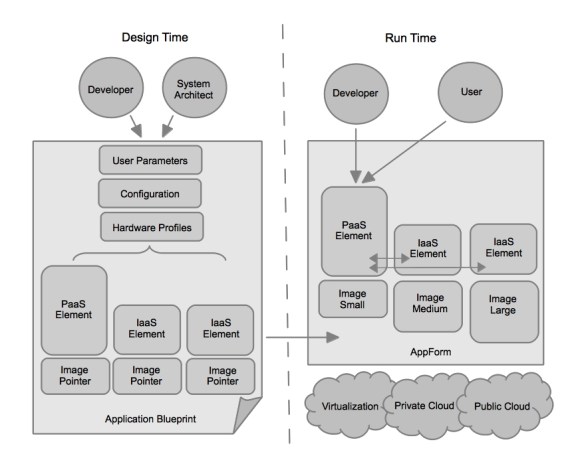
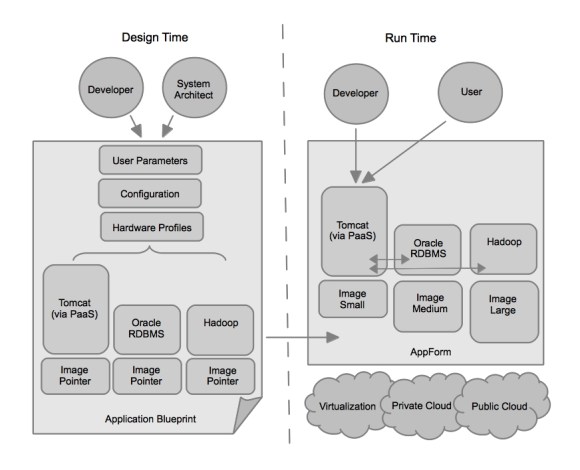
Figure 1: Combining PaaS and IaaS

Figure 1 depicts the use of an Application Blueprint to deliver a hybrid service model of IaaS and PaaS. During Design Time, a Developer and System Architect work together to design the Application Blueprint. This involves using CloudForms to define and build all the necessary images that will serve as the foundations for each element in the AppForm (a running Application Blueprint). CloudForms allows the System Architect and Developer to build all these images with the push of a button and tracks all the images at each provider. In this case, a single PaaS Element and two IaaS Elements were described in the Application Blueprint.

The design process also allows the System Architect and Developer to associate hardware profiles to each of the images, and specify how the software that runs on the images should be configured upon launch. Finally, user parameters can be accepted in the Application Blueprint, to allow for customization when the Application Blueprint is launched by it’s intended end user. The result of designing an Application Blueprint is a customizable reusable and portable description of a complete application environment.

Once the Application Blueprint is designed and published to a catalog, users or developers are able to launch the Application Blueprint, the result of which is an AppForm at Run Time. The running AppForm can contain both a PaaS and a mix of IaaS elements and CloudForms will orchestrate the configuration of the two service models together upon launch according to the design of the Application Blueprint.

An Example

Imagine an organization has a legacy Human Resources system of record which is a client server model built on Oracle RDBMS. Over time, they’d like to shift this system to a system engagement in order to make it more engaging for their employees. They’d also like to begin providing some data analysis via MapReduce to select individuals in the Human Resources department. In this case, replacing the system of record with a completely new system of engagement is not an option. This may be because of the cost associated with a rewrite or the fact that there are many back end processes that tie into the Oracle RDBMS that cannot be easily changed.

synthesizedcloudblueprint02

Figure 2: Example Scenario

In this example, the Application Blueprint is designed to include an OpenShift PaaS which delivers a scalable, manged application platform (Tomcat in this case) and both a Oracle RDBMS and Hadoop. Once the Application Blueprint is launched users or developers can access this entire environment and begin working. This goes beyond gaining increased developer efficiency at just the platform layer – it drives many of the efficiencies of PaaS across the Infrastructure as well.

Further Benefits of a Hybrid Service Model

There are many other benefits to this synthesis of PaaS and IaaS service models. One other I’d like to explore is it’s effect on system testing. With a hybrid service model, not only do developers have access to all the qualities of both PaaS and IaaS in a single description that is portable, but the Application Lifecycle Environment framework contained within CloudForms along with it’s ability to automatically provision both PaaS and IaaS can be leveraged to lay the foundation for a governed DevOps model. This provides greater efficiency in testing, accelerating delivery of applications, while allowing for control over important aspects of both the Infrastructure and Platform layers.

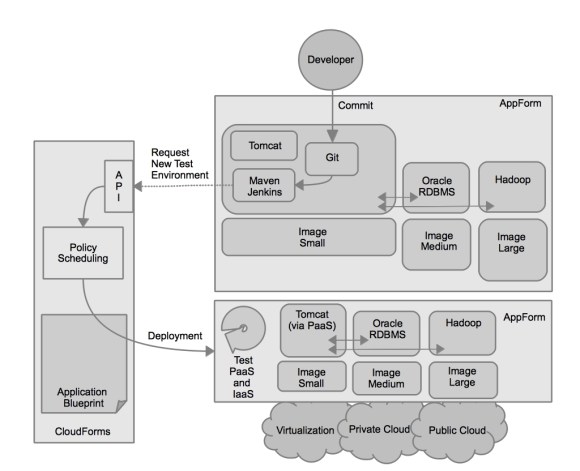
Figure 3: Governed DevOps

Figure 3: Hybrid Service Model leading to Governed DevOps

Figure 3 illustrates how the Hybrid Service Model allows for a governed DevOps model to be implemented. Before the hybrid service model, developers needed to request the required IaaS elements in order to complete a system test. This process is often manual and time consuming. With a hybrid service model in place, upon commit of new code to the source control system, the continuous integration systems contained within the PaaS layer can request a new test environment be created that includes the required IaaS elements for system testing. This greatly reduces the time required to test, and in turn, accelerates application delivery.

How do I get started?

Organizations can begin to prepare for a Hybrid Service Model by ensuring that all decisions made in their IT organization regarding cloud computing adhere to the properties of a truly open cloud. Namely that the technologies the cloud strategy they pursue:

  • Is Open Source
  • Has a viable, independent community
  • Embraces Open Standards
  • Allows freedom of Intellectual Properpty
  • Allows choice of infrastructure
  • Has open APIs
  • Enables portability

Red Hat’s Open Hybrid Cloud adheres to the following properties. To learn more about how Red Hat is optimizing IT with it’s Open Hybrid Cloud approach be sure to register for the Optimizing IT Virtual Event which takes place on December 5th, 2012 at 11:00AM EST and December 6th, 2012 at 9:00AM EST.

Tagged , , , , , ,

Accelerating IT Service Delivery for the Enterprise

If you find this post interesting and would like to learn more about how Red Hat’s cloud solutions are optimizing IT be sure to register for the Optimizing IT Virtual Event which takes place on December 5th, 2012 at 11:00AM EST and December 6th, 2012 at 9:00AM EST.

Organizations are continually seeking ways to accelerate IT service delivery in order to deliver greater business value while simultaneously increasing flexibility, consistency, and automation while maintaining greater control.

Platform as a Service (PaaS) provides organizations faster delivery of applications to their stakeholders by automating many of the routine tasks associated with application development and providing standardized runtimes for applications. This results in developers being able to focus on writing code rather then performing mundane tasks that do not add value.

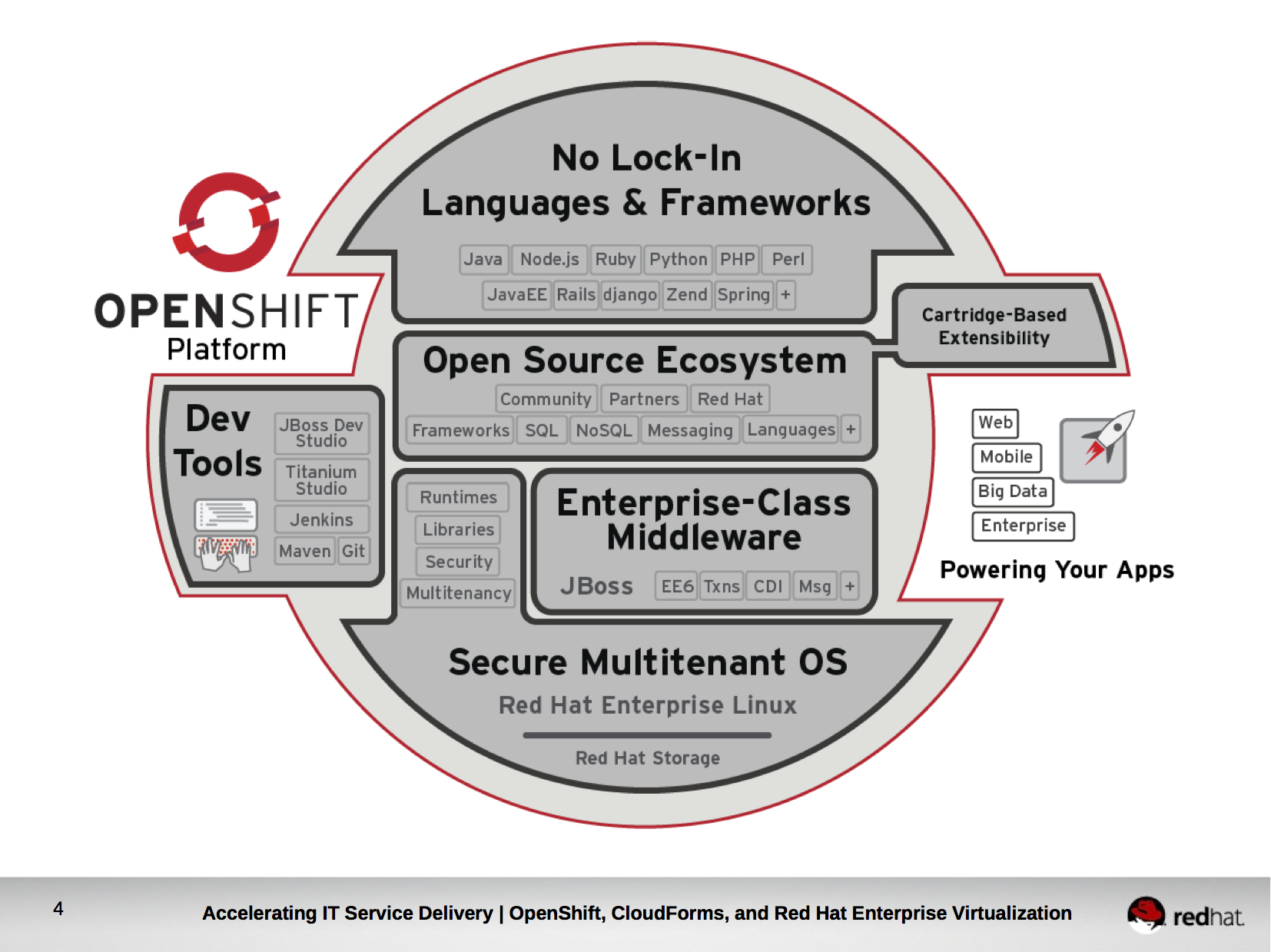
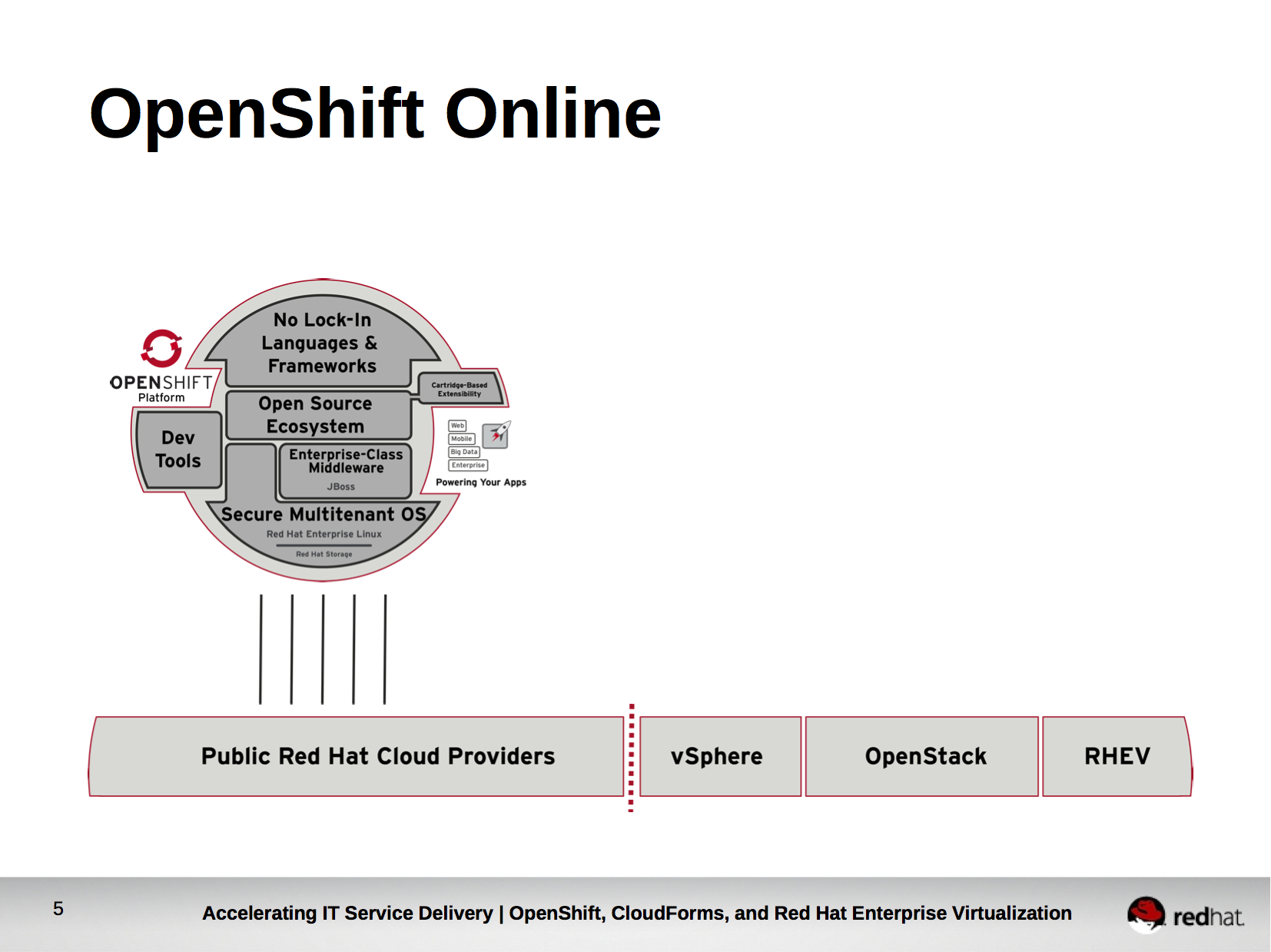
OpenShift is Red Hat’s PaaS. OpenShift provides access to a broad choice of languages and frameworks, developer tools, and has an open source ecosystem which gives voice to the community and partners who work with Red Hat on OpenShift. Languages and Frameworks in OpenShift are delivered as cartridges and OpenShift provides the ability to extend cartridges to include customized cartridges. Finally, and perhaps most importantly for the purposes of our topic today, OpenShift leverages Red Hat Enterprise Linux as the underlying operating system in delivering PaaS. This is important not only because Red Hat Enterprise Linux is highly certified and has a proven track record for handling mission critical workloads, but because Red Hat Enterprise Linux runs just about anywhere – including on thousands of physical systems, virtual infrastructure, and certified public clouds. It also provides OpenShift with access to some great underlying technologies that are native to Linux like LXC, SELinux, and Control Groups which provide secure multi-tenancy and fine grain resource control without the need to reinvent the concepts from scratch.

Red Hat first offered access to it’s OpenShift PaaS as a hosted service, now named OpenShift Online, starting in May, 2011. For roughly 18 months, Red Hat worked on honing OpenShift while it hosted thousands of applications in OpenShift Online. During this time, an ever increasing demand was building from IT organizations who wanted to replicate the success of OpenShift Online in their own datacenters.

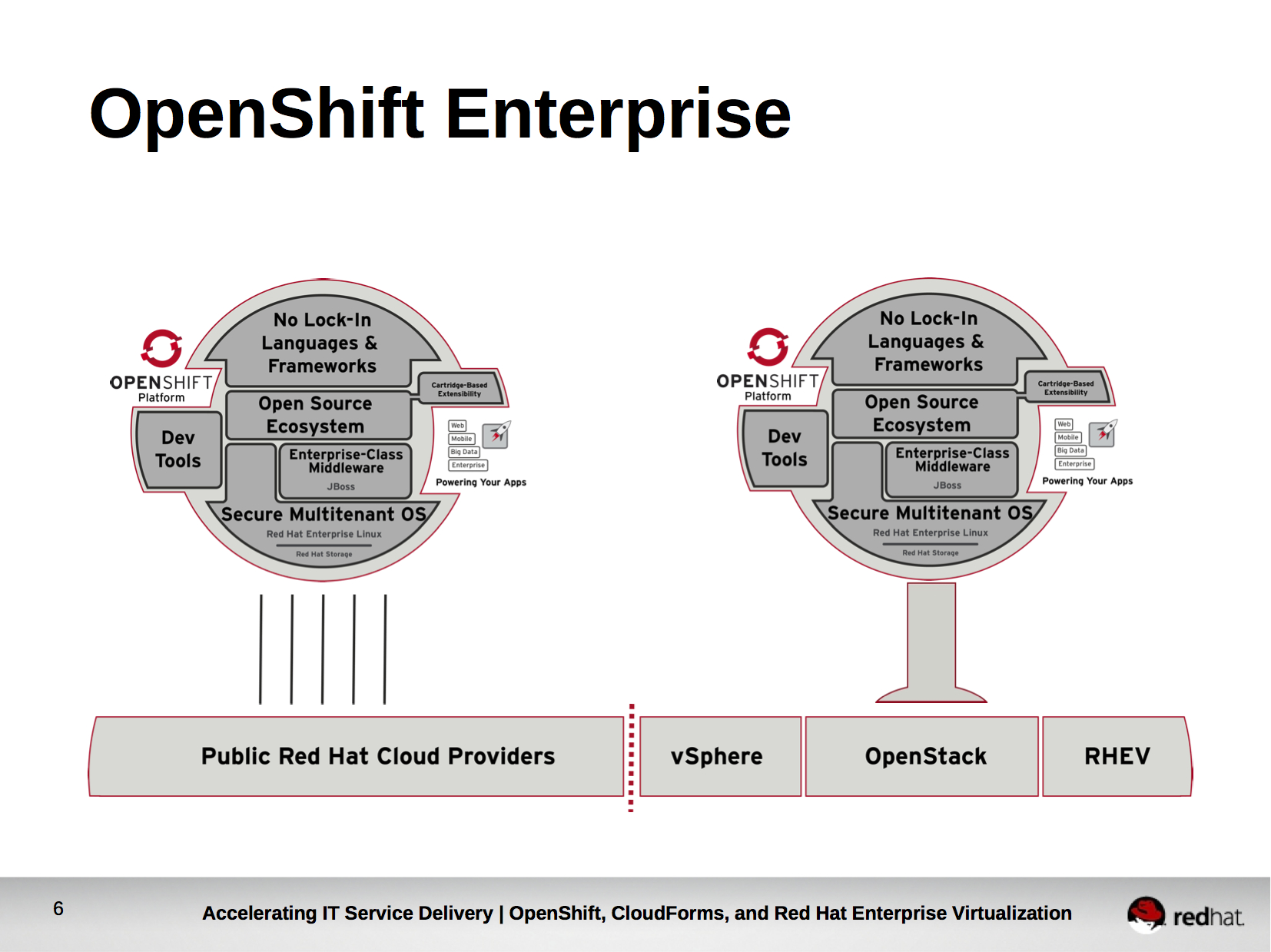
For this reason, Red Hat released OpenShift Enterprise – an on-premise offering of OpenShift which allows IT organizations to accelerate IT service delivery in their own datacenter in the same way organizations did in the public cloud with OpenShift Online. OpenShift Enterprise was the first comprehensive on-premise PaaS offering for enterprises in the industry, and it is a big game changer.

When an organization wants to adopt OpenShift Enterprise there are several decisions they must consider carefully.

First, they must decide what will host the Red Hat Enterprise Linux that serves as a foundation to OpenShift. Should they use physical hardware, virtual machines, or do they want to run in a public cloud? The correct decision will be different for each organization based on their specific requirements. Furthermore, in the rapidly evolving IT landscape, organizations will likely want to change the underlying infrastructure their PaaS runs on top of relatively frequently. Take, for example, the rise of Red Hat Enterprise Virtualization backed by KVM as a highly secure and industry performance leading open source hypervisor.  It is important that organizations maintain flexibility in being able to deploy OpenShift Enterprise to a choice of infrastructure while maintaining consistency of their deployments of OpenShift Enterprise at each provider.

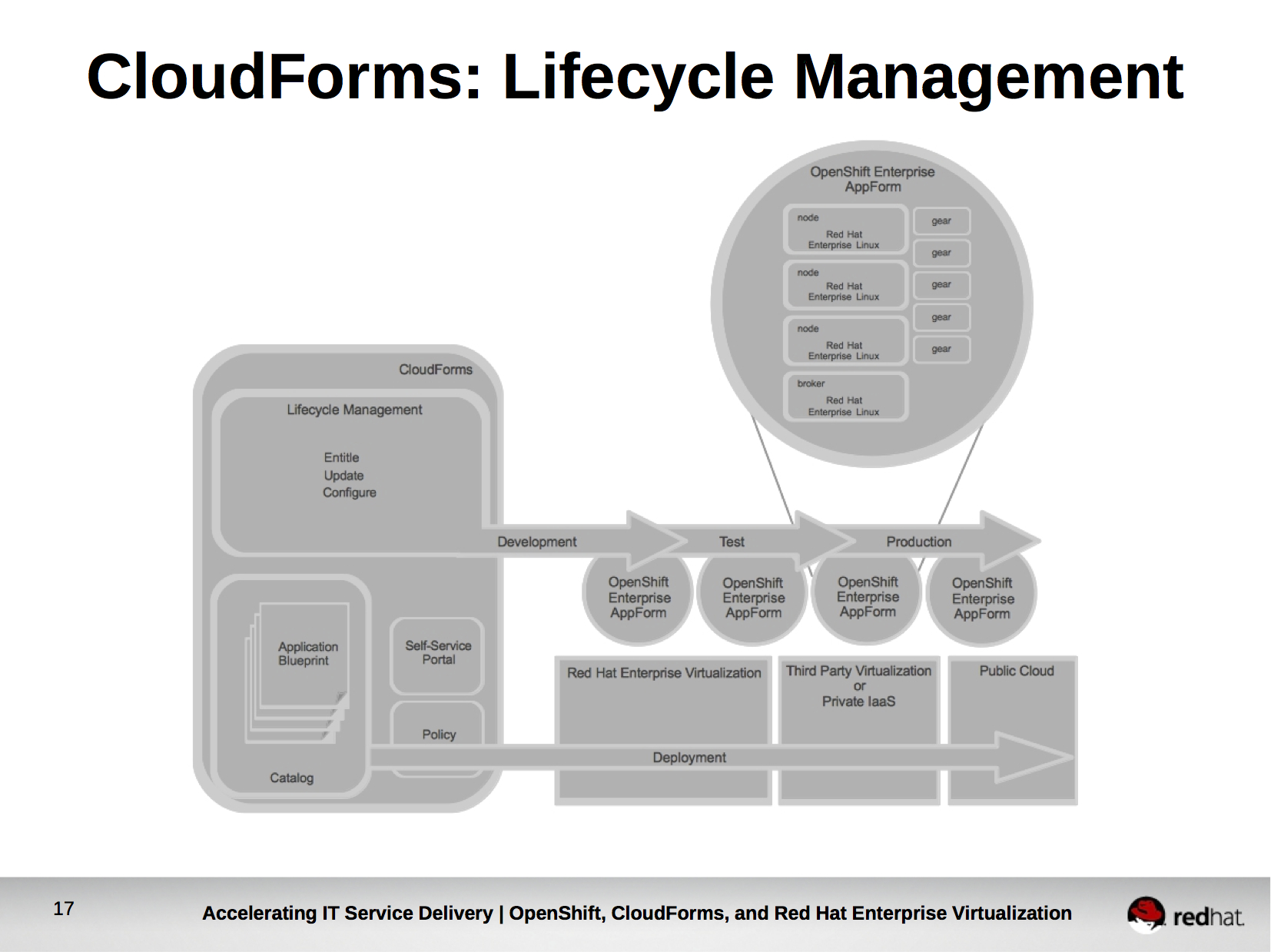
Second, how will OpenShift Enterprise be deployed onto the foundation of Red Hat Enterprise Linux? An organization may decide that OpenShift Enterprise will be deployed in one large pool that is equally distributed to all end users. The organization may, however, decide to split OpenShift Enterprise into smaller deployments based on it’s decided application lifecycle workflow (For example, Development, Test, and Production OpenShift Enterprise deployments). Each deployment of OpenShift Enterprise requires installing software and configuring it. These redundant (and often mundane) tasks should be automated to reduce time to deploy and the risk of human error.

Third, which cartridges (languages and frameworks) will be made available to the users of OpenShift Enterprise? It is likely that an organization would desire to allow developers access to a broad choice of languages in a development environment, but limit the use of frameworks and languages in test and production to those that are certified to the organization’s standards. It is important for organizations to be able to control which cartridges are available and installed within each OpenShift Enterprise deployment.

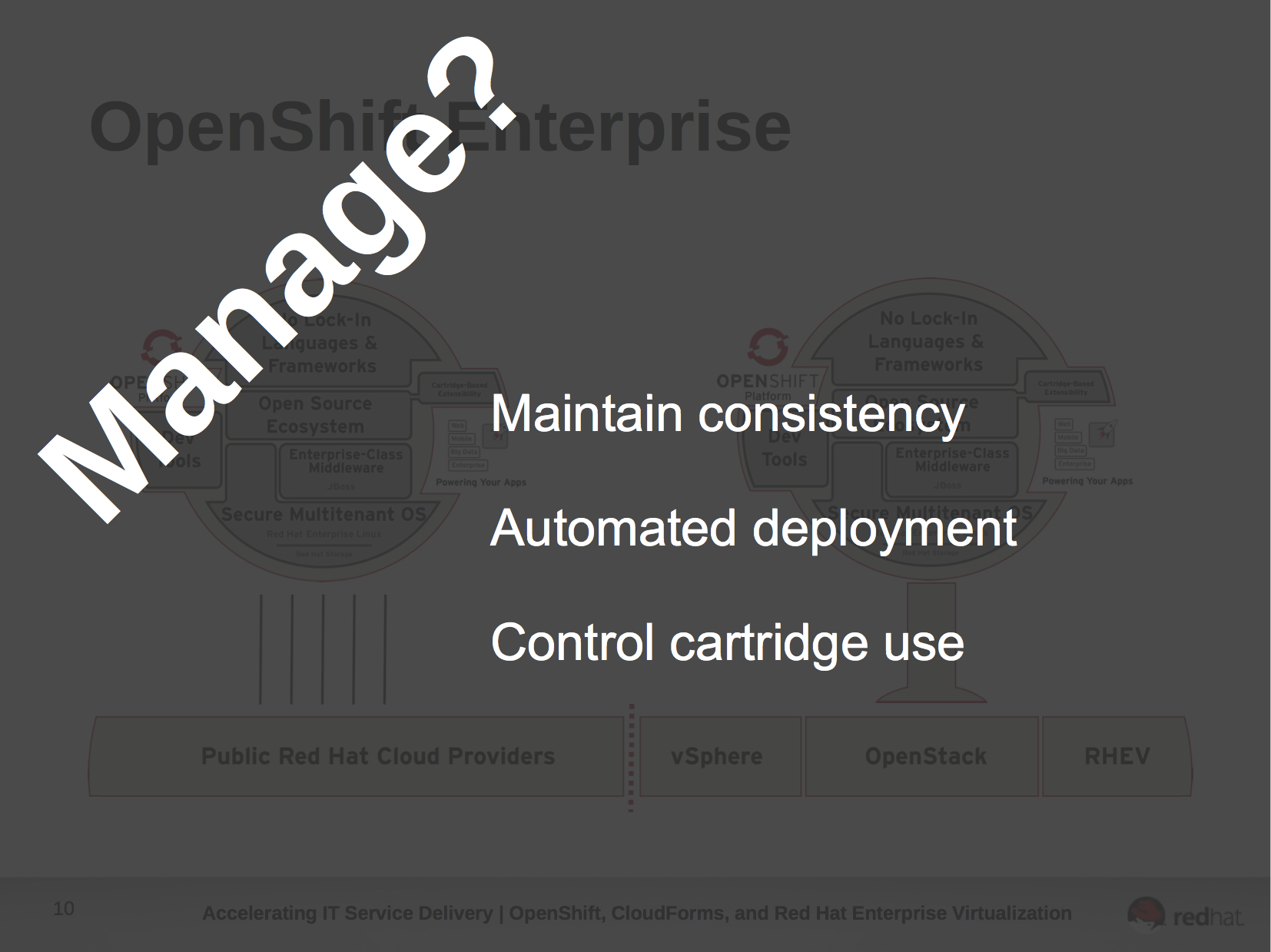
While organizations want to accelerate IT service delivery by utilizing an on-premise PaaS they desire to do so in a flexible yet consistent manner which allows for choice of infrastructure, while leveraging automation and controlling what languages and frameworks users of the PaaS can utilize.

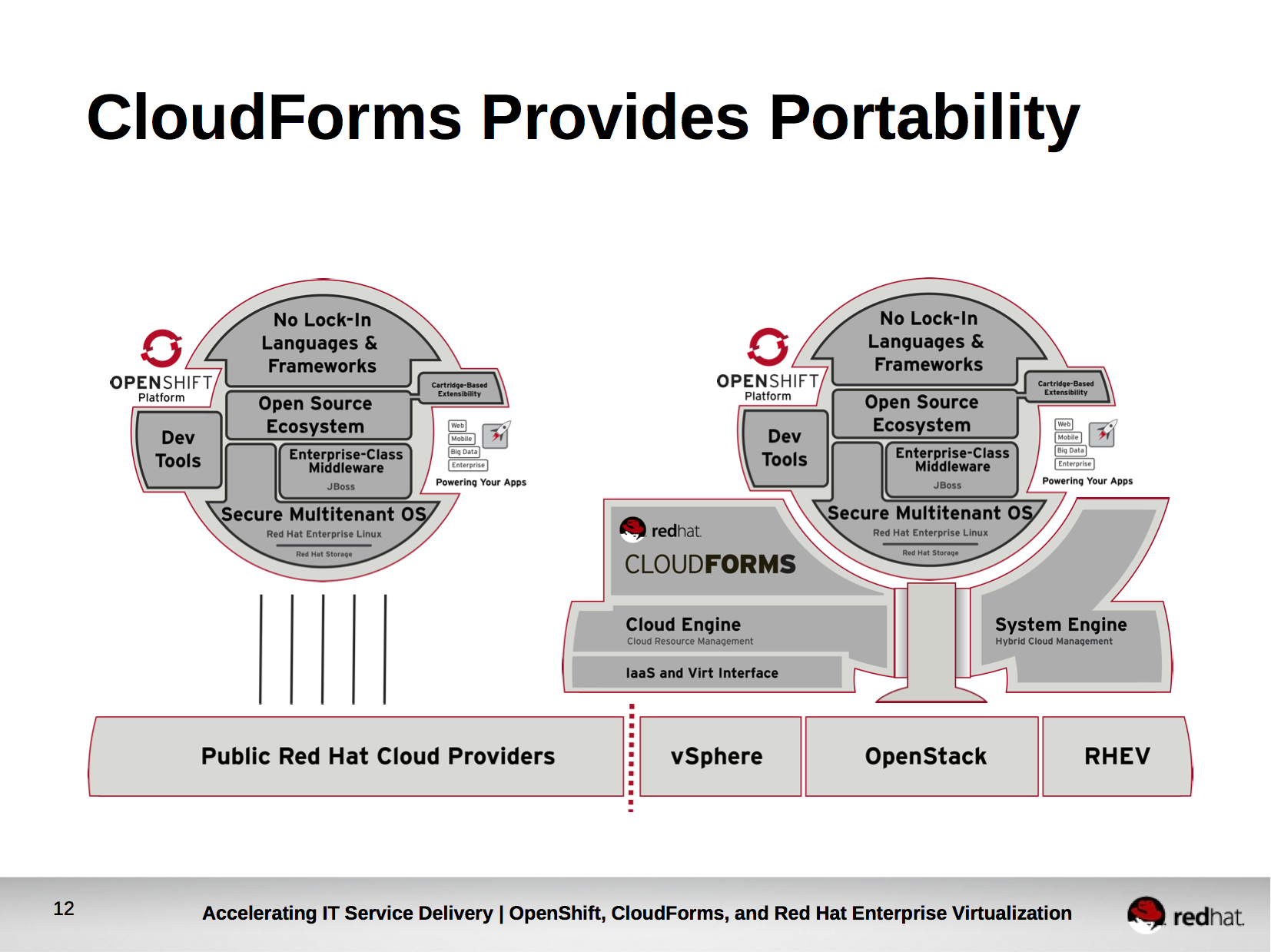
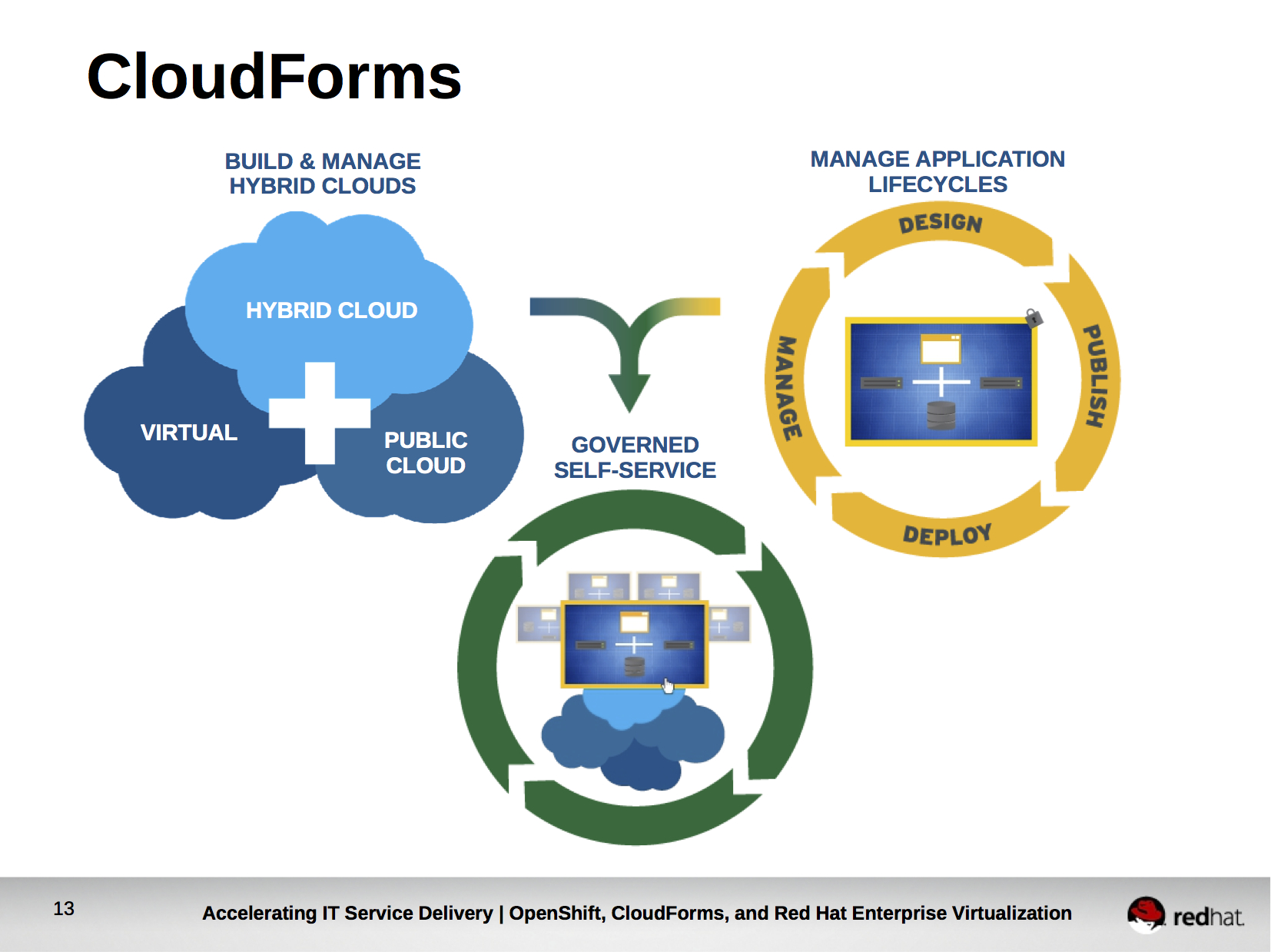
Red Hat CloudForms delivers these capabilities, allowing organization to deploy and manage OpenShift Enterprise across a wide range of infrastructure. It provides both cloud resource management by abstracting and decoupling underlying infrastructure providers from the end user and hybrid cloud management of Red Hat Enterprise Linux and the software installed within it.

CloudForms focuses on three key areas that provide cloud resource management and hybrid cloud management of Red Hat Enterprise Linux and the software that runs upon it.

First, it provides the ability to define a hybrid cloud consisting of one or more cloud resource providers. These can either be virtual infrastructure providers (For example, Red Hat Enterprise Virtualization) or public cloud providers (For example, Amazon EC2). CloudForms understands how to build operating systems instances for these providers, so system administrators don’t need to understand the different processes for each provider, which often differ greatly. CloudForms communicates with the various cloud resource providers via the Deltacloud API.

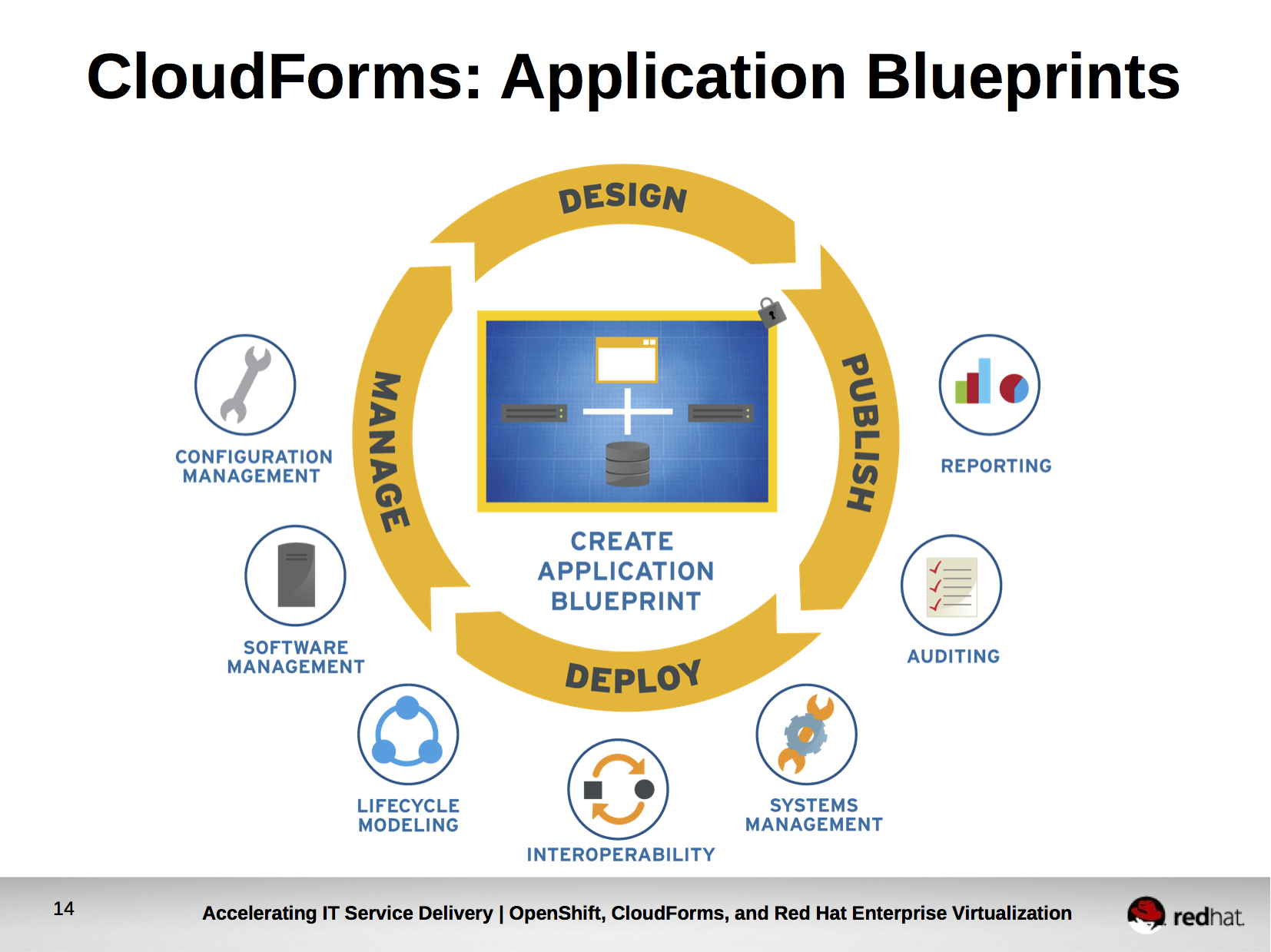
Second, it allows for the definition and lifecycle management of Application Blueprints. Application Blueprints are re-usable descriptions of applications, including the operating systems, additional software, and actions that need to be performed to configure that software. In defining a single application blueprint a CloudForms administrator could deploy an application to the cloud resource provider of their choice. CloudForms will manage launching the correct instances and configuring the software as required, even if the topologies and properties of each cloud resource provider are different.

Third, CloudForms allows for self-service deployment of the defined Application Blueprints based on policy and permissions. CloudForms users can select the Application Blueprint from a catalog, provide user defined input that was designed into the Application Blueprint, and launch it. Upon launch they can begin using their application.

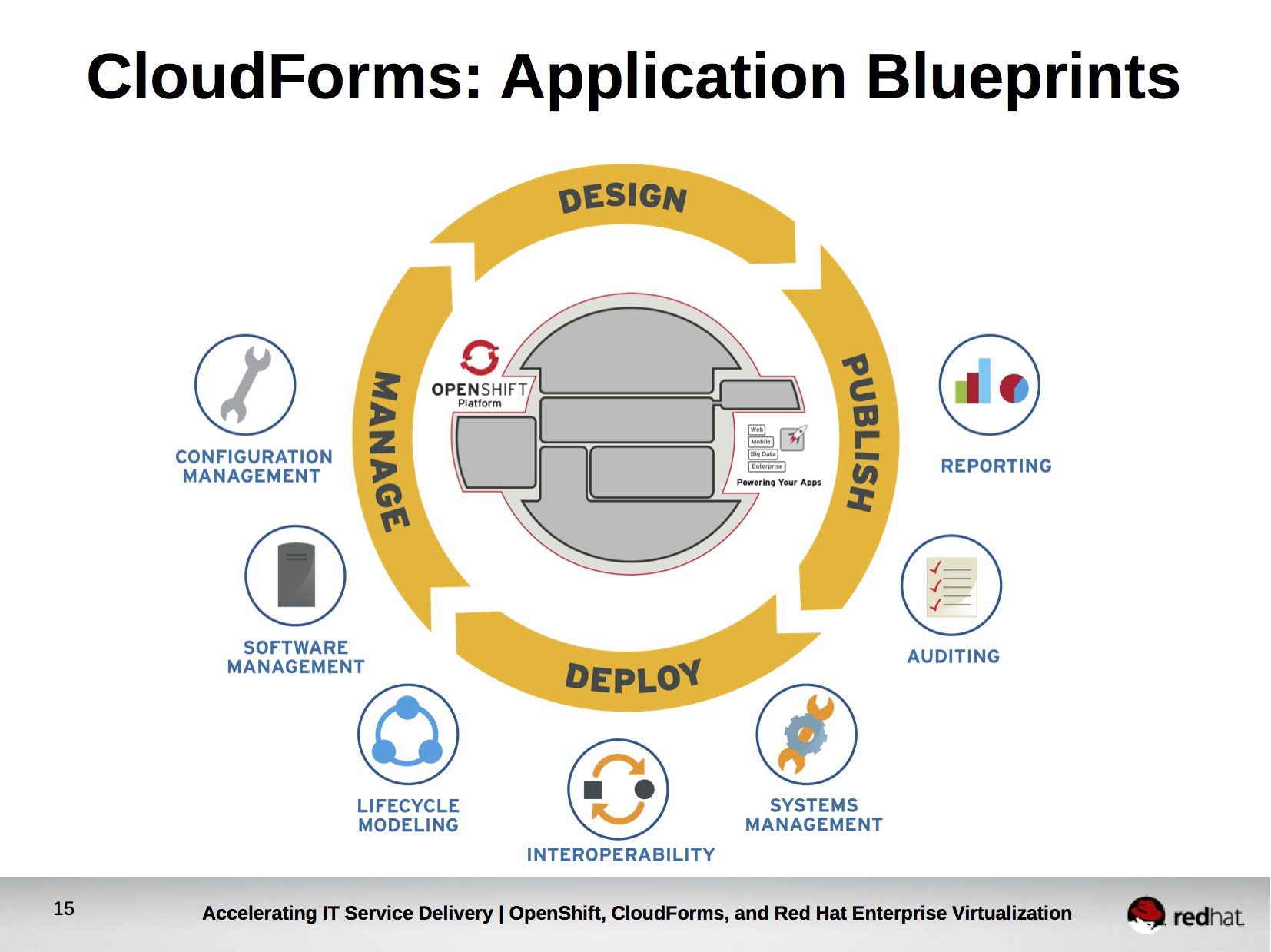
Organizations that want to achieve flexibility, consistency, automation, and management of OpenShift Enterprise can use CloudForms to create an Application Blueprint for OpenShift Enterprise.

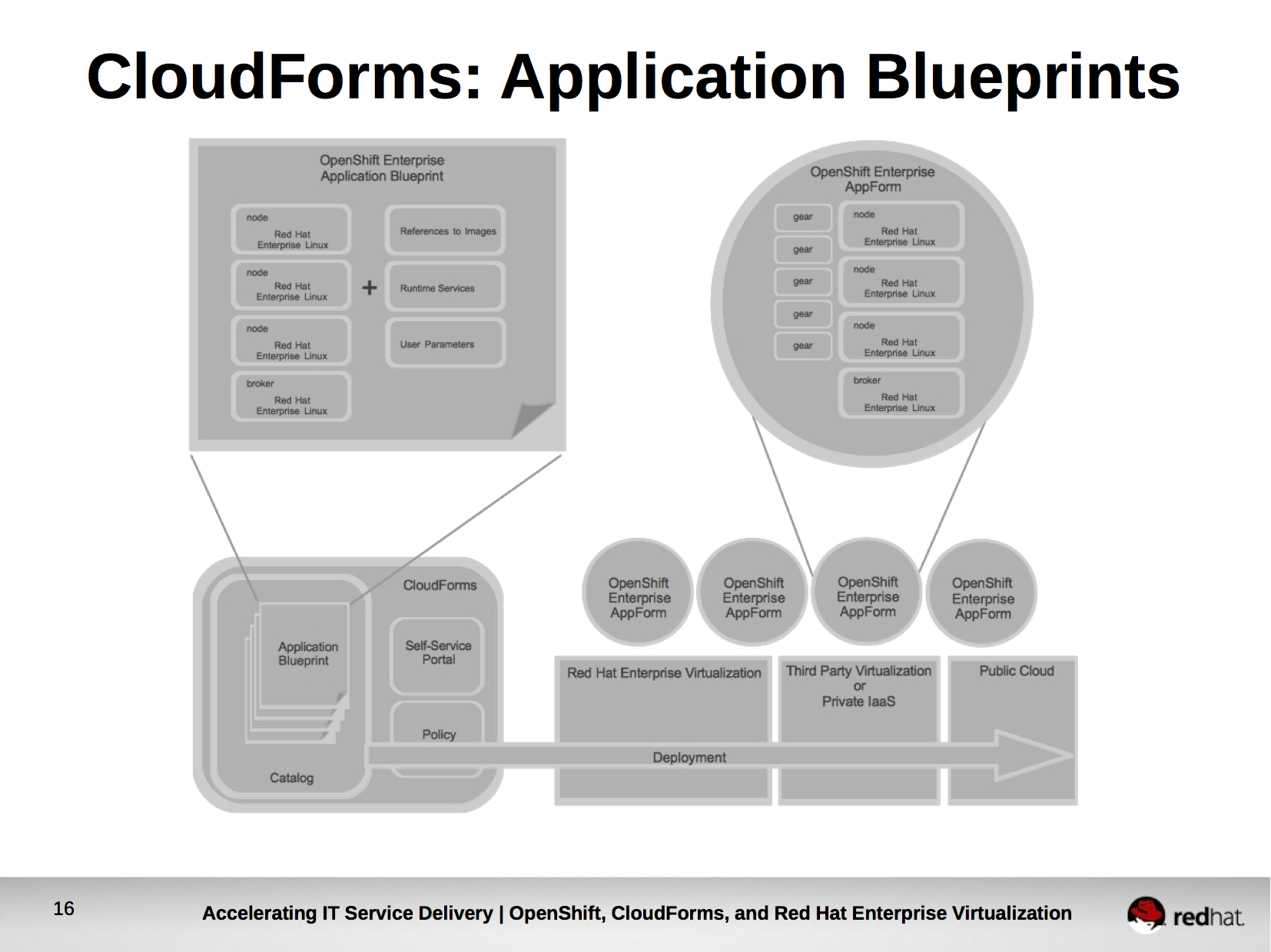
Upon defining an Application Blueprint for OpenShift Enterprise within CloudForms, OpenShift Enterprise Administrators would be permitted to deploy, via self-service, new OpenShift Enterprise AppForms (running OpenShift Enterprise Deployments) to their choice of cloud resource provider based on the policy set forth in CloudForms.

Upon deployment of the OpenShift Enterprise AppForm, instances comprising the AppForm would automatically register to CloudForms for ongoing lifecycle management. Ongoing lifecycle management provides organizations the ability to update underlying instances of Red Hat Enterprise Linux in a manner in line with their defined processes. It also allows organizations to control which cartridges (languages and frameworks) are installed on which OpenShift Enterprise deployments. For example, the OpenShift Enterprise AppForm in the development Application Lifecycle Environment may have all cartridges installed, while OpenShift Enterprise AppForms in the Test and Production Application Lifecycle Environments only have organizationally approved cartridges (maybe python, java, php) installed.

If you’d like to see the benefits of using CloudForms to deploy and manage OpenShift Enterprise, read my earlier post which includes a video demonstration.

The combination of Red Hat Enterprise Virtualization, OpenShift Enterprise, and Red Hat CloudForms allows organizations to accelerate IT service delivery while increasing flexibility and consistency, and providing the automation and management enterprises require.

The slides used in this post are available in PDF format here.

Tagged , , , , , ,

Deploying and Managing OpenShift with CloudForms

The following video demonstrates how OpenShift Enterprise can be deployed and managed via CloudForms. Along with the management of the underlying Red Hat Enterprise Linux that OpenShift Enterprise runs on, managing OpenShift Enterprise via CloudForms provides the following key benefits:

  • Automation of OpenShift Enterprise deployments
  • Consistency and Stability of OpenShift Enterprise builds
  • Governance of languages and frameworks available to OpenShift Enterprise users

More information on CloudForms and OpenShift.

[Consistent] Big Data: An Application Blueprint for Hadoop

I’m lucky enough to still spend a large portion of my time actually speaking with customers. Conversations with customers are invaluable and always leave me with new perspectives. Of course, we talk about cloud computing, but occasionally the conversation will switch to the topic of big data. More often then not, customers big data strategies include Hadoop, a framework for running applications on large clusters built of commodity hardware. The Hadoop framework transparently provides applications both reliability and data motion. Hadoop implements a computational paradigm named Map/Reduce, where the application is divided into many small fragments of work, each of which may be executed or re-executed on any node in the cluster. In addition, it provides a distributed file system (HDFS) that stores data on the compute nodes, providing very high aggregate bandwidth across the cluster. Both MapReduce and the Hadoop Distributed File System are designed so that node failures are automatically handled by the framework [1].

Companies like Google, Yahoo, Hulu, Adobe, Spotify, and Facebook are to some extent, powered by Hadoop [2]. Customers understand the success these companies have experienced due to their effective handling of big data and want to know how they can use Hadoop to replicate that success. Of course, this conversation about big data and Hadoop usually happens after we’ve already discussed Red Hat’s Open Hybrid Cloud vision and philosophy. It’s only natural, then, that they ask how Red Hat’s Open Hybrid Cloud can help them gain the benefits of Hadoop within the constraints of their existing IT infrastructure. Since I’ve had the conversation several times and it usually ends at the whiteboard, I thought it might be useful to sit down and actually show the unique way in which Red Hat’s Open Hybrid Cloud philosophy can be applied to adopting Hadoop. While I’ll be writing about Hadoop, this problem is not unique – it is often faced anytime developers go beyond that which enterprise IT can provide.
Developers: “I want it yesterday”
Good developers want to develop, great developers want to solve problems. For this reason, great developers often adopt technology early for the ways in which it allows them to solve problems that they couldn’t solve with existing technology. Take the scenario of developers adopting Hadoop. They might go out to their public cloud of choice and request a few instances and deploy Hadoop. Of course, deploying Hadoop is not always straightforward and requires some system administration skills. In this case, the developer might use a stack provisioning tool within the public cloud (such as AWS CloudFormations) to launch a pre-configured stack. Once Hadoop is running the developer starts developing.

Developers Deploying Hadoop in Public Cloud

Developers Deploying Hadoop in Public Cloud

System Administrators: “I want it stable”
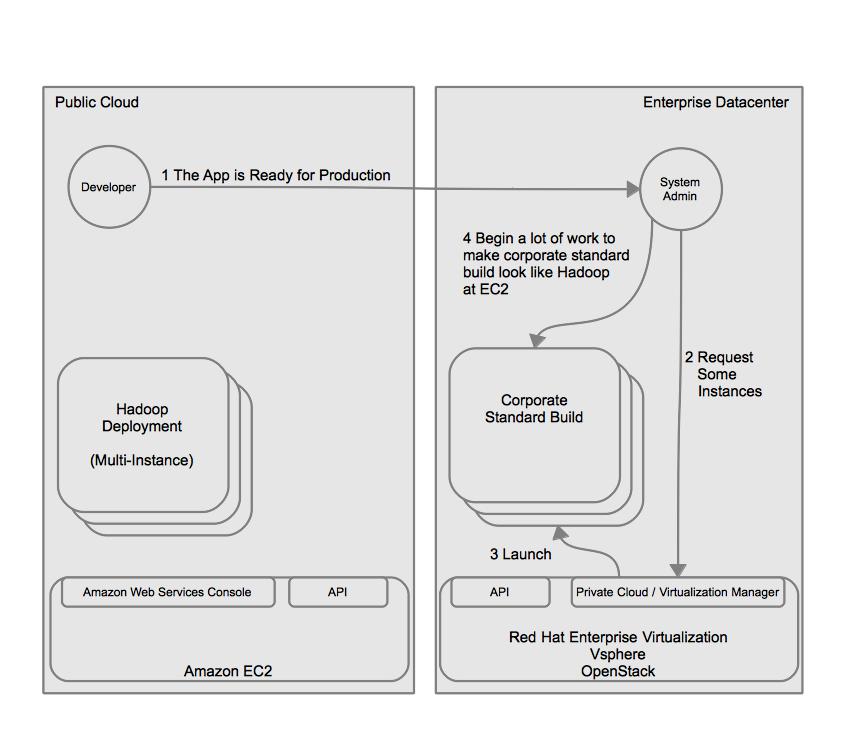
Once development is complete, the developer sends a message to the system administrator letting them know that the new application is ready to go (we’ll skip change control, Quality Assurance, etc for simplicity). He provides his application code in the form of a package to the system administrator. The system administrator launches the corporate standard build on his virtual infrastructure or IaaS cloud in order to deploy the package the developer provided.

Deploying Public Cloud Development within the Datacenter

Deploying Public Cloud Development within the Datacenter

This scenario presents several issues:

  1. There is no simple way to bring the pre-configured stacks or instances from the public cloud into the enterprise datacenter.
  2. The instances in the public cloud were launched based on the configurations of the developer or whoever developed the stack. This is most likely not compliant with the standard build required by the organization for security or compliance reasons (think PCI, HIPAA, DISA STIG).
  3. Even if the developer documented how to setup Hadoop thoroughly it causes the introduction of another manual step in the process, increasing the likelihood of human error.
  4. The corporate standard build within the enterprise datacenter may vary greatly from the builds in the public cloud. This increases the chances of issues of incompatibility between the application and the infrastructure hosting it.

CloudForms: Delivering managed flexibility
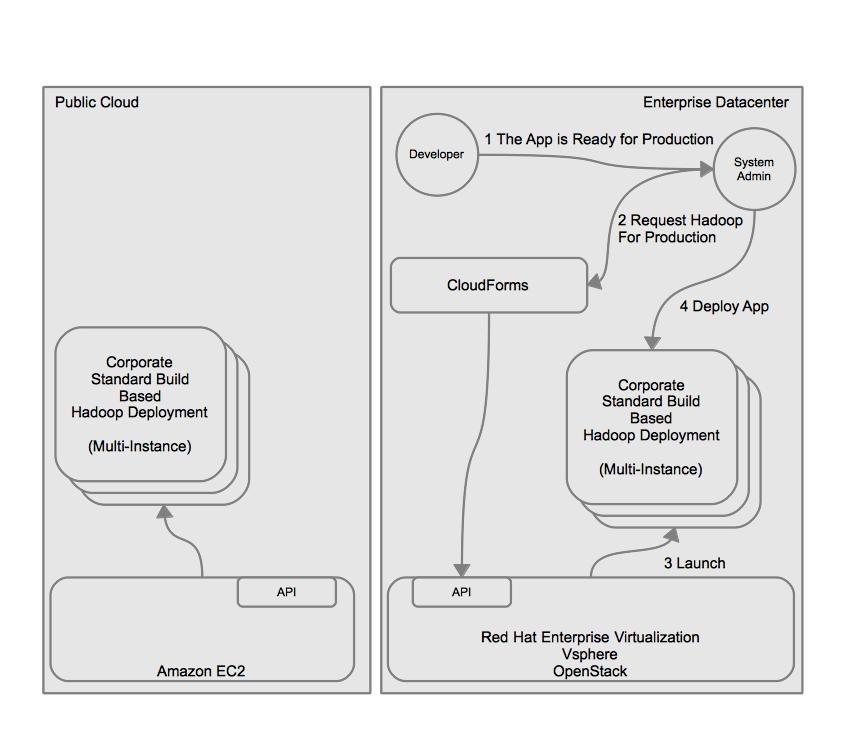
Red Hat’s Open Hybrid Cloud approach can help solve these problems through the use of CloudForms which is based on the open source projects of Aeolus and Katello. CloudForms allows organizations to deploy and manage applications to multiple locations and infrastructure types based on a single application template and policy—maximizing flexibility while simplifying management. The image below provides an overview of how CloudForms changes the way in which Developers and System Administrators work together to achieve speed while maintaining control. Note that CloudForms can also be used to provide quotas, priorities, and other functions to the consumption of resources by developers. We’ll leave those topics for another post. Lets look at how CloudForms can solve this problem.

CloudForms provides managed self-service

CloudForms provides managed self-service

  1. The system administrator defines an application blueprint for Hadoop. This application blueprint is based on the corporate standard build and is portable across multiple cloud resource providers, such as Red Hat Enterprise Virtualziation (RHEV), VMware vSphere, and Amazon EC2. The system administrator places it in the appropriate catalog and allows access to the catalog by the developers.
  2. The developer requests the application blueprint be launched into the Development cloud.
  3. Since the system administrator defined the development cloud and added the a public cloud (Amazon EC2) as a cloud resource provider, CloudForms orchestrates the launch of the Hadoop application blueprint on the public cloud and returns information on how to connect to the instances comprising the running application.
  4. The developer begins development, the same way they did previously.

The key takeaway is that developers experience is the same. They simply request and begin working. In fact, if the pre-configured application stacks in the public cloud provider didn’t yet exist the developers experience will have improved because the CloudForms, using the application blueprint’s services, handled all the complex steps to configure Hadoop.

In the previous scenario, when the developer sends a message to the system administrator that the application is ready for production the system administrator has to go through the cumbersome task of configuring Hadoop from scratch. This would likely include asking the developer questions such as “What version of the operating system are you running? Is SELinux running? What are the firewall rules?”. To which the developer might have likely respond, “SELinux? Firewall? Ummm … I think it’s Linux”. Now, with CloudForms and an Application Blueprint defined, the system administrator can request the same application blueprint be launched to the on-premise enterprise datacenter. With just a few clicks the same known quantity is running on-premise. The system administrator can now be certain that the development and production platforms are the same. Even better, the launched instances in both the public cloud and on-premise register with CloudForms for ongoing lifecycle management, ensuring the instances stay compliant.

Seamless transition from public cloud to on-premise deployment

Seamless transition from public cloud to on-premise deployment

Decoupling User Experience from Resource Provider
There is another benefit that might not be immediately apparent in this use case. By moving self-service to CloudForms the developers user experience has been decoupled from that of the resource provider. This means that if Enterprise IT wanted to shift development workload to another public cloud in the future, or move it on-premise, they could do so without the developers experience changing.

Application Blueprint for Hadoop
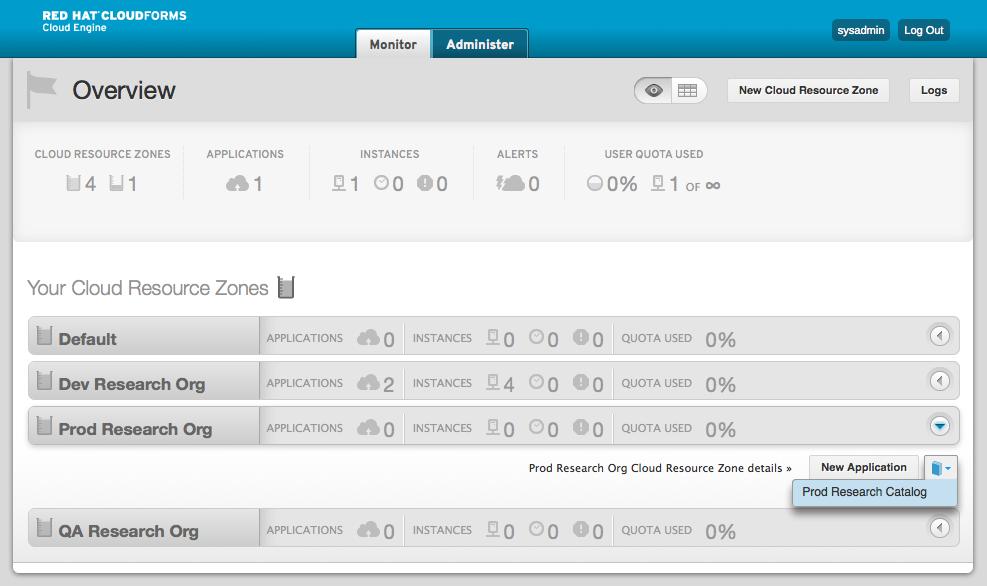
Want to see it in action? I spent a bit of time creating an application blueprint for Hadoop. You can find the blueprint, services, and scripts at GitHub. Here we go. Let’s imagine a developer would like to begin development of a new application using Hadoop. They simply point their web browser to the CloudForms self-service portal and log in.

Once in the self-service portal they select the catalog that has been assigned to them by the CloudForms administrator (likely the system administrator), provide a unique name for their application, and launch.


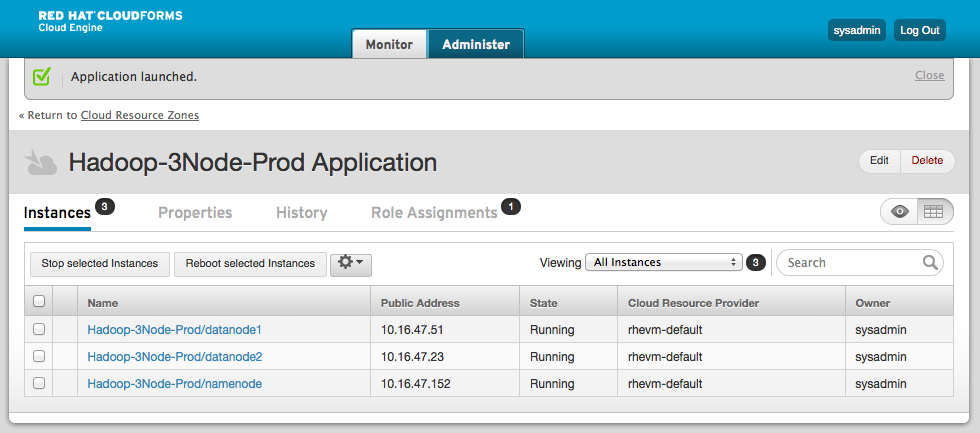
Within a minute or two (with EC2, often less) they receive a view of the 3 instances running that comprise their Hadoop development environment.

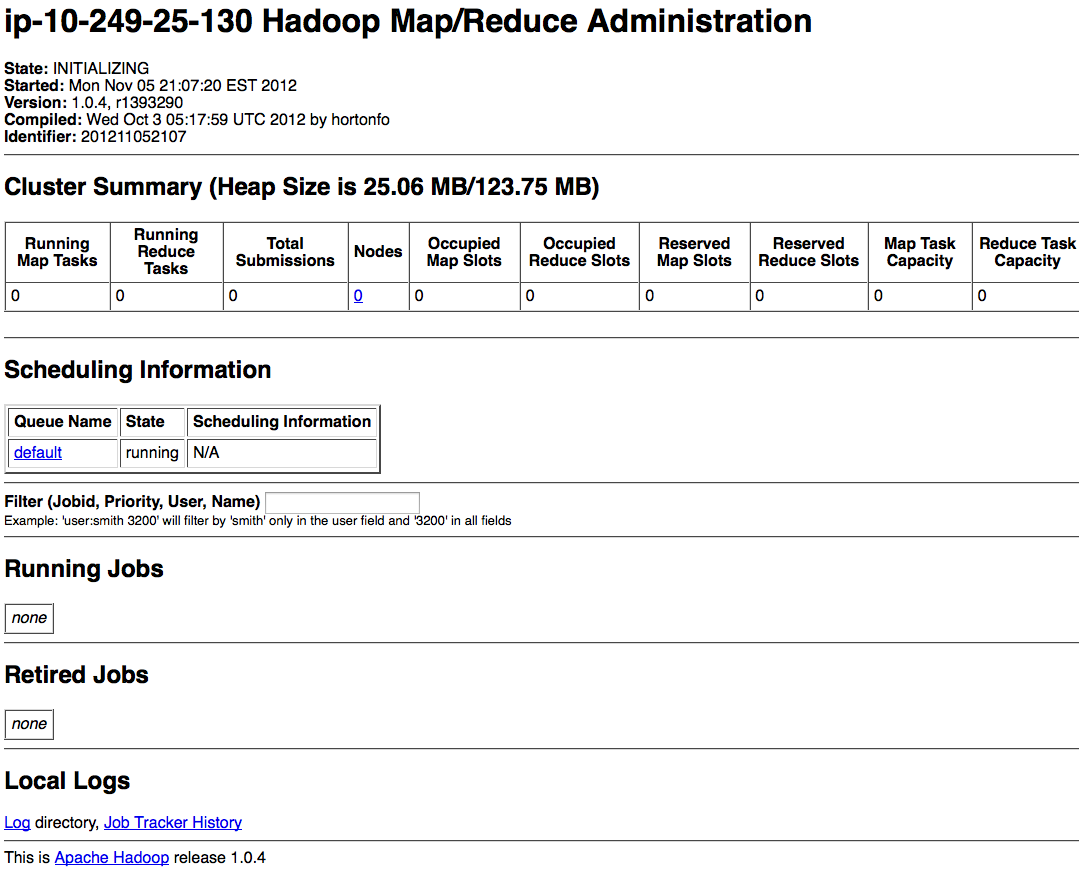
And off the developer can go. They can download their key and log into their instance. CloudForms even started all the services for them, take a look at the jobtracker and DFS health screens below from Hadoop.


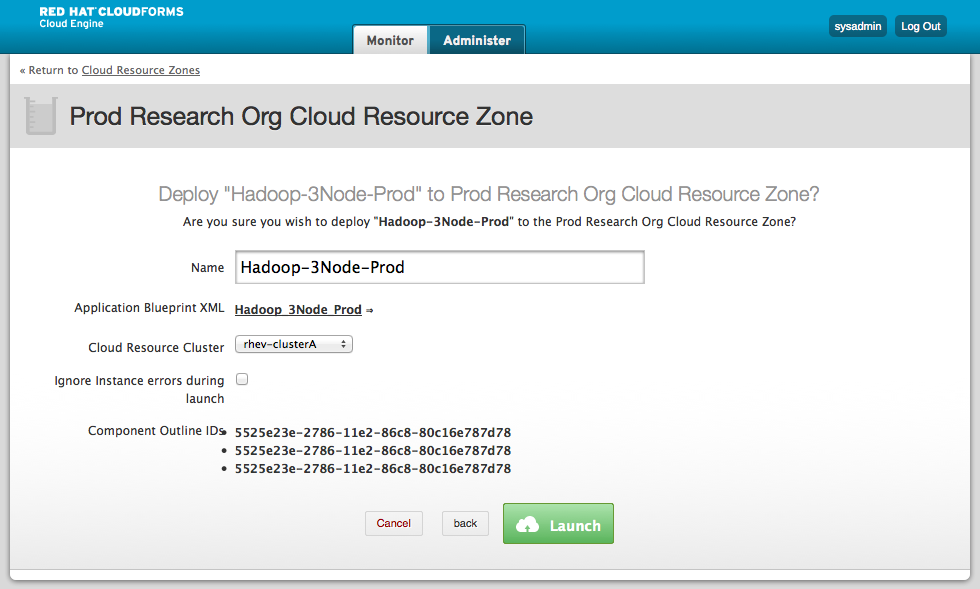
Now, if you recall when the developer logged in to CloudForms only the development cloud was available. This was because the CloudForms administrator limited the clouds and catalogs the developer could use. Once the application is ready to move to production, however, the system administrator can log in and launch the same application blueprint to the production cloud. In this case, the production is running on Red Hat Enterprise Virtualization.


An important concept to grasp is that CloudForms is maintaining the images at the providers and keeping track of which component outline maps to which image. This means the system administrator could update his image for the underlying Hadoop virtual machines (aka instances) without having to throw away the application blueprint and start all over. This makes the life-cycle sustainable, something system administrators will really appreciate.

Also, if the system administrator wanted to change the instance sizes to offer smaller or larger instances or increase the number of instances in the hadoop environment they could do so with a few simple clicks and keystrokes.

So there you have it, consistent Hadoop deployments via application blueprints in CloudForms. Now, if you’d like to take things one step further, check out Matt Farrellee’s project which integrates hadoop with condor.

Non-Linked References
[1] http://wiki.apache.org/hadoop/
[2] http://wiki.apache.org/hadoop/PoweredBy

Puppet Enterprise and Red Hat CloudForms

Please note this is referring to CloudForms Version 1. For more information on CloudForms version 2 integration with puppet you should see this post by John Hardy.

Effective configuration management has always been seen as critical to running an efficient IT department. The school of thought has been that effective configuration management is necessary for automation which, in turn, reduces operational expenditures. I’d argue that it is important to ensure that automation is a critical success factor for reducing opex before pursuing it. For some scenarios in which automation may not always lead to reduced opex I’d refer to some great research by Aaron B. Brown and Joseph L. Hellerstein’s on Reducing the Cost of IT Operations–Is Automation Always the Answer? It’s clear that whether to automate or not is an important question to answer before pursuing it as a strategy to reduce opex. For those scenarios in which a proper analysis has been done and automation appears to be a means to reducing opex you can read on. 🙂

As I mentioned in my earlier post on Open Hybrid PaaS, CloudForms is based on the upstream projects of Aeolus and Katello and allows users to gain greater re-use, increased flexibility, and the wonderment of self-service among other things. One way in which CloudForms achieves greater re-use and increased flexibility is by providing users with the ability to bootstrap instances that have been launched in a cloud resource provider with configuration information. This is particularly useful since each cloud resource provider could potentially have differences that the applications must be aware of.  Network topologies, IP address pools, DNS names, may be dynamically assigned and completely different in a private cloud based on Red Hat Enterprise Virtualization then in Amazon EC2 for example. For more information on how this bootstrap configuration works I’d refer you to the Technical Review Webinar, which provides an architecture overview of CloudForms and gives a demonstration of how the bootstrapping in different clouds is performed.

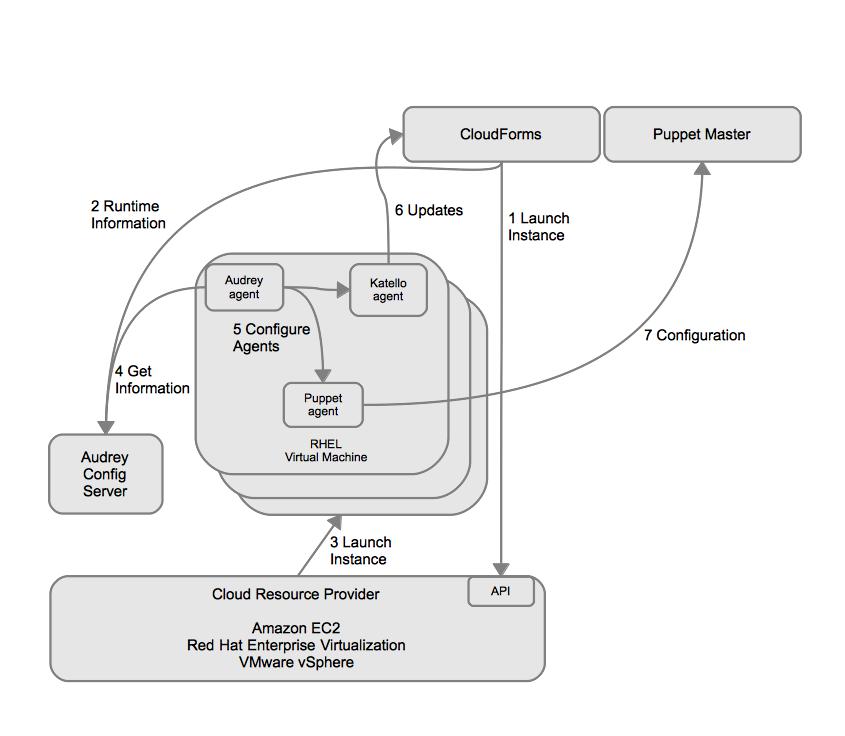
So you can bootstrap your instances, but how do you manage your configurations on the systems once they are running? Managing drift and configuration deployment is not just a “at boot” problem. In the future, Red Hat CloudForms will likely include the ability to manage configurations of deployed instances ongoing. This will likely happen through the inclusion of The Foreman project and some workflow in Katello. Even still, there is no reason an organization couldn’t get started using puppet today with CloudForms. Here is what integrating a puppet master into a CloudForms enabled environment would work today.

Integrating puppet into a CloudForms environment

  1. CloudForms requests that the cloud resource provider launch the instance using the Deltacloud API.
  2. CloudForms passes runtime configuration information to the Audrey Config Server.
  3. The Cloud Resource Provider launches the instance.
  4. The Audrey Agent included in the image runs at boot and connects to the Audrey Config Server, exchanging information.
  5. With the information required for the environment (for example what the hostname of the puppet master is) the audrey agent configures the Katello Agent and Puppet Agent.
  6. The Katello Agent can now get updates from CloudForms.
  7. The Puppet Agent can now get configuration from Puppet Master.

Here is a quick look at how Puppet Enterprise can be integrated into CloudForms Application Blueprints. We will assume you have already deployed a puppet master. If you need help with that I’d recommend reading the quick start guide on Puppet Enterprise.

First, synchronize the puppet enterprise packages into CloudForms System Engine. This will allow us to build system templates and include the packages required by puppet enterprise.

Synchronizing the Puppet Enterprise Packages

The packages you will need are below. You can find them by extracting the tarball from puppet enterprise and then just creating a yum repository from them.

 pe-puppet-enterprise-release
 pe-puppet
 pe-facter
 pe-ruby
 pe-ruby-libs
 pe-ruby-shadow
 pe-mcollective
 pe-mcollective-common
 pe-ruby-irb
 pe-ruby-rdoc
 pe-rubygem-stomp
 pe-rubygems
 pe-augeas
 pe-augeas-libs
 pe-rubygem-hiera-puppet
 pe-rubygem-hiera
 pe-ruby-augeas
 pe-rubygem-stomp-doc
 pe-ruby-ldap
 pe-ruby-ri

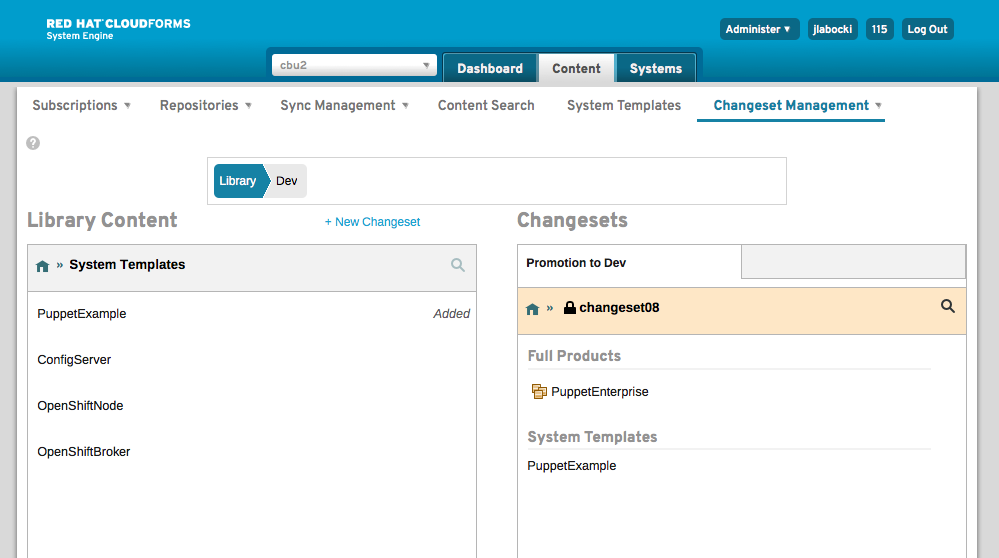
Next, create the system templates and include the packages listed above in them and promote a changeset with the content outside of your library.

Including the puppet enterprise packages in a system template

Promoting the system template and puppet product

Then, download the system template and import it as a new image in CloudForms Cloud Engine and build your images for your providers.

Image Building

Once you have built your images you can include the necessary services in your Application Blueprint to configure the Puppet agent. You can find my services and scripts for the puppet enterprise agent in my GitHub repository.

Application Blueprint

Once you have added the services it’s just a matter of launching the Application Blueprint and specifying the hostname of the puppet master for which you wish to register the instances too. Please note that you could also take this input out of the hands of the user launching the Application Blueprint if desired.

Almost there

Launching to RHEV

The services and script will automatically register the associated instances to the puppet master. As you can see in the screenshot below, the puppet master now sees the instance has issued a certificate request and it can be signed.


After you have signed the request, you can see the node within the puppet enterprise console and can begin managing it.

Instance details within puppet enterprise console

By leveraging the re-usability of Application Blueprints in CloudForms and its bootstrapping methodology to automatically register instances to a puppet master it is possible to effectively manage configurations across various cloud resource providers.

Open Hybrid PaaS

This being my initial post I thought it would only be appropriate to do something a little daring. I decided to tinker with the idea of building an Open Hybrid PaaS. Before you read on, you should be warned, this is NOT a supported use case and a lot of other problems remain to be solved before this concept becomes a reality. Nonetheless, it’s always fun to see what technology can do, and if we don’t tinker we’ll never drive vision to reality.

Before we begin, here are a list of projects and products that were used in this post.

Upstream / Enterprise Projects

Additional Products and Services

  • VMware vSphere 5
  • Amazon EC2

An Overview on OpenShift Origin
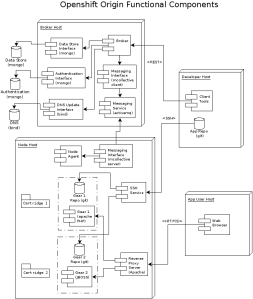
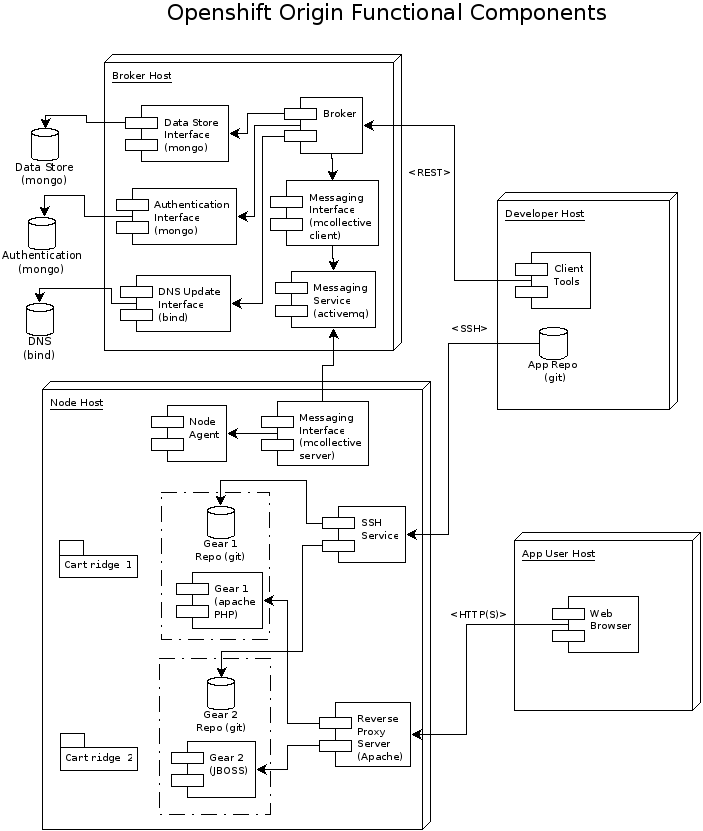
OpenShift Origin Components

OpenShift Origin Components


The diagram above is from OpenShift Origin’s Build Your Own PaaS page which is an amazing resource for deploying OpenShift Origin and understanding the architecture of OpenShift Origin. OpenShift Origin enables you to create, deploy and manage applications within the cloud. It provides disk space, CPU resources, memory, network connectivity, and an Apache or JBoss server. Depending on the type of application being deployed, a template file system layout is provided (for example, PHP, Python, and Ruby/Rails). It also manages a limited DNS for the application [1].

Why do I need to flexibly provision nodes if my PaaS already scales?
It’s understandable to ask why a provisioning methodology is needed for OpenShift Origin. After all, OpenShift Origin can spin up gears inside a node to meet capacity. The problem is that OpenShift scales gears, but does not scale nodes, which are the container in which the gears run. Essentially, if OpenShift Origin runs out of nodes you are out of luck. Of course, in most cases it’s probably good enough to monitor the PaaS and provision nodes as capacity dictates. We, however, are nerds, and we don’t want to have any manual actions (eventually).

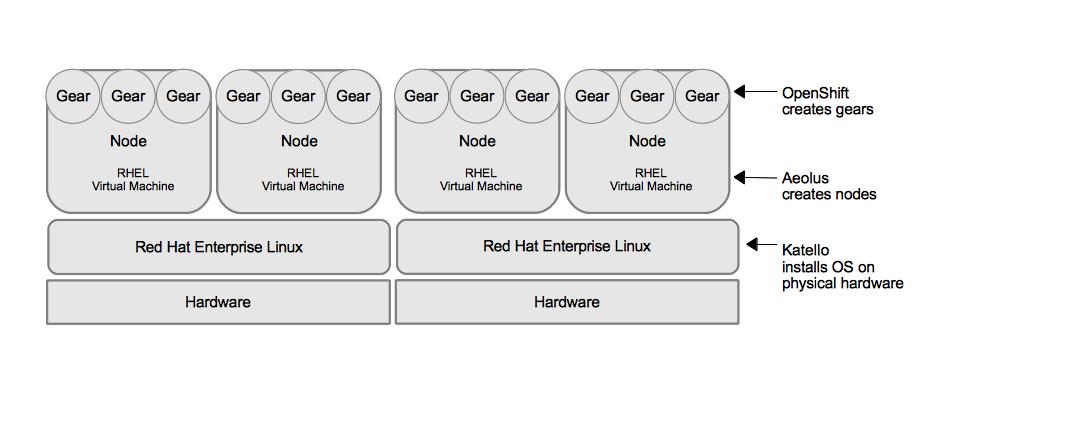
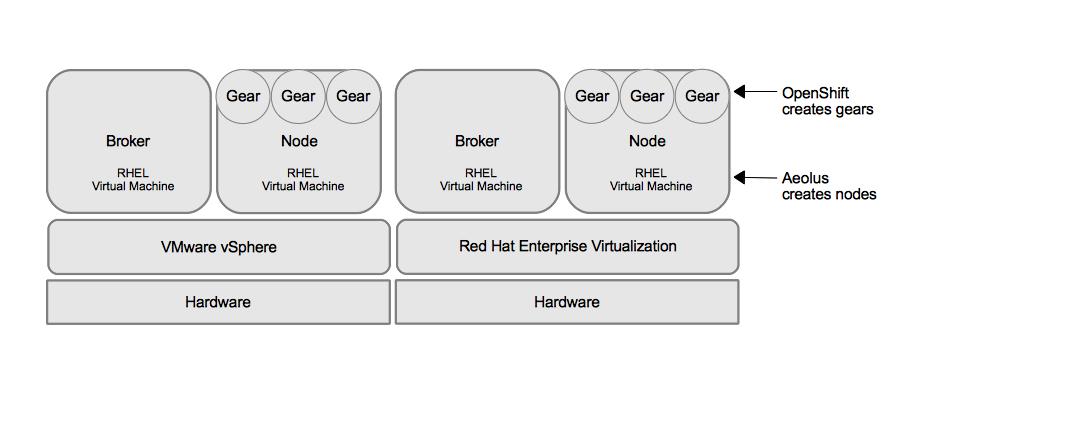
Beyond scaling nodes, the open source technologies of Katello, Aeolus, and OpenShift Origin provide users a means by which they can build a PaaS that spans multiple virtualization providers, including public clouds. This post demonstrates how a PaaS was deployed to VMware vSphere via Aeolus and Katello and then with a few clicks the same deployment was deployed on RHEV. While Amazon EC2 was outside of the scope of this exercise, I don’t see any reason why we couldn’t also run in EC2 with a few more clicks. The portability provided by the combination of these three projects is extremely valuable to organizations who wish to avoid vendor lock-in and choose the infrastructure they run on while utlizing a PaaS. Here is a simple diagram that illustrates the possibilities these projects bring to the table when used together. Note that Katello will utilize Foreman to support bare metal installations and Aeolus can create nodes or brokers.
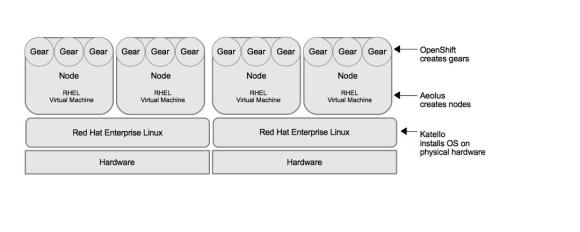
Units of Scale

OpenShift, Aeolus, and Katello Provisioning Capabilities

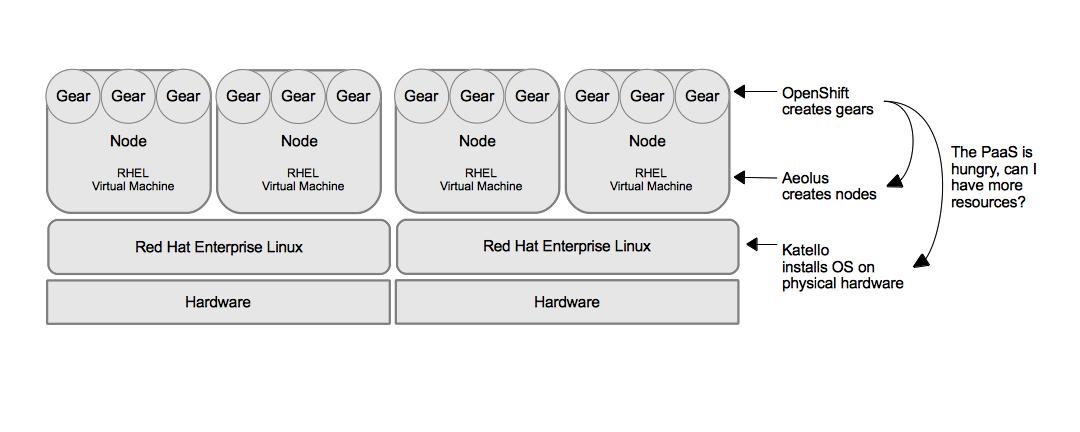
What would be really useful is if OpenShift Origin were able to request more resources from Aeolus or Katello and Aeolus or Katello could orchestrate the request based on the capacity and importance of other workloads running on either virtualization providers, physical hardware, or public cloud providers.

Nerd Heaven

This is probably a good topic for another post. Let’s move on before I get too far off course. In this scenario I’m demonstrating how Katello and Aeolus can compliment OpenShift Origin to provide a consistent implementation of OpenShift Origin across multiple virtualization providers.
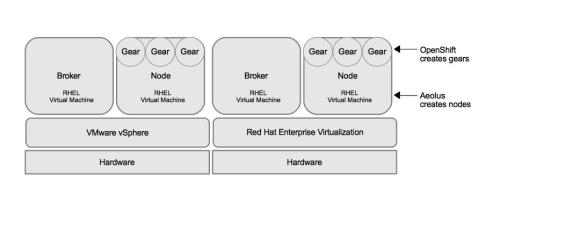
Consistent OpenShift Origin PaaS across RHEV and vSphere

Consistent OpenShift Origin PaaS across RHEV and vSphere provided by Aeolus

An Overview of Aeolus/Katello Terminology
It is probably a good idea to provide an overview of a few of the objects used in Katello and Aeolus.

  • System Template/Component Outline – An XML description of a system, including the operating system it is built from and any other packages to be included.
  • Image – A binary form of the system template that can be run in a specific virtualization or cloud provider. We take the system template and run it through an installation process to create a virtual machine image for the correct provider (qcow, ami, vmdk).
  • Application Blueprint – Once we have images based on system templates built we can create an application blueprint which references one or many images. We can also add services (see below) and apply hardware profiles to the images.
  • Services – These are actions we would like to execute on the images when they are launched. They are included in the application blueprint and can take parameters as input.

So, what was needed to build an Open Hybrid PaaS using Aeolus, Katello, and OpenShift Origin? Here we go:

Step 1, Mirror content in Katello and create System Templates
Katello is here to help you take control of your software and your systems in an easy-to-use and scalable manner. Offering a modern web user interface and API, Katello can pull content from remote repositories into isolated environments, make subscriptions management easier and provide provisioning at scale [2]. Basically, its really good systems life-cycle management.

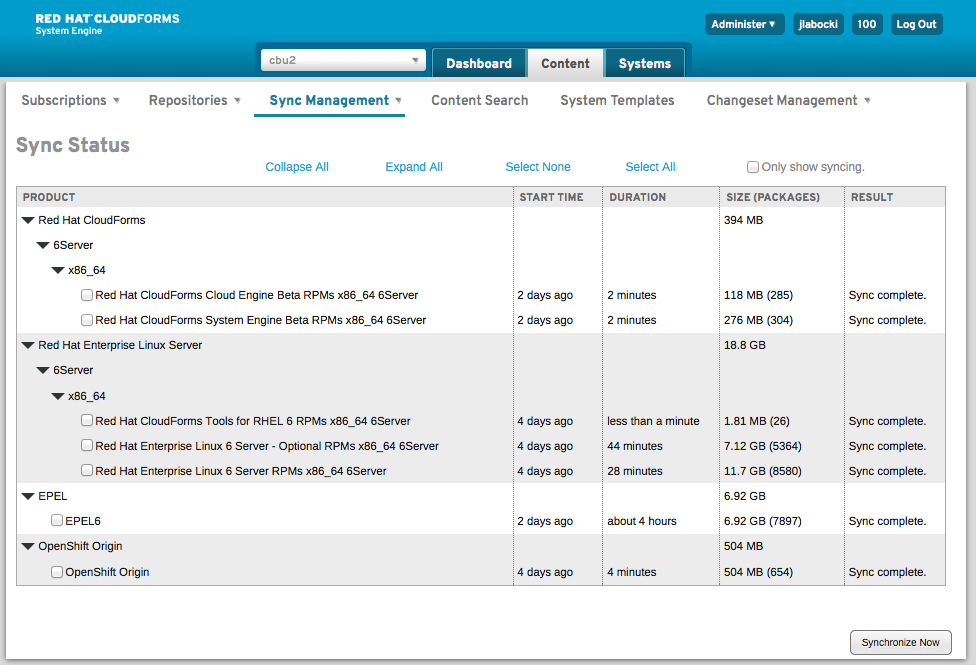
Using Katello, I mirrored the following repositories into my environment.

From Red Hat’s Content Delivery Network

  • Red Hat CloudForms Tools for RHEL 6 RPMs x86_64 6Server
  • Red Hat Enterprise Linux 6 Server – Optional RPMs x86_64 6Server
  • Red Hat Enterprise Linux 6 Server RPMs x86_64 6Server
  • Red Hat CloudForms Cloud Engine Beta
  • Red Hat CloudForms System Engine Beta

From outside Red Hat

  • Extra Packages for Enterprise Linux (EPEL)
  • OpenShift Origin

    Synchronizing Content

    Synchronizing Content

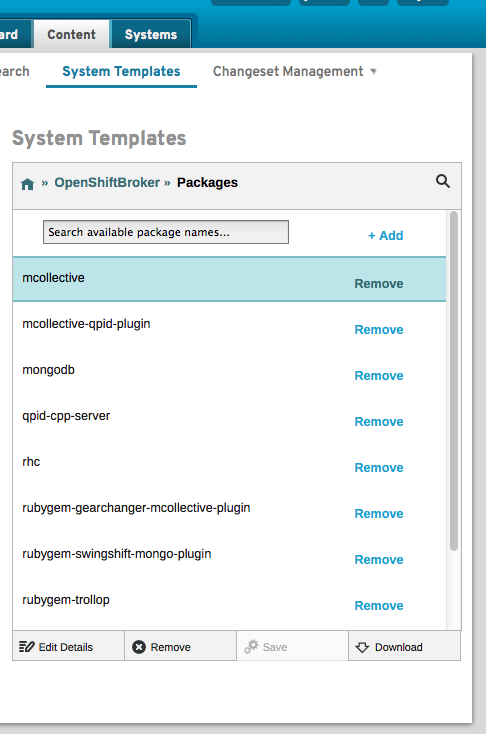
I created two system templates, one for the OpenShift Broker and one for the OpenShift Node. The OpenShift Broker had the following packages:

  • mcollective
  • mcollective-qpid-plugin
  • mongodb
  • qpid-cpp-server
  • rhc
  • rubygem-gearchanger-mcollective-plugin
  • rubygem-swingshift-mongo-plugin
  • rubygem-trollop
  • rubygem-uplift-bind-plugin
  • stickshift-broker
openshiftbroker

OpenShift Broker Template

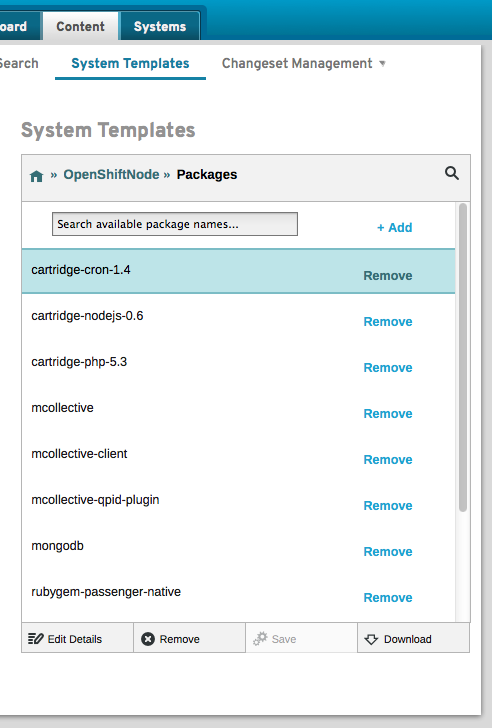
The OpenShift Node included the following packages:

  • cartridge-cron-1.4
  • cartridge-nodejs-0.6
  • cartridge-php-5.3
  • mcollective
  • mcollective-client
  • mcollective-qpid-plugin
  • mongodb
  • rubygem-passenger-native
  • rubygem-stickshift-node
  • stickshift-mcollective-agent
OpenShift Node Template

OpenShift Node Template

Step 2, Build provider specific images with Aeolus
Aeolus is a single, consistent set of tools to build and manage organized groups of virtual machines across clouds [3]. Within Aeolus I configured both a Red Hat Enterprise Virtualization Provider as well as VMware vSphere cloud resource provider.
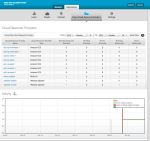
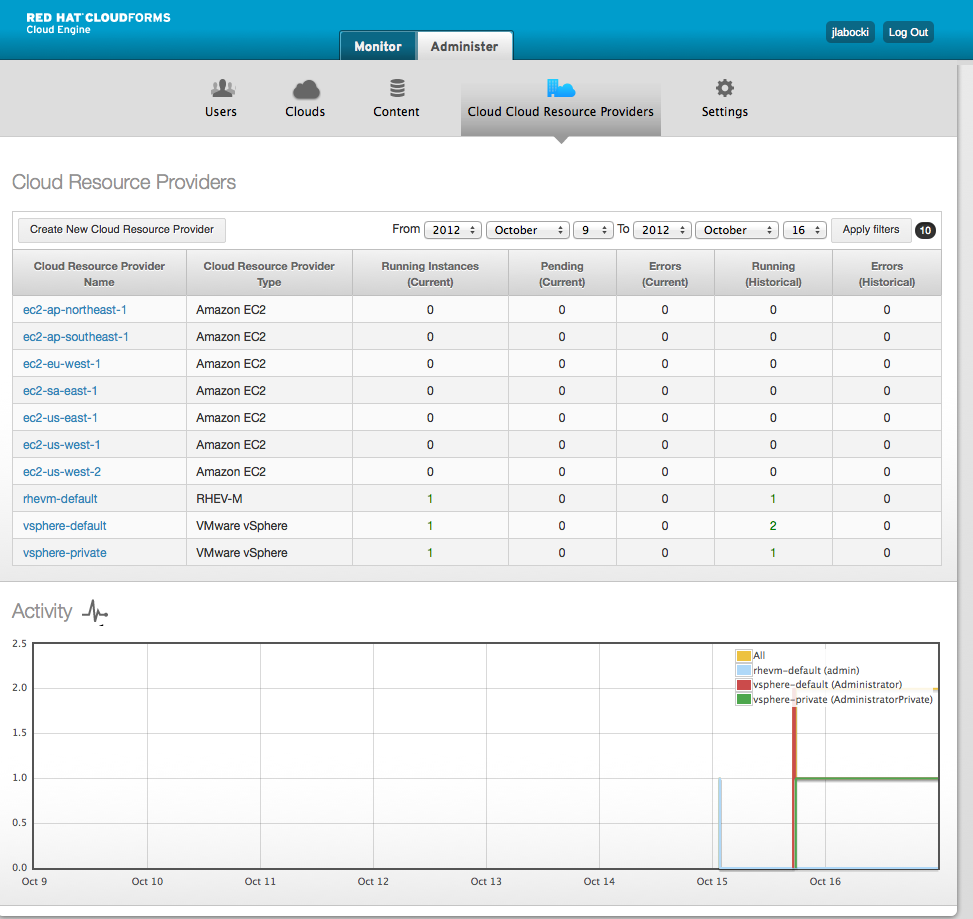
Cloud Resource Providers in Aeolus

Cloud Resource Providers in Aeolus

It should be noted that I did not have access to delegate my DNS zone with our corporate IT department, so I created a private non-routable network for my virtual machines where I controlled both DNS and DHCP. This is where everything OpenShift Origin existed.

After setting up the cloud resource providers I imported my OpenShift Node and OpenShift Broker system templates and built images for both RHEV and vSphere. The concept of having both descriptions of my builds and then provider specific images is important. It allows operations focused staff to control the content in the build more sustainably. As soon as I update my description Aeolus can take the description and manage the generation of the images for all providers.
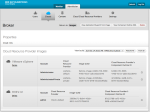
Image Building for OpenShift Broker

Image Building for OpenShift Broker

Since my application blueprints reference images that are maintained by Aeolus I don’t impact my self-service users when making changes to my descriptions. Pretty snazzy.
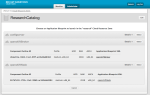
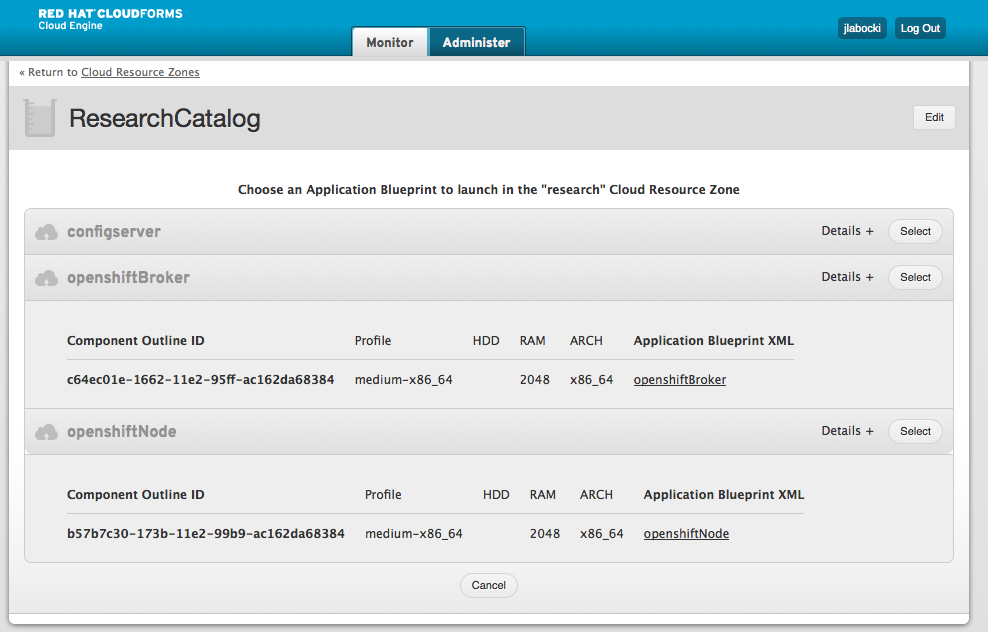
OpenShift Broker and Node in the Self-Service Catalog

OpenShift Broker and Node in the Self-Service Catalog

Step 3, Deploy an OpenShift Broker and OpenShift Node, Automate, Test
Once the images were built I created a simple application blueprint which contained the images. I deployed the application blueprint and then began walking through the steps on the Build Your Own wiki page and translating them into a script that could be included as part of a service in the blueprints.

OpenShift Origin Brokers and Nodes in vSphere

It took a lot of tweaking, deploying, testing, and tweaking some more to get everything working properly, but in the end I have application blueprints which I can deploy via Aeolus to VMware vSphere which will provide me with a working OpenShift Origin environment.
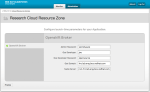
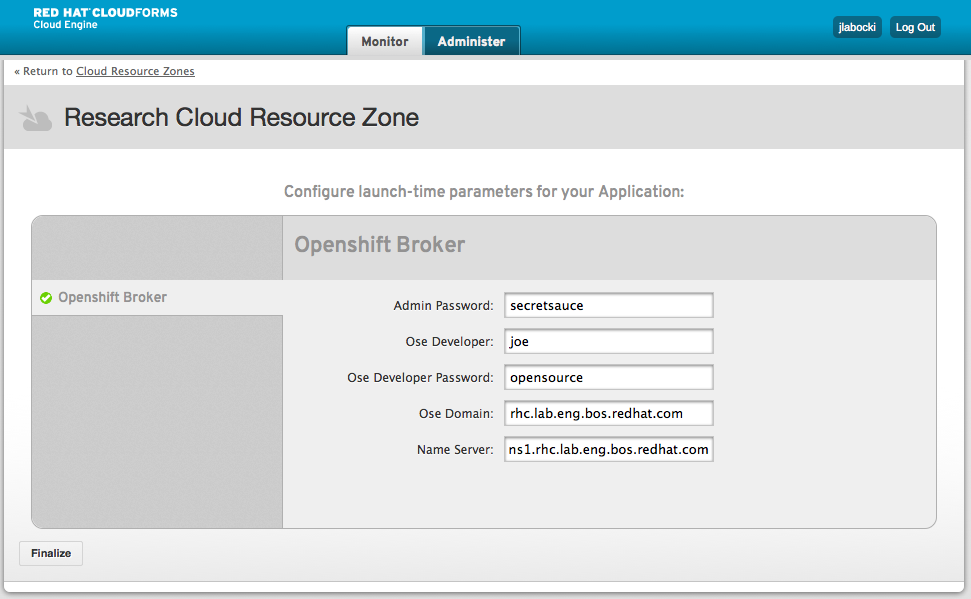
Finalziing Parameters

Finalzing Parameters for automated launch

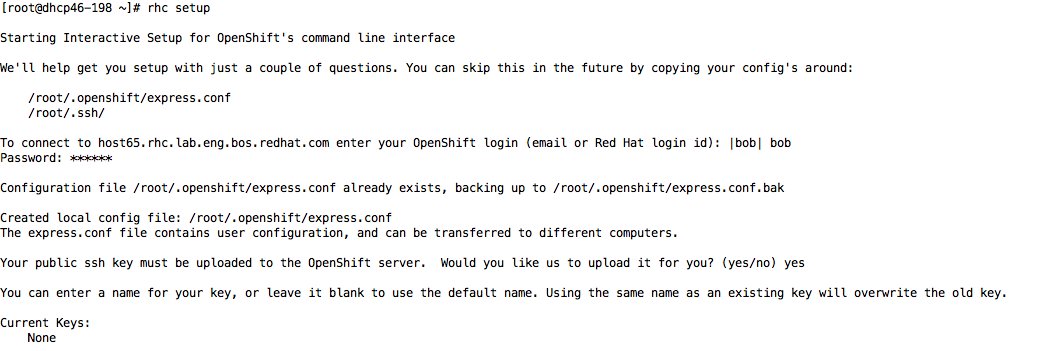
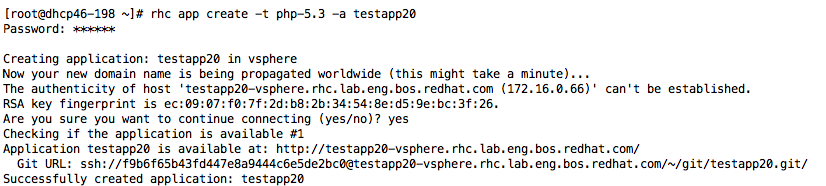
Once I had a working environment I could use the OpenShift origin tools (rhc) to create a new domain and then create an application.

rhc Domain Setup

rhc Creating an Application

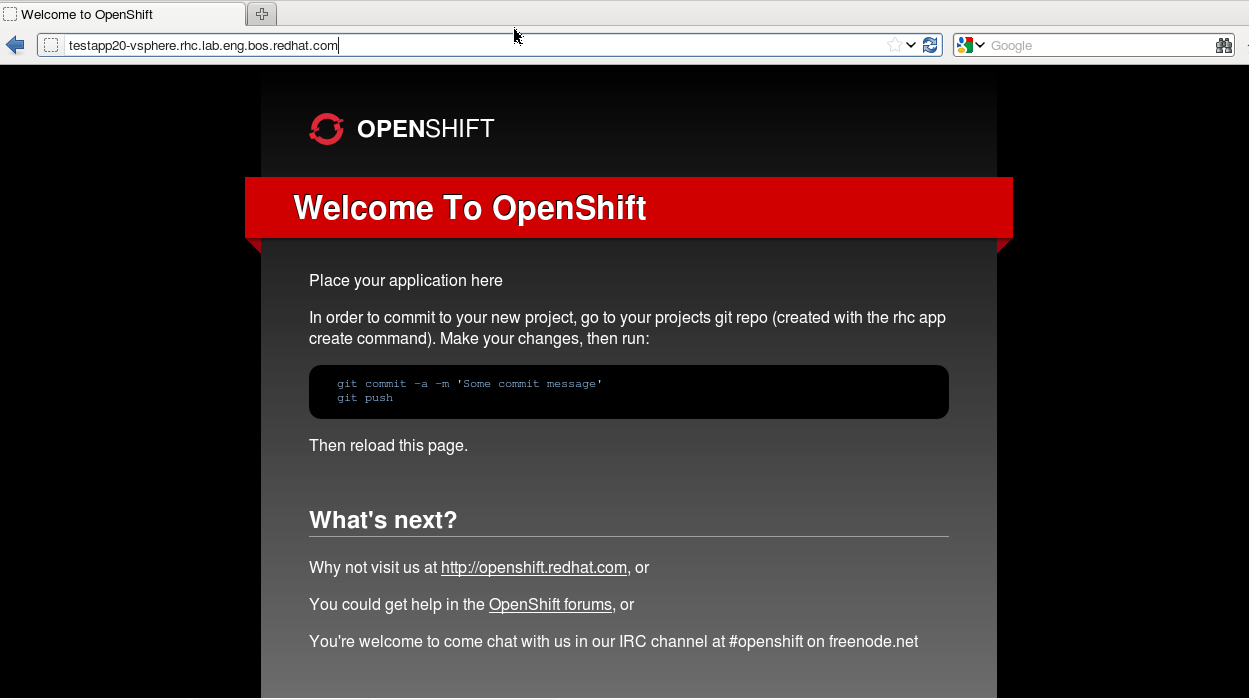
Voila! My application is running. I can now make changes and git push to update my application.
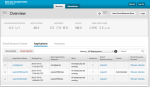
OpenShift on vSphere

OpenShift on vSphere

OpenShift Application on vSphere

Step 4, Deploy to a different provider (RHEV)
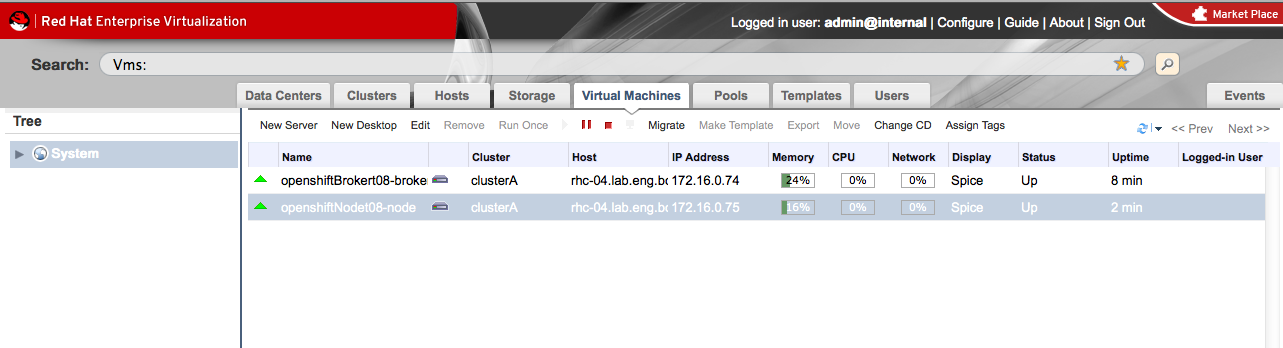
I had tested, tested, and tested some more across a single provider. Once I was able to deploy an OpenShift Broker and OpenShift Node and was able to run the rhc toolset to create an application I considered my deployment a success. Next it was time to take my deployment from VMware to RHEV. Since Aeolus abstracts the differences between VMware and RHEV, I should be able to deploy the same application blueprint, changing the cloud resource cluster from VMware to RHEV and have the OpenShift Origin PaaS running on RHEV.

It worked!

OpenShift Origin on RHEV

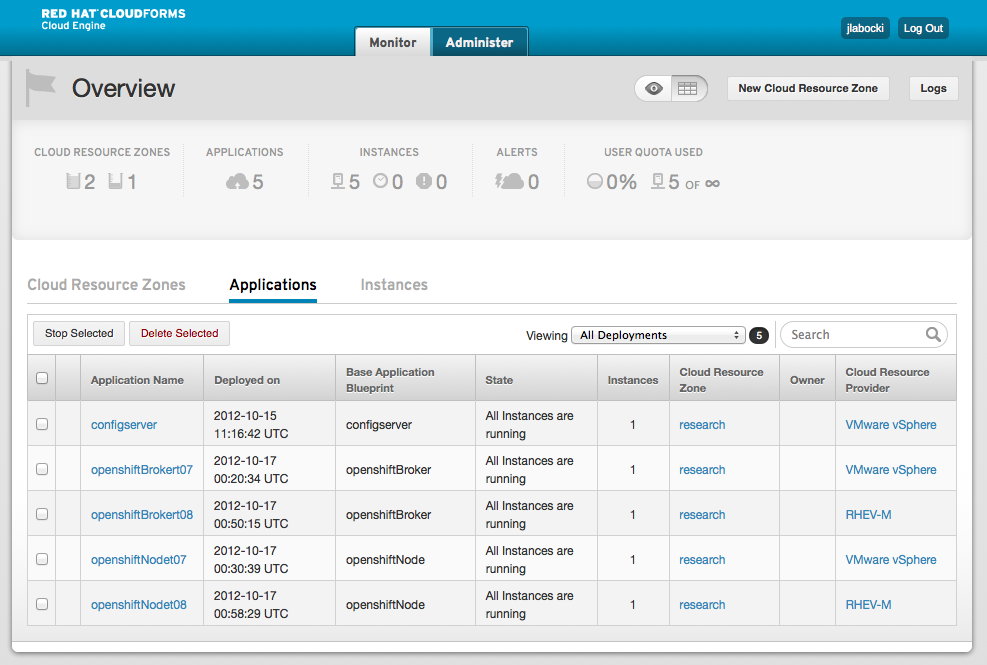
Now I can easily move my PaaS between virtualization providers. Think of the negotiating power I’ll have come renewal time! 😉 I could also continue to deploy the OpenShift Node Application Blueprint to scale my OpenShift Origin installation at the node layer.

Self-Service OpenShift Origin across two virtualization provider

Step 5, Share (of course)
I started a github repository which includes the application blueprints along with instructions on how you can use them. Contributions are welcome and appreciated. I plan on keeping all the work I do around application blueprints, services, and scripts in that repository.

Summary
The combination of Aeolus, Katello, and OpenShift Origin have the potential to let organizations realize an Open Hybrid Cloud. Katello provides re-usability of system templates, ongoing management of deployed systems (updates), and will soon allow for physical system provisioning and configuration management via puppet and foreman. Aeolus gives organizations a way to take those re-usable system templates and create rich application blueprints that reside in a catalog and can be provisioned to multiple providers through a single self-service portal. OpenShift Origin is an amazingly elegant open source PaaS which is built on the proven Red Hat Enterprise Linux operating system. By using these technologies together organization can realize unsurpassed flexibility, agility, and sustainability.

After completing this exercise there are three areas that I believe should be examined to help with further integration:

  1. How can OpenShift Origin call an external system to request more nodes?
  2. How can I launch an application blueprint in Aeolus from an external system?
  3. What orchestrates the scaling? Ideally it should be a system that understands scalability at all levels (physical server, virtual machines/nodes, and gears)? Aeolus and Katello don’t understand scaling gears, OpenShift Origin doesn’t understand scaling physical or virtual machines/nodes.
  4. How can services, images, and application blueprints be made easier to share between instances of Aeolus and Katello?

References
[1] https://openshift.redhat.com/community/wiki/architecture-overview
[2]  http://www.katello.org/
[3] http://aeolusproject.org/about.html
[4] https://github.com/jameslabocki/RedHat
[5] https://openshift.redhat.com/community/wiki/build-your-own